
1. Introduction
This manual provides essential information for the safe and effective operation, maintenance, and care of your Jackson Safety True Sight II Digital Auto-Darkening Welding Helmet, Model 46118. Please read this manual thoroughly before using the helmet to ensure proper function and to prevent injury.
The Jackson Safety True Sight II helmet is designed with advanced Balder Technology, offering superior optical clarity and protection for various welding, grinding, and torch cutting applications.
2. Safety Information
WARNING: Failure to read, understand, and follow all instructions in this manual may result in serious injury or death. Always wear appropriate personal protective equipment (PPE) in addition to this welding helmet.
- Always inspect the helmet and auto-darkening filter (ADF) before each use for any damage. Do not use if damaged.
- Ensure the correct shade level is selected for your welding process.
- Protect the ADF from liquid contact and harsh chemicals.
- Do not modify the helmet or ADF. Unauthorized modifications can compromise safety.
- This helmet is not suitable for laser welding or cutting applications.
- Replace batteries promptly when the low battery indicator appears.
3. Product Overview
The Jackson Safety True Sight II Digital Auto-Darkening Welding Helmet features advanced technology for enhanced visibility and protection.
Key Features:
- Balder Technology: Provides a true 1/1/1/1 optical clarity rating (DIN EN379) for a clear and accurate view of the weld puddle.
- Large Viewing Area: An expansive 4.0" x 3.25" viewing area enhances peripheral vision.
- Four Independent Sensors: Strategically positioned to minimize the possibility of blockage during welding, ensuring consistent darkening.
- Digital Keypad: Internal digital controls for shade, sensitivity, and delay adjustments, operable even with gloves.
- Multiple Modes: Dedicated modes for Weld, Grind, and Torch applications.
- Variable Shade Control: Adjustable shade levels from 5-8 and 9-13.
- Comfort Headgear: Ergonomic design for extended wear.

Figure 3.1: Front view of the Jackson Safety True Sight II Digital Auto-Darkening Welding Helmet.

Figure 3.2: The HLX Welding Helmet with Stars & Scars design, featuring TrueSight II Digital Variable ADF.

Figure 3.3: Visual comparison highlighting the superior optical clarity provided by Balder Technology, including true color recognition and a large viewing area.
4. Setup and Adjustment
4.1 Battery Installation
The helmet requires two (2) AAA Lithium Ion batteries (included). Ensure correct polarity when installing.
- Locate the battery compartment on the inside of the auto-darkening filter (ADF) unit.
- Open the compartment cover.
- Insert two AAA batteries, matching the (+) and (-) indicators.
- Close the battery compartment cover securely.
4.2 Headgear Adjustment
Proper headgear adjustment is crucial for comfort and stability.
- Size Adjustment: Use the oversized knob (370 Speed Dial™) at the back of the headgear to adjust the circumference for a snug fit. Turn clockwise to tighten, counter-clockwise to loosen.
- Top Strap Adjustment: Adjust the top strap to position the helmet correctly on your head, ensuring the viewing area is at eye level.
- Distance Adjustment: Adjust the distance between the helmet and your face using the side knobs to achieve optimal balance and viewing angle.
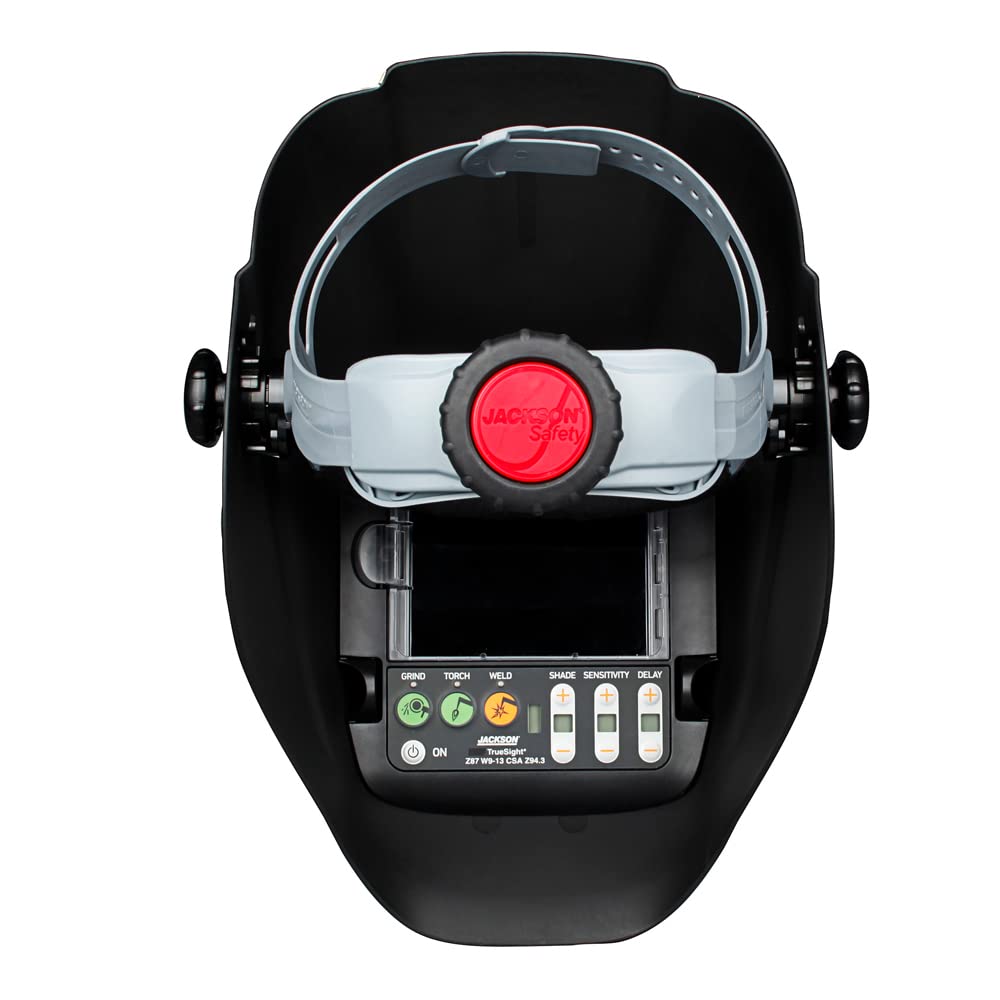
Figure 4.1: Internal view of the helmet, highlighting the adjustable headgear and digital control panel.

Figure 4.2: Demonstrates the helmet's comfort and protection features, including the angled view, four arc sensors, and the 370 Speed Dial™ knob for easy adjustment.
5. Operating Instructions
The True Sight II helmet offers digital controls for various settings.
5.1 Power On/Off
Press the ON button on the digital keypad to power on the ADF. The helmet will automatically power off after a period of inactivity to conserve battery life.
5.2 Mode Selection (Weld, Grind, Torch)
Select the appropriate mode for your task using the dedicated buttons on the digital keypad.
- Weld Mode: For all welding processes. The ADF will darken automatically upon arc ignition.
- Grind Mode: Disables the auto-darkening function, allowing the helmet to be used as a face shield for grinding operations. The shade will remain light (typically shade 3 or 4).
- Torch Mode: Optimized for torch cutting applications, offering specific shade ranges (5-8).
5.3 Shade Adjustment
Adjust the shade level using the SHADE buttons (+/-) on the digital keypad.
- Shade Range 9-13: For most common welding applications.
- Shade Range 5-8: For low amperage welding or torch cutting.
Refer to welding standards (e.g., ANSI Z87.1) for recommended shade levels based on your welding process and amperage.
5.4 Sensitivity Adjustment
Adjust the SENSITIVITY using the (+/-) buttons. This controls how readily the ADF reacts to welding light.
- High Sensitivity: For low amperage welding or when the arc is partially obstructed.
- Low Sensitivity: For high amperage welding or to prevent accidental darkening from ambient light or other welders' arcs.
5.5 Delay Adjustment
Adjust the DELAY using the (+/-) buttons. This controls the time the filter remains dark after the arc extinguishes.
- Short Delay: For tack welding or short welds to speed up work.
- Long Delay: For high amperage welding to protect eyes from afterglow and hot metal.

Figure 5.1: Detailed view of the digital keypad, showing buttons for Weld, Grind, Torch modes, and Shade, Sensitivity, Delay adjustments.

Figure 5.2: Illustrates the helmet's features for efficient operation, including the digital keypad, multiple modes, and adjustable settings.
6. Maintenance
6.1 Cleaning the Helmet
- Clean the helmet shell with mild soap and water. Avoid harsh solvents.
- Clean the inner and outer protective lenses with a soft, clean cloth and a mild lens cleaning solution. Do not use abrasive cleaners.
- Do not immerse the ADF unit in water or any cleaning solution.
6.2 Replacing Protective Lenses
Regularly inspect and replace scratched or damaged inner and outer protective lenses to maintain optical clarity and protection.
- Carefully remove the retaining frame or clips holding the outer lens.
- Remove the old lens.
- Insert a new, clean protective lens.
- Secure the retaining frame or clips.
- Repeat for the inner lens if necessary.
6.3 Battery Replacement
Replace batteries when the low battery indicator illuminates or if the ADF fails to darken properly. Refer to Section 4.1 for battery installation steps.
7. Troubleshooting
| Problem | Possible Cause | Solution |
|---|---|---|
| ADF does not darken. |
|
|
| ADF flickers or darkens intermittently. |
|
|
| Poor visibility through ADF. |
|
|
8. Specifications
| Feature | Detail |
|---|---|
| Model Number | 46118 |
| Optical Clarity Rating | 1/1/1/1 (DIN EN379) |
| Viewing Area | 4.0" x 3.25" |
| Shade Range | Variable 5-8 / 9-13 |
| Sensors | 4 Independent Arc Sensors |
| Modes | Weld, Grind, Torch |
| Power Source | 2 x AAA Lithium Ion Batteries (included) |
| Compliance | ANSI Z87.1-2010, CSA Z94.3, DIN Plus certified |
| Product Dimensions | 1 x 1 x 1 inches (approximate) |
| Item Weight | 16 ounces (1 Pound) |
9. Warranty and Support
For warranty information or technical support, please contact Jackson Safety customer service. Details can typically be found on the product packaging or the official Jackson Safety website.
Manufacturer: SureWerx
Brand: Jackson Safety
Website: www.jacksonsafety.com (Example link, actual link may vary)
