
Introduction
This instruction manual provides detailed information for the installation, operation, and maintenance of the vidaXL Gate Opener set 50W 200kg. Please read this manual thoroughly before installation and use to ensure proper function and safety. This gate opener is suitable for both home and commercial use, designed for durability and performance with high-quality materials.
Safety Information
Important Safety Instructions:
- Ensure all electrical connections are performed by a qualified electrician.
- Keep children and pets away from the gate area during operation.
- Do not attempt to repair or modify the unit yourself. Contact qualified personnel for service.
- The gate opener is equipped with an emergency release key for manual operation during power failure.
- The system includes a stop/reverse function upon obstruction to prevent injury or damage.
- Always ensure the gate area is clear before operating the gate.
Package Contents
Verify that all components are present in the package:
- 2 x Gate Actuators
- 1 x Control Box
- 2 x Remote Controls
- 2 x Emergency Release Keys
- Installation Accessories (bolts, nuts, brackets, etc.)
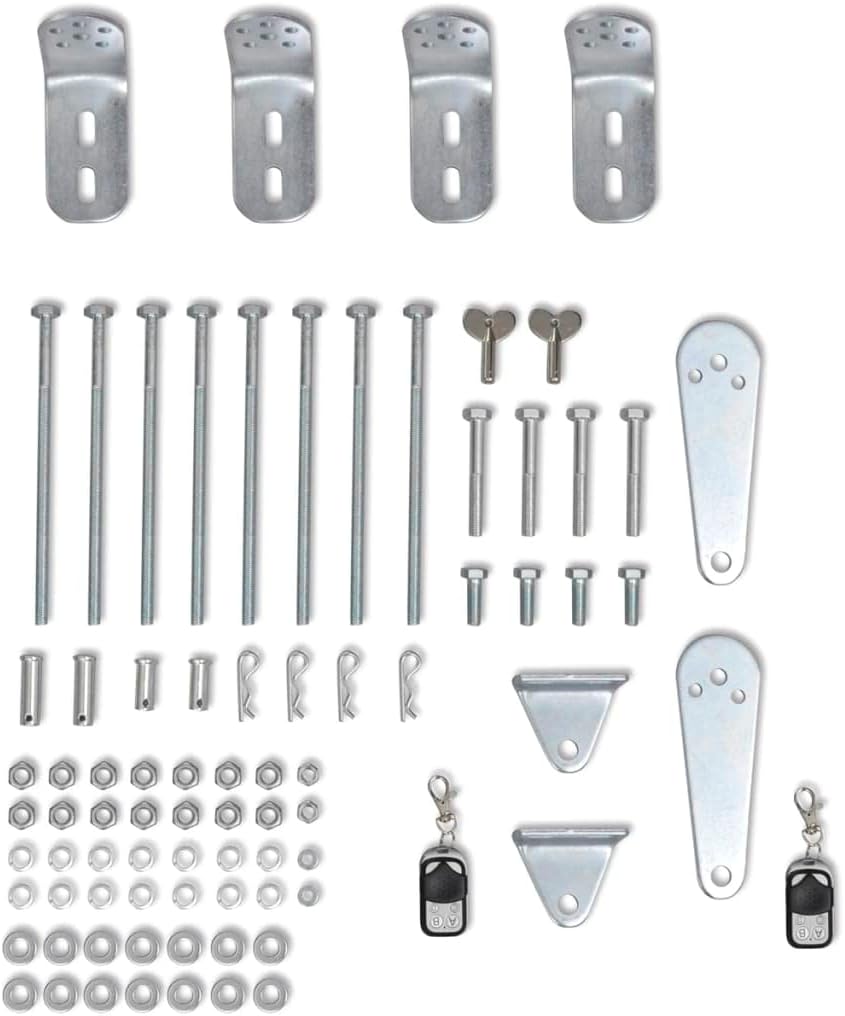
Image: Complete kit of vidaXL Gate Opener components. This includes two gate actuators, a central control box, two remote controls, two emergency release keys, and a variety of installation accessories such as bolts, nuts, and mounting brackets.
Setup and Installation
Installation should be performed by individuals with appropriate technical knowledge. Refer to the detailed installation diagrams provided in the separate installation guide (not included in this manual). Key steps include:
- Mounting the Actuators: Securely attach the two gate actuators to the gate and gate posts using the provided installation accessories. Ensure proper alignment for smooth gate movement.
- Installing the Control Box: Mount the control box in a protected location, away from direct weather exposure. Ensure easy access for wiring and maintenance.
- Electrical Connections: Connect the actuators, power supply (230V/50Hz or 120V/60Hz), and any safety sensors (not included) to the control box according to the wiring diagram.
- Initial Configuration: Power on the system. Use the digital display on the control box to set parameters such as single/double gate mode, opening/closing intervals, and automatic closing function (0-99 seconds).
- Remote Control Pairing: Pair the remote controls with the control box as per the instructions in the full manual.
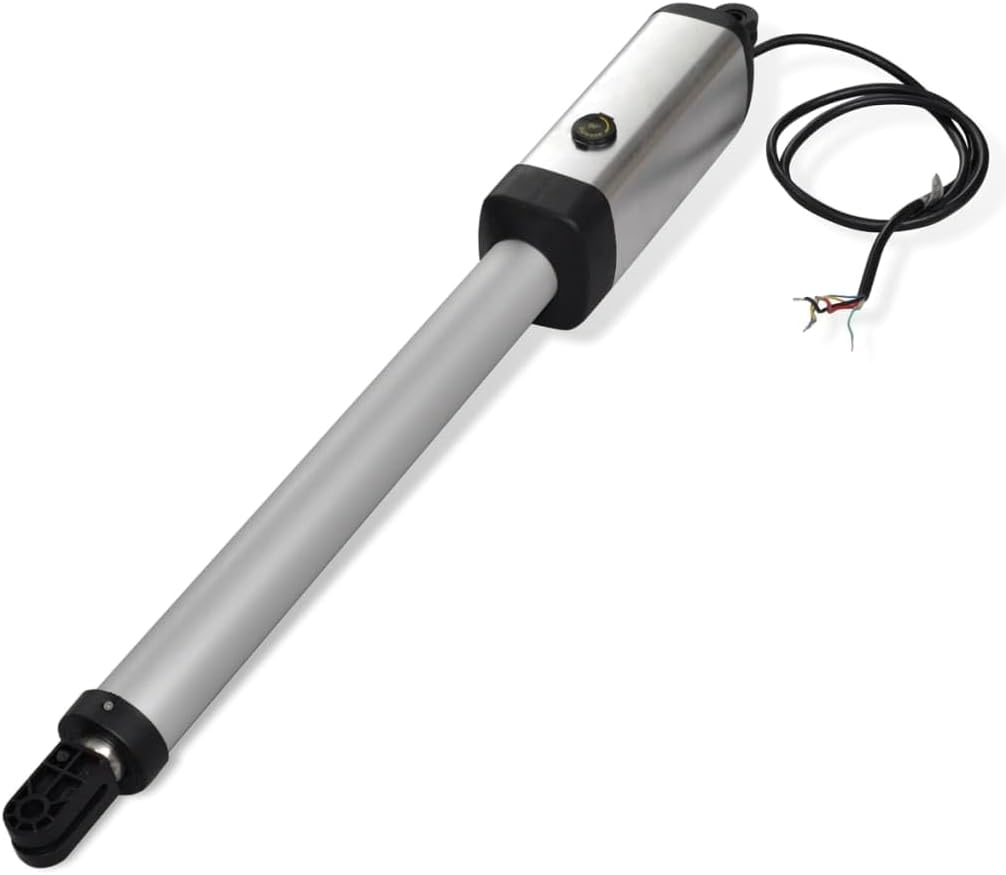
Image: A single gate actuator. This cylindrical device, primarily silver with black end caps, is responsible for the mechanical movement of the gate. Electrical wiring extends from one end for connection to the control box.

Image: The control box. This grey, rectangular unit houses the electronic components that manage the gate opener's functions. It features cable glands for secure wiring and a caution sticker indicating important safety information regarding installation and water protection.

Image: A remote control for the gate opener. This compact device, featuring a black body with a silver faceplate, has four distinct buttons labeled A, B, C, and D for various gate operations. It also includes a keyring for convenient carrying.
Note: A gate stop is not included and may be required for certain installations.
Operating Instructions
The gate opener can be operated using the provided remote controls or through the control box interface.
- Opening/Closing: Press the designated button on the remote control to open or close the gate.
- Stop Function: Pressing any button during gate movement will stop the gate.
- Obstruction Detection: The system is designed to stop and reverse if an obstruction is detected during opening or closing.
- Automatic Closing: If enabled, the gate will automatically close after a set delay (0-99 seconds) once fully open.
- Emergency Release: In case of power failure, use the emergency release key to manually unlock and operate the gate. Insert the key into the actuator's emergency release port and turn it as instructed in the full manual.
Maintenance
Regular maintenance ensures optimal performance and longevity of your gate opener system.
- Monthly: Check the gate's hinges and moving parts for smooth operation. Lubricate if necessary.
- Quarterly: Inspect the actuators and control box for any signs of wear, damage, or loose connections.
- Annually: Have a qualified technician inspect the entire system, including electrical components and safety features.
- Keep the area around the gate and actuators clear of debris.
Troubleshooting
This section addresses common issues you might encounter.
| Problem | Possible Cause | Solution |
|---|---|---|
| Gate does not respond to remote. | Dead remote battery, remote not paired, power failure. | Replace remote battery, re-pair remote, check power supply. |
| Gate stops unexpectedly. | Obstruction detected, motor overheating (MRT limit reached). | Clear obstruction, allow motor to cool down. |
| Gate opens/closes partially. | Incorrect limit switch settings, mechanical obstruction. | Adjust limit switches, check for mechanical issues. |
| Control box display is off. | No power supply. | Check main power connection and circuit breaker. |
For more complex issues, consult a qualified technician.
Specifications
| Parameter | Value |
|---|---|
| Motor Voltage | 24 V DC |
| Power per Actuator | 50 W |
| Current | 2 A |
| Power Supply | 230 V/50 Hz or 120 V/60 Hz |
| Actuator Speed | 16 mm/second |
| Max. Actuator Distance | 385 mm |
| Max. Gate Weight (per gate) | 200 kg |
| Max. Gate Width (per gate) | 3 m |
| Ambient Temperature | 5 ℃ ~ 40 ℃ |
| Protection Class | IP44 |
| Material | Metal |
Warranty and Support
For warranty information and technical support, please refer to the documentation provided with your purchase or visit the official vidaXL website. Keep your proof of purchase for warranty claims.
Contact Information:
- Brand: vidaXL
- Website: Visit vidaXL Store on Amazon
- Model Number: VDX-141726