
Product Overview
The TecNiq S30 Red LED Side Marker Light is a durable and high-performance lighting solution designed for trucks, trailers, and RVs. This 2-inch round red LED sidemarker features a sealed, waterproof body, ensuring immunity to shock and vibration. Manufactured in the USA, it utilizes ultra-efficient lenses and powerful next-generation LEDs to provide reliable illumination for over 100,000 hours. The P2-rated lamp meets or exceeds FMVSS 108 standards and includes TecSeal Urethane Potting for guaranteed circuit board protection.

Image: Front and back view of the TecNiq S30 Red LED Side Marker Light. The front displays a red lens with vertical ridges and brand/DOT markings. The back reveals two metal electrical connectors and indicates its manufacturing origin.
Setup and Installation
The TecNiq S30 LED side marker is designed for grommet mounting, fitting industry-standard 2-inch openings. Installation requires a compatible grommet (included) and a 2-pole connector system.
Installation Steps:
- Prepare Mounting Hole: Ensure a clean, round 2-inch diameter hole is available at the desired mounting location.
- Insert Grommet: Firmly press the provided rubber grommet into the mounting hole until it is securely seated.
- Connect Wiring: The light features two metal pins for electrical connection. Connect your vehicle's 2-pole wiring harness to these pins. Typically, one pin is for power (positive) and the other for ground (negative). Refer to your vehicle's wiring diagram for specific connections.
- Insert Light into Grommet: Carefully push the LED side marker light into the grommet until it snaps into place. Ensure the light is flush with the mounting surface.
- Test Functionality: Activate your vehicle's lighting system to verify the side marker light illuminates correctly.
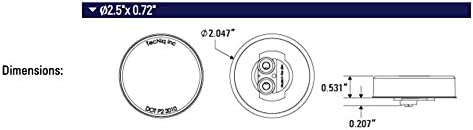
Image: Technical drawing illustrating the dimensions of the TecNiq S30 LED side marker light, providing precise measurements for installation planning.
Important: Always disconnect power before performing any electrical work. Consult a qualified technician if you are unsure about wiring procedures.
Operation
The TecNiq S30 LED side marker lights operate automatically when connected to your vehicle's appropriate lighting circuit. They are designed for continuous, reliable performance once installed correctly.
- Activation: The lights will illuminate when the vehicle's parking lights or headlights are turned on, or as dictated by the specific wiring configuration for side markers.
- Longevity: These LED lights are engineered for an operating life exceeding 100,000 hours, providing long-term, maintenance-free illumination.
- Visibility: The ultra-efficient lenses and powerful LEDs ensure optimal visibility, enhancing safety on the road.
Maintenance
The TecNiq S30 LED side marker lights are designed for minimal maintenance due to their robust construction and sealed design.
- Cleaning: Periodically clean the lens with a soft cloth and mild soap and water to remove dirt and debris that may obstruct light output. Avoid abrasive cleaners.
- Inspection: Occasionally inspect the lights for any physical damage to the lens or housing. Check the wiring connections for corrosion or looseness.
- Waterproof Design: The sealed body and TecSeal Urethane Potting protect the internal components from water ingress, shock, and vibration, eliminating the need for internal maintenance.
Troubleshooting
If your TecNiq S30 LED side marker light is not functioning as expected, consider the following troubleshooting steps:
- Light Not Illuminating:
- Check the electrical connections at the 2-pole connector. Ensure they are secure and free from corrosion.
- Verify that power is being supplied to the light's circuit. Use a multimeter to check for voltage at the connector.
- Inspect the vehicle's fuse box for any blown fuses related to the lighting circuit.
- Ensure the light is properly seated in the grommet and making good contact with the electrical pins.
- Light is Dim or Flickering:
- Check for poor or intermittent electrical connections.
- Ensure adequate voltage is reaching the light. Low voltage can cause dimming.
- Inspect for any damage to the wiring insulation that could cause a short or resistance.
- Water Inside Lens:
- While the light is sealed, extreme conditions or improper installation can sometimes lead to moisture. If water is observed, inspect the grommet for proper seating and ensure there are no cracks in the housing.
- If the seal is compromised, the unit may need replacement.
If these steps do not resolve the issue, contact TecNiq customer support for further assistance.
Product Specifications
| Brand | TecNiq, Inc |
| Model Number | S30 |
| Manufacturer Part Number | S30-RR0P-1 |
| Light Source Type | LED |
| Color | Red |
| Operating Life | Over 100,000 Hours |
| Mounting Type | Grommet Mounted (Industry Standard 2") |
| Connectors | 2-Pole |
| Waterproof Rating | Sealed Body, TecSeal Urethane Potting |
| Standards Compliance | Exceeds FMVSS 108 standards, P2-rated |
| Included Components | Grommets |
| Manufacturing Origin | Made in USA |
Warranty Information
The TecNiq S30 Red LED Side Marker Light comes with a Lifetime Warranty. This warranty covers defects in materials and workmanship under normal use and service. For specific terms and conditions, or to initiate a warranty claim, please refer to the official TecNiq, Inc. warranty policy or contact their customer support.
Customer Support
For technical assistance, troubleshooting beyond the scope of this manual, or warranty inquiries, please contact TecNiq, Inc. customer support.
- Brand: TecNiq, Inc
- Online Store: Visit the TecNiq, Inc Store on Amazon
- Further contact information may be available on the official TecNiq, Inc. website.