
Spectra Premium S10225
Spectra Premium S10225 Camshaft Position Sensor Instruction Manual
Model: S10225 | Brand: Spectra Premium
1. Introduction
This manual provides essential information for the proper installation, operation, and maintenance of your Spectra Premium S10225 Camshaft Position Sensor. Please read this manual thoroughly before attempting any installation or service to ensure safe and correct usage. This sensor is engineered to meet or exceed Original Equipment (OE) specifications for fit, form, and function, ensuring reliable performance in your vehicle's engine management system.
2. Safety Information
Always prioritize safety when working on a vehicle. Improper installation or handling of automotive components can lead to injury or damage. It is recommended that installation be performed by a qualified automotive technician.
- Disconnect the vehicle's battery before beginning any electrical work.
- Wear appropriate personal protective equipment, including safety glasses and gloves.
- Ensure the vehicle is securely supported on jack stands if working underneath.
- Refer to your vehicle's specific service manual for detailed instructions and torque specifications.
- Avoid contact with hot engine components.
3. Package Contents
Verify that all components are present and undamaged upon opening the package.
- 1x Spectra Premium S10225 Camshaft Position Sensor
- 1x Wiring Harness (integrated)

Figure 3.1: Overall view of the Spectra Premium S10225 Camshaft Position Sensor, showing the main body, shaft, and integrated wiring harness with connector.
4. Installation
The installation process for a camshaft position sensor can vary significantly between vehicle makes and models. Always consult your vehicle's specific repair manual for precise instructions.
General Installation Steps:
- Preparation: Park the vehicle on a level surface, engage the parking brake, and disconnect the negative terminal of the battery. Allow the engine to cool completely.
- Locate the Sensor: Identify the location of the existing camshaft position sensor. This is typically found near the cylinder head or timing cover.
- Disconnect Wiring: Carefully disconnect the electrical connector from the old sensor.
- Remove Old Sensor: Using appropriate tools, unbolt or unclip the old sensor from its mounting location. Be mindful of any O-rings or seals.
- Inspect Mounting Area: Clean the mounting surface to ensure a proper seal for the new sensor.
- Install New Sensor: Insert the new Spectra Premium S10225 sensor into the mounting hole. Ensure any O-rings are properly seated and lubricated if necessary. Secure the sensor with the retaining bolt(s) or clip(s) to the manufacturer's specified torque.
- Connect Wiring: Reconnect the electrical connector to the new sensor, ensuring it clicks into place securely.
- Final Steps: Reconnect the vehicle's battery. Start the engine and check for proper operation and any diagnostic trouble codes (DTCs). Clear any stored DTCs using an OBD-II scanner if necessary.
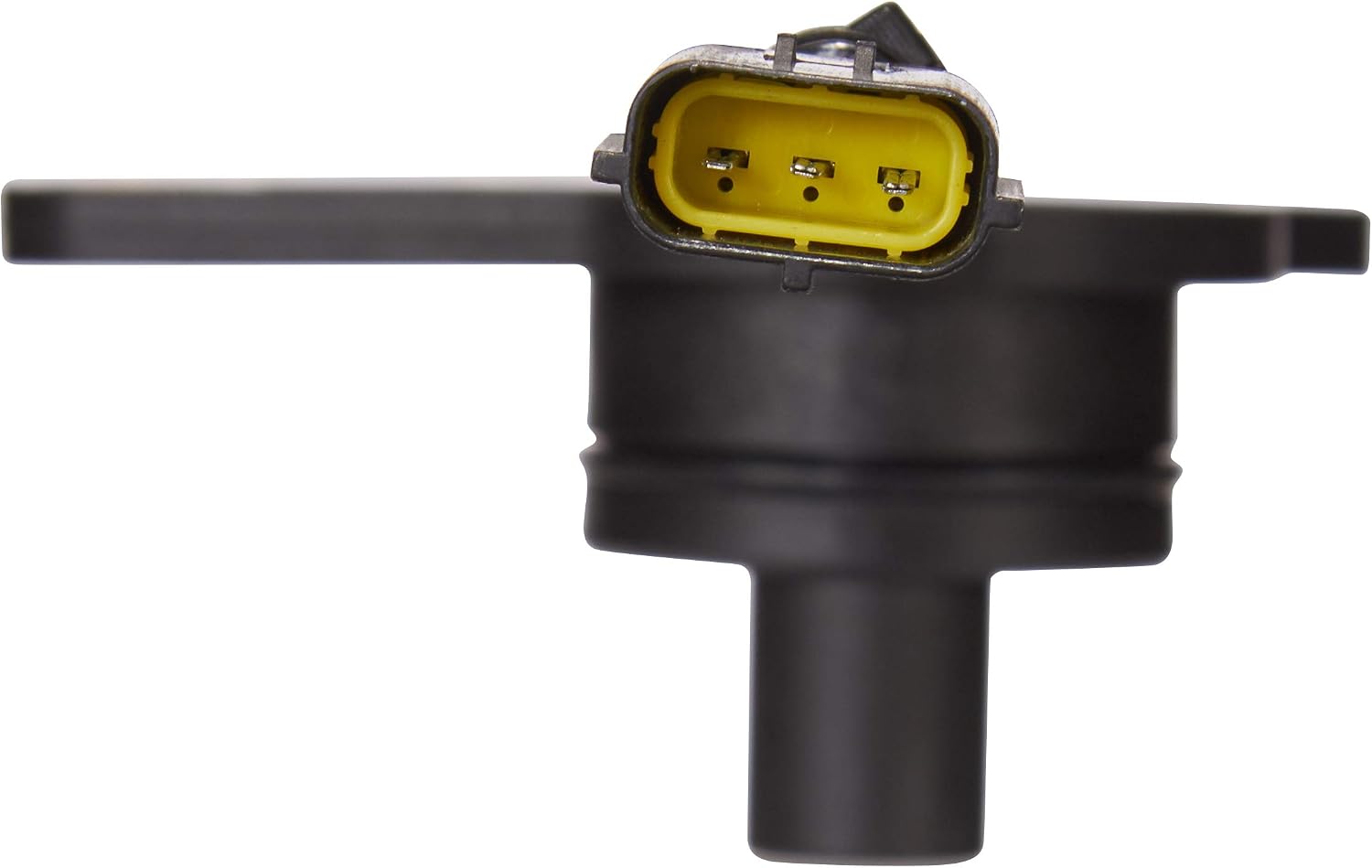
Figure 4.1: Detail of the sensor's electrical connector, highlighting the pin configuration.

Figure 4.2: Angled top view, showing the mounting flange and sensor body.

Figure 4.3: Angled bottom view, illustrating the sensor's shaft and mounting points.

Figure 4.4: Side profile of the sensor, showing the shaft length and body design.
5. Operation
Once correctly installed, the Spectra Premium S10225 Camshaft Position Sensor operates automatically as part of the vehicle's engine management system. It continuously monitors the rotational position of the camshaft and transmits this data to the engine control unit (ECU). The ECU uses this information to synchronize fuel injection and ignition timing, ensuring optimal engine performance and efficiency. No user interaction is required for the sensor's operation after installation.
6. Maintenance
The Spectra Premium S10225 Camshaft Position Sensor is designed for long-term reliability and typically requires no routine maintenance. However, periodic inspection during other engine services is recommended.
- Visual Inspection: During routine vehicle maintenance, visually inspect the sensor and its wiring for any signs of damage, corrosion, or loose connections.
- Cleaning: If the sensor or connector appears dirty, gently clean it with an appropriate electrical contact cleaner. Avoid harsh chemicals or abrasive materials.
- Durability: This sensor is built to withstand harsh automotive environments, having undergone rigorous testing for durability through long-cycle thermal shock (-50 to 300 degrees Celsius) and salt spray to ensure resistance against extreme vibrations and corrosion.
7. Troubleshooting
A faulty camshaft position sensor can cause various engine performance issues. If you suspect a problem with your sensor, consider the following:
Common Symptoms of a Faulty Sensor:
- Check Engine Light (CEL) illuminated on the dashboard.
- Engine cranking but not starting.
- Rough idling or stalling.
- Reduced engine power or poor acceleration.
- Poor fuel economy.
Diagnostic Steps:
- Scan for DTCs: Use an OBD-II scanner to retrieve any stored diagnostic trouble codes. Common codes related to camshaft position sensors include P0340, P0341, P0342, P0343, P0345, P0346, P0347, P0348.
- Inspect Wiring: Check the sensor's wiring harness for any visible damage, fraying, or corrosion. Ensure the connector is fully seated.
- Professional Diagnosis: If symptoms persist or you are unsure about the diagnosis, consult a qualified automotive technician. They can perform advanced electrical tests to confirm sensor functionality.
8. Specifications
| Feature | Specification |
|---|---|
| Brand | Spectra Premium |
| Model | S10225 |
| Material | Metal |
| Mounting Type | Flange Mount |
| Output Type | Push-Pull |
| Upper Temperature Rating | 300 Degrees Celsius |
| Item Weight | 3.98 ounces |
| Package Dimensions | 4.49 x 3.5 x 2.99 inches |
| UPC | 874183016826, 627785016622 |
| OEM Part Number | 0K0131813X |
9. Warranty & Support
Spectra Premium products are manufactured to high-quality standards and are backed by a manufacturer's warranty. For specific warranty terms and conditions, please refer to the documentation included with your purchase or visit the official Spectra Premium website.
For technical assistance, product inquiries, or warranty claims, please contact Spectra Premium customer support through their official channels. You can find more information and contact details on the Spectra Premium Store on Amazon.
Ask a question about this manual
Ask about setup, troubleshooting, compatibility, parts, safety, or missing instructions. Manuals+ will review the question and use this page’s manual context to help answer it.