1. Safety Information
WARNING: Electrical work can be hazardous. Installation, service, and maintenance of this device should only be performed by a qualified electrician in accordance with all applicable electrical codes and regulations. Failure to follow these instructions can result in serious injury or death.
- Always turn off power at the main service panel before working on electrical circuits.
- Use appropriate personal protective equipment (PPE).
- Ensure all wiring connections are secure and correct.
- Do not bypass or tamper with the GFCI device.
Regular testing of Ground Fault Circuit Interrupters (GFCIs) is crucial for ensuring their proper function and continued safety. Underwriters Laboratories (UL) recommends testing GFCI devices monthly.
2. Product Overview
The SIEMENS QF220A is a 20 Amp, 2-pole Ground Fault Circuit Interrupter (GFCI) designed to provide enhanced electrical safety by detecting and interrupting ground faults. This Type QPF2 circuit breaker features a 10,000 AIC interrupting rating and includes advanced self-test and lockout capabilities.
Key Features:
- Double pole, 20 Amp, Type QPF2 GFCI Circuit Breaker
- 10,000 AIC interrupting rating
- Integrated self-test function as required by UL 943
- Lockout feature prevents resetting if a device compromise is detected
- Provides Class A GFCI protection
- Suitable for various applications including spas, hot tubs, kitchens, and bathrooms.
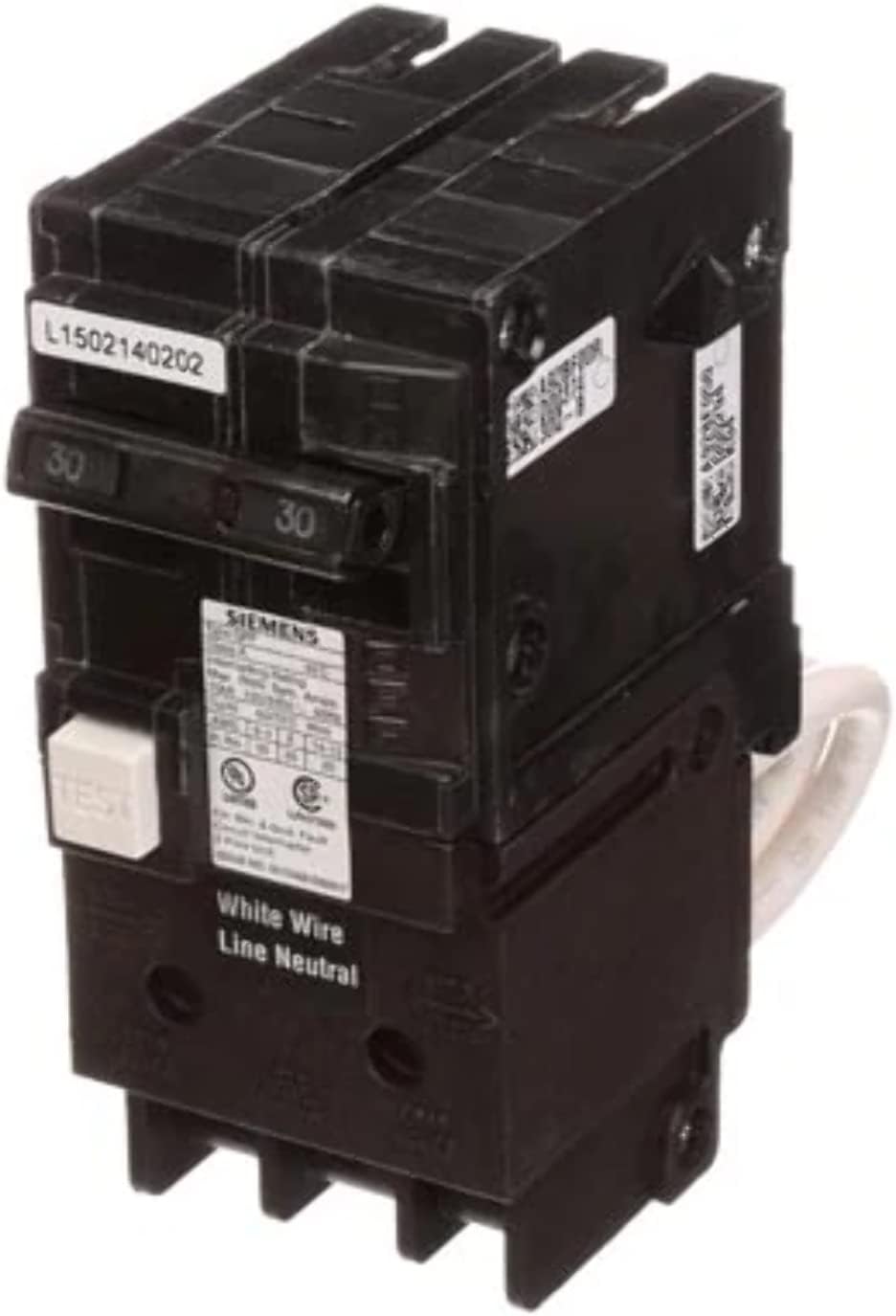
Figure 1: SIEMENS QF220A Ground Fault Circuit Interrupter. This image shows the front view of the circuit breaker, highlighting its compact design and labeling.
3. Installation
The SIEMENS QF220A is a plug-in mount circuit breaker designed for use in compatible Siemens load centers. Installation must be performed by a qualified electrician to ensure compliance with local and national electrical codes.
General Installation Steps (for qualified personnel only):
- Power Disconnection: Turn off all power to the electrical panel at the main service disconnect. Verify power is off using a voltage tester.
- Panel Access: Remove the cover of the electrical panel.
- Wiring: Connect the load wires (hot and neutral) to the appropriate terminals on the GFCI breaker. Connect the pigtail (white neutral wire) from the GFCI breaker to the neutral bar in the panel.
- Mounting: Align the GFCI breaker with the appropriate slots in the load center and firmly push it into place until it is securely seated.
- Cover Replacement: Reinstall the electrical panel cover.
- Power Restoration: Restore power to the main service panel.
- Initial Test: Perform the manual test as described in the "Operation" section to confirm proper function.
Refer to the detailed wiring diagram provided with the product packaging for specific connection instructions.
4. Operation
Once installed and power is restored, the SIEMENS QF220A GFCI circuit breaker is ready for operation. It continuously monitors for ground faults and performs automatic self-tests.
Manual Test Procedure:
- Ensure power is on to the circuit protected by the GFCI.
- Locate the "TEST" button on the face of the circuit breaker.
- Press the "TEST" button. The breaker should immediately trip (move to the OFF position or an intermediate trip position).
- If the breaker trips, reset it by pushing the handle fully to the OFF position, then to the ON position.
- If the breaker does not trip when the "TEST" button is pressed, it indicates a malfunction. The GFCI should be replaced immediately.
Self-Test and Lockout Feature: The QF220A automatically performs continuous self-tests to ensure proper functionality. If the device detects a compromise or malfunction during a self-test, it will trip and enter a "lockout" state. In this state, the breaker cannot be reset, indicating that the device requires replacement to maintain safety. This feature prevents users from unknowingly operating a compromised GFCI.
5. Maintenance
The SIEMENS QF220A GFCI circuit breaker requires minimal maintenance. The primary maintenance task is regular testing to confirm its protective function.
- Monthly Testing: Perform the manual test procedure (as described in Section 4) at least once every 30 days. This verifies that the GFCI is capable of detecting and interrupting ground faults.
- Visual Inspection: Periodically inspect the breaker for any signs of physical damage, discoloration, or loose connections. Any issues should be addressed by a qualified electrician.
- Cleaning: Keep the area around the circuit breaker clean and free from dust and debris. Do not use liquids or abrasive cleaners directly on the breaker.
6. Troubleshooting
If your SIEMENS QF220A GFCI circuit breaker trips or fails to reset, consider the following:
| Problem | Possible Cause | Solution |
|---|---|---|
| Breaker trips frequently | Ground fault in the circuit or connected appliance; overloaded circuit. | Unplug all appliances on the circuit and reset the breaker. If it holds, plug in appliances one by one to identify the faulty one. If it still trips with no load, contact a qualified electrician to inspect the wiring. |
| Breaker trips during manual test | Normal operation. | Reset the breaker by pushing the handle fully OFF, then ON. |
| Breaker does not trip during manual test | GFCI malfunction. | The GFCI is not providing protection and must be replaced immediately by a qualified electrician. |
| Breaker trips and cannot be reset (lockout) | Internal malfunction detected by self-test. | The GFCI has detected a critical internal fault and is in a lockout state. It must be replaced by a qualified electrician. |
If troubleshooting steps do not resolve the issue, contact a qualified electrician for further assistance.
7. Specifications
| Attribute | Value |
|---|---|
| Brand | SIEMENS |
| Model Number | QF220A |
| Current Rating | 20 Amps |
| Number of Poles | 2 |
| Voltage | 120 Volts |
| Interrupting Rating (AIC) | 10,000 |
| Circuit Breaker Type | GFCI (Ground Fault Circuit Interrupter) |
| Mounting Type | Plug-In Mount |
| Product Dimensions | 30"D x 8"W x 6"H |
| Item Weight | 14 ounces |
| UPC | 887621216665 |
8. Warranty and Support
For warranty information or technical support regarding your SIEMENS QF220A Ground Fault Circuit Interrupter, please refer to the documentation included with your purchase or visit the official SIEMENS website. You may also contact SIEMENS customer service directly for assistance.
Contact Information:
- Manufacturer: SIEMENS
- Website: www.siemens.com (Please check for regional specific websites)


