
Introduction
The Care Touch Digital Infrared Ear Thermometer is designed for accurate and rapid measurement of body temperature via the ear canal. This device utilizes infrared technology to detect the heat emitted from the eardrum, providing a reading within approximately 2 seconds. It is suitable for use with infants, children, and adults, offering a convenient and hygienic method for temperature monitoring.
Important Safety Information
- Read all instructions carefully before using the thermometer.
- This thermometer is intended for ear temperature measurement only. Do not use it for other purposes.
- Keep the device out of reach of children. Small parts may pose a choking hazard.
- Do not drop or expose the thermometer to strong impacts.
- Avoid exposing the thermometer to direct sunlight, extreme temperatures, or high humidity.
- Do not immerse the thermometer in water or other liquids.
- Consult a physician if you have concerns about temperature readings or symptoms of illness.
Product Features

Image: The Care Touch Digital Infrared Ear Thermometer with its key features labeled, including Fever Alarm, Smiley Result Indicator, 2-Second Results, Auto Shut-off, Low Battery Indicator, Jumbo Display, and FDA Approval.
- Fast and Accurate Results: Provides temperature readings within approximately 2 seconds.
- Jumbo Display: Large, clear digital display for easy reading of results.
- Smiley Result Indicator and Fever Alarm: Displays a smiley or frown icon based on the temperature reading and sounds an alarm if a fever is detected.
- Memory Function: Stores the last ten temperature readings for tracking changes over time.
- Auto Shut-off: Automatically powers off after a period of inactivity to conserve battery life.
- Low Battery Indicator: Alerts the user when the battery needs replacement.
Components
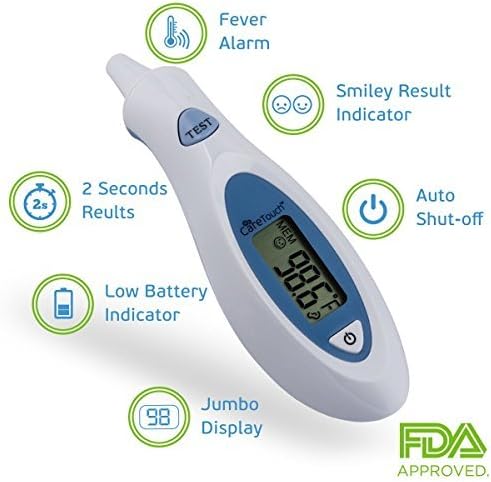
Image: A close-up view of the Care Touch Digital Infrared Ear Thermometer, showing the 'TEST' button, display, and power button.

Image: A top-down view of the thermometer, highlighting its ergonomic shape and display.
The thermometer consists of a main body with an infrared sensor tip, a digital display, a 'TEST' button for measurement, and a power button. The battery compartment is located on the underside of the device.
Setup
Battery Installation
- Locate the battery compartment cover on the back of the thermometer.
- Gently slide or lift the cover to open the compartment.
- Insert one CR2032 lithium battery, ensuring the positive (+) side is facing upwards as indicated inside the compartment.
- Close the battery compartment cover securely.
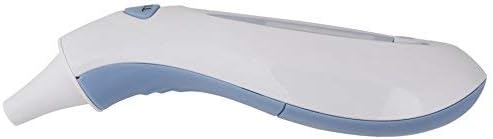
Image: The back of the thermometer, showing the battery compartment cover.
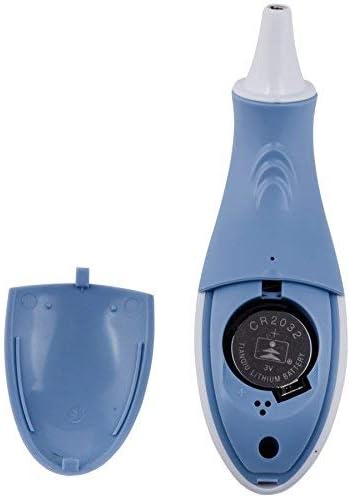
Image: The open battery compartment, revealing the CR2032 battery slot.
Operating Instructions
Taking a Temperature Measurement
- Press the power button to turn on the thermometer. The display will show all segments briefly, then the last recorded temperature, and finally '---' indicating it is ready for measurement.
- Gently insert the thermometer tip into the ear canal. For accurate readings, ensure the tip is positioned correctly to aim at the eardrum.
- Press the 'TEST' button. A beep will sound, and the measurement will be completed in approximately 2 seconds.
- Remove the thermometer from the ear. The temperature reading will be displayed on the screen.
- Observe the smiley/frown indicator and listen for the fever alarm if applicable.
- The thermometer will automatically shut off after a period of inactivity.

Image: The thermometer being used to take a baby's temperature, demonstrating proper positioning.
Memory Recall
The thermometer stores the last ten temperature readings. To access these memories:
- With the thermometer powered on, press the 'MEM' button (often integrated with the power button or a separate button, refer to device markings).
- Each press of the 'MEM' button will cycle through the stored readings, from the most recent to the oldest.
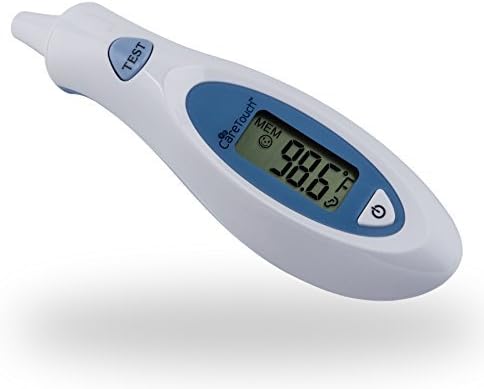
Image: A hand holding the thermometer, with 'LAST TEN MEMORIES' indicated, showing the memory function.
Measurement Considerations
- Ensure the ear canal is clean and free of obstructions like earwax, which can affect accuracy.
- Wait at least 30 minutes after waking up or after physical activity before taking a temperature.
- If multiple readings are taken, allow a short interval (e.g., 30 seconds) between measurements to allow the ear canal to return to its normal temperature.
- Always use the same ear for consistent monitoring, as temperatures can vary slightly between ears.
- External factors such as ear infections, ear plugs, or hearing aids can influence readings.
Maintenance and Cleaning
Cleaning the Thermometer
- After each use, gently wipe the probe tip with an alcohol swab or a soft cloth dampened with rubbing alcohol.
- Allow the tip to air dry completely before storing.
- Do not use abrasive cleaning agents or immerse the thermometer in water.
- Clean the main body of the thermometer with a soft, dry cloth.
Storage
- Store the thermometer in a cool, dry place, away from direct sunlight and extreme temperatures.
- Keep it in its protective case (if provided) to prevent damage.
Troubleshooting
| Problem | Possible Cause | Solution |
|---|---|---|
| Thermometer does not turn on. | Dead battery or incorrect battery installation. | Replace the battery (CR2032) and ensure it is inserted correctly. |
| 'ERR' message on display. | Measurement error, possibly due to improper placement or environmental factors. | Ensure the probe tip is clean and correctly positioned in the ear canal. Retake the measurement. |
| Inaccurate or inconsistent readings. | Dirty probe tip, earwax obstruction, or improper measurement technique. | Clean the probe tip. Ensure the ear canal is clear. Follow operating instructions carefully. Allow time between readings. |
| Low battery indicator displayed. | Battery power is low. | Replace the CR2032 battery. |
Specifications
- Model: ET-103
- Measurement Range: (Typically 32.0°C - 42.9°C / 89.6°F - 109.2°F, consult packaging for exact range)
- Measurement Time: Approximately 2 seconds
- Display: Digital LCD
- Memory: Last 10 readings
- Battery: 1 x CR2032 Lithium Battery
- Automatic Shut-off: Yes
- Package Dimensions: 8.5 x 4.6 x 1.5 inches
- Item Weight: 3.2 ounces
- Manufacturer: Future Diagnostics USA
Warranty and Support
Care Touch offers a guarantee for this product. If you are unsatisfied with the product within 2 years from the date of purchase, you may be eligible for a return or replacement. For specific warranty details, support, or inquiries, please refer to the product packaging or contact Care Touch customer service directly. Contact information can typically be found on the manufacturer's website or product documentation.
Note: Statements regarding dietary supplements have not been evaluated by the FDA and are not intended to diagnose, treat, cure, or prevent any disease or health condition. This product is a medical device for temperature measurement.