Introduction
This manual provides comprehensive instructions for the installation, operation, and maintenance of your Valore Titan Professional VTI-E30AS Under Cabinet Range Hood. Please read this manual thoroughly before installation and use to ensure proper function and safety. Keep this manual for future reference.

Image: Front view of the Valore Titan Professional VTI-E30AS 30-inch stainless steel under cabinet range hood, showcasing its sleek design and central control panel.
Important Safety Information
Always follow basic safety precautions when using electrical appliances to reduce the risk of fire, electric shock, or injury.
- Read all instructions before operating the appliance.
- Installation must be performed by a qualified installer in accordance with all applicable codes and standards.
- Ensure the electrical supply matches the voltage specified on the rating label.
- Do not operate the range hood with damaged cords or plugs.
- Clean grease filters regularly to prevent grease fires.
- Never flambé under the range hood.
- Provide adequate ventilation for proper combustion and exhausting of gases through the flue of fuel-burning equipment to prevent back-drafting.
- This appliance is not intended for use by persons (including children) with reduced physical, sensory or mental capabilities, or lack of experience and knowledge, unless they have been given supervision or instruction concerning use of the appliance by a person responsible for their safety.
Product Features
The Valore Titan Professional VTI-E30AS range hood is designed for efficient and quiet kitchen ventilation.
- Powerful Ventilation: 600 CFM motor for effective smoke and odor removal.
- Quiet Operation: Virtually noise-free at 1 sone in Quiet-Speed mode.
- Durable Construction: Made from durable 430-grade stainless steel.
- Efficient Filtration: Dishwasher-safe stainless steel baffle filters with a grease collection tray.
- User-Friendly Controls: 3-speed electronic capacitive touch controls.
- Illumination: 35W Halogen lights with dual-level lighting.
- Smart Features: Clean filter reminder and 5-minute automatic delay-off function.
- Recessed Design: Slim under-cabinet profile for a clean kitchen aesthetic.

Image: Illustrates key features including recessed hood design, 600 CFM motor, and dishwasher-safe stainless steel baffle filters.

Image: Close-up of the control panel showing 3-speed electronic capacitive touch controls and 35W Halogen lights with dual-level lighting.

Image: Depicts smart features such as the clean filter reminder, 5-minute automatic delay-off, and ultra-quiet performance.
Specifications
| Attribute | Detail |
|---|---|
| Model Number | WW70330AS |
| Material | Alloy Steel, Stainless Steel (430-grade) |
| Mounting Type | Under Cabinet Mount |
| Air Flow Capacity | 600 Cubic Feet Per Minute (CFM) |
| Number of Speeds | 3 |
| Controls Type | Touch (Capacitive) |
| Light Source Type | Halogen |
| Wattage | 35 watts |
| Product Dimensions (L x W x H) | 30 x 23 x 8 inches (76.2 x 58.4 x 20.3 cm) |
| Item Weight | 40 pounds (18.1 kg) |
| Ventilation Type | Exhaust (Ducted) |
| Included Components | Light Bulb, Baffle Filters |

Image: Diagram illustrating the key dimensions of the range hood: 8 inches height, 22 1/2 inches depth, and 29 15/16 inches width.

Image: Technical drawing providing detailed top, side, and bottom views with precise measurements for installation planning.
Installation Guide
Proper installation is crucial for the performance and safety of your range hood. It is recommended that installation be performed by a qualified professional.
Pre-Installation Checklist:
- Verify all components are present and undamaged.
- Ensure the installation area meets the required dimensions and clearances.
- Confirm electrical supply is available and meets specifications.
- Prepare necessary tools and materials (e.g., drill, screwdriver, duct tape, wood battens).
Installation Steps (Under Cabinet):
- Choose the desired ducting type (vertical or horizontal).
- Begin installation by removing the baffle filters.
- Reinforce the cabinet with 1" x 2" wood battens if additional reinforcement is necessary or if cabinets are framed.
- Temporarily place the hood in the desired installation location. Measure and mark where the duct and electrical openings will be. Note: If using a single internal fan, you will need to make a circular duct opening of 8". If using a double internal fan, please refer to the original manual for precise opening dimensions.
- Make the required openings for the duct and electrical wiring. Ensure the duct opening is large enough to apply duct tape.
- Secure the hood to the cabinet with four M4 wood screws provided.
- Proceed with the electrical component installation.
- Install the duct and duct tape.
- Reinstall the baffle filters.
- Turn on the hood and ensure there are no leaks around the duct tape.
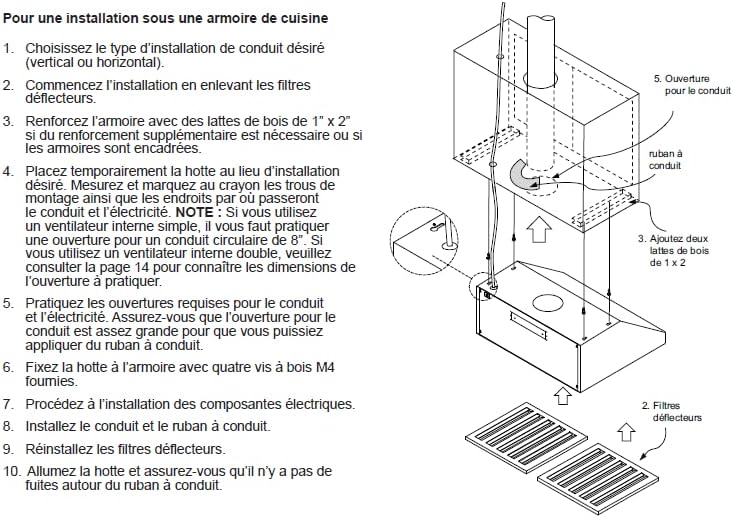
Image: Diagram illustrating the steps for under-cabinet installation, including ducting and filter placement.

Image: Diagram showing recommended installation height: minimum 24 inches to maximum 32 inches above the cooking surface, with a typical counter height of 36 inches.
Operation
Your Valore Titan Professional range hood features intuitive touch controls for easy operation.
Control Panel Functions:
- Power Button (⏻): Press to turn the range hood ON or OFF.
- Fan Speed Control (─ / +): Use the '-' button to decrease fan speed and the '+' button to increase fan speed. There are 3 available speeds.
- Light Button (💡): Press to turn the halogen lights ON or OFF. Some models may have dual-level lighting; press again to cycle through brightness levels.
- Delay-Off Function: The hood features a 5-minute automatic delay-off function. This allows the fan to continue running for 5 minutes after cooking to clear residual odors, then automatically shuts off.
- Clean Filter Reminder: An indicator will illuminate to remind you when it's time to clean the baffle filters. Refer to the Maintenance section for cleaning instructions.
Maintenance
Regular maintenance ensures optimal performance and extends the lifespan of your range hood.
Cleaning Baffle Filters:
The stainless steel baffle filters are dishwasher-safe for easy cleaning.
- Turn off the range hood and disconnect power before cleaning.
- Remove the baffle filters by sliding them out of their slots.
- Place the filters in a dishwasher on a normal cycle, or wash by hand with hot water and a mild detergent.
- Allow filters to dry completely before reinstalling.
- Reinstall the filters by sliding them back into their slots until they click into place.
Cleaning Exterior Surfaces:
- Use a soft cloth dampened with warm water and a mild, non-abrasive detergent.
- For stainless steel surfaces, wipe in the direction of the grain to prevent scratching.
- Do not use abrasive cleaners, steel wool, or scouring pads, as these can damage the finish.
- Dry thoroughly with a clean, soft cloth.
Light Bulb Replacement:
Refer to the manufacturer's specific instructions for replacing halogen light bulbs. Ensure the hood is powered off and bulbs are cool before attempting replacement.
Troubleshooting
Before contacting customer service, please refer to the following table for common issues and their solutions.
| Problem | Possible Cause | Solution |
|---|---|---|
| Hood does not operate. | No power supply. | Check if the power cord is plugged in. Check the circuit breaker or fuse. |
| Poor suction performance. | Grease filters are dirty. | Clean the baffle filters as per the Maintenance section. |
| Ducting is obstructed or too long/restrictive. | Check ductwork for obstructions or excessive bends. Ensure ducting size is appropriate. | |
| Lights not working. | Light bulb is faulty. | Replace the light bulb. |
| Electrical connection issue. | Check wiring connections. If unsure, consult a qualified electrician. | |
| Excessive noise. | Loose components or improper installation. | Ensure all screws are tightened. Check for vibrations. |
| Motor or fan blade issue. | Contact customer support if the noise persists after checking for loose parts. |
Warranty Information
For detailed warranty terms and conditions, please refer to the warranty card included with your product or visit the official West Wind website. Keep your purchase receipt as proof of purchase for any warranty claims.
Customer Support
If you encounter issues not covered in this manual or require further assistance, please contact West Wind customer support. Contact information can typically be found on the manufacturer's website or on the product packaging.
Please have your model number (WW70330AS) and purchase date ready when contacting support.