
PRO TREK PRW-7000-1AJF
PRO TREK PRW-7000-1AJF User Manual
CASIO PROTREK PRW-7000-1AJF Mens Japan Import
Product Overview
The CASIO PROTREK PRW-7000-1AJF is a robust outdoor watch designed for various activities, from mountaineering to fishing. It integrates advanced sensor technology to provide essential environmental data. This manual provides detailed instructions on how to set up, operate, and maintain your watch.
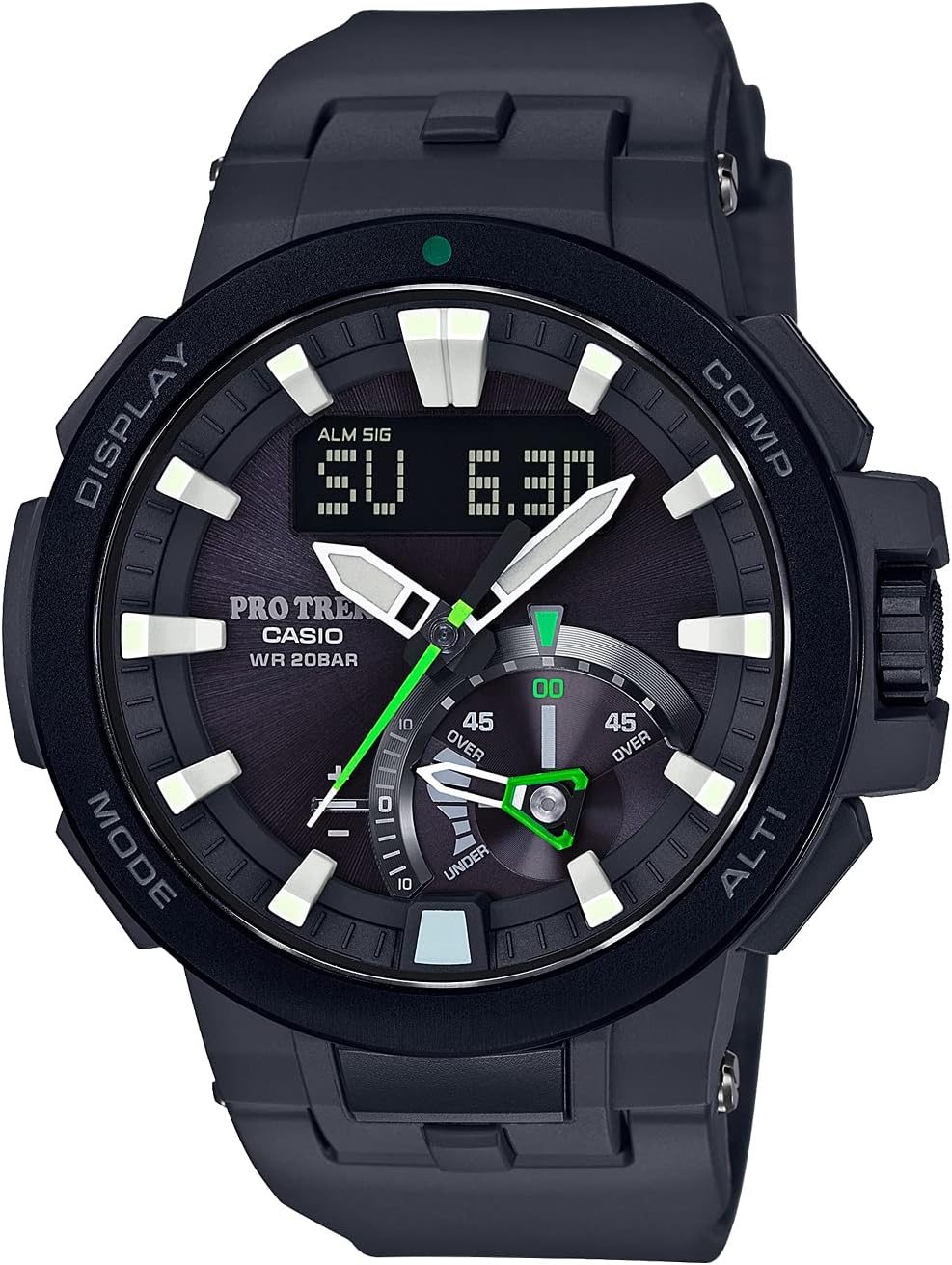
The PRW-7000 features water resistance to 20 bar and a compass bearing sensor with auto horizontal compensation. The second hand and indicator hand display various outdoor data for ease of viewing. The PRO TREK series of outdoor watches leverages Casio sensor technology to measure different types of outdoor data. In particular, PRO TREK models equipped with Triple Sensor Ver. 3 technology deliver precise compass bearing, atmospheric pressure/altitude, and temperature readings, and have proven to be a hit with people who are active in the mountains and other places in the great outdoors.
Key Features
- World Time: Displays time for 48 cities (31 time zones), with daylight saving on/off and home city/world time city swapping.
- Stopwatch: 1/100 second stopwatch with a measuring capacity of 24 hours, including elapsed time, split time, and 1st/2nd place times.
- Countdown Timer: Measures in 1-second units, with a maximum of 60 minutes.
- Alarm: Features 5 independent daily alarms and an hourly time signal.
- Triple Sensor Ver. 3: Provides precise compass bearing, atmospheric pressure/altitude, and temperature readings.
- Water Resistance: Rated for 20 bar (200 meters), suitable for various water activities.
- Fishing Timer: Suggests optimal fishing times based on lunar data.
- Tide Graph & Moon Data: Displays tide information and moon phase.
- Dual Coil Motor: Enables high-speed movement of the indicator hand for quick data display.
Setup Guide
Initial Setup and Time Adjustment
- Charging: This watch is solar-powered. Expose the watch face to light to ensure it is sufficiently charged before initial use. Avoid prolonged storage in dark places.
- Home City Setting: In Timekeeping Mode, hold down the 'ADJUST' button (usually top-left) until the city code starts to flash. Use the 'MODE' and 'COMP' buttons to select your desired home city.
- Time and Date Setting: After setting the home city, you can adjust the time and date. Use the 'MODE' button to cycle through settings like hour, minute, year, month, and day. Use the 'COMP' and 'ALTI' buttons to change the values. Press 'ADJUST' again to exit settings.
- Automatic Time Reception (if applicable): The PRW-7000 supports Multi-Band 6 atomic timekeeping. Ensure the watch is placed in an area with good signal reception, especially overnight, for automatic time calibration.
Sensor Calibration
For accurate readings, it is recommended to calibrate the sensors periodically or when moving to a new environment.
- Compass Calibration: In Compass Mode, perform a two-point calibration by rotating the watch horizontally twice. Refer to the detailed manual for specific steps.
- Altimeter Calibration: If you know the accurate altitude of your current location, you can manually input it to calibrate the altimeter.
- Barometer/Thermometer Calibration: These sensors are generally factory calibrated. Ensure the watch is off your wrist for temperature readings to avoid body heat interference.
Operation
The PRW-7000 features multiple modes accessible via the 'MODE' button (bottom-left) and dedicated sensor buttons.
Timekeeping Mode
This is the default mode, displaying the current time and date. The digital display can show day of the week, month, and day.
Compass Mode
Press the 'COMP' button (top-right) to enter Compass Mode. The second hand will point north, and the digital display will show the bearing in degrees. The auto horizontal compensation ensures accurate readings even when the watch is tilted.

Altimeter/Barometer/Thermometer Mode
Press the 'ALTI' button (bottom-right) to cycle through Altimeter, Barometer, and Thermometer readings. The indicator hand at 5 o'clock can show atmospheric pressure differences or altitude differences.


Fishing Timer, Tide Graph, and Moon Data
These features are particularly useful for marine activities. The Fishing Timer suggests optimal fishing times based on lunar data, while the Tide Graph shows tide levels for a specified date and location. Moon data displays the moon phase.

Other Modes
Cycle through other modes like World Time, Stopwatch, Countdown Timer, and Alarm by pressing the 'MODE' button. Each mode has specific sub-functions and settings that can be adjusted using the 'ADJUST', 'COMP', and 'ALTI' buttons.
Maintenance and Care
- Cleaning: Wipe the watch regularly with a soft, dry cloth. For stubborn dirt, use a mild soap solution and a soft brush, then rinse thoroughly with fresh water and dry.
- Water Resistance: The watch is water resistant to 20 bar. Ensure the crown is pushed in completely before exposing the watch to water. Do not operate buttons underwater.
- Charging: As a solar-powered watch, ensure it receives adequate light exposure. Avoid prolonged storage in dark places, which can deplete the battery. If the battery level is low, expose the watch to bright light for several hours.
- Temperature Extremes: Avoid exposing the watch to extreme temperatures (below -10°C or above 60°C) for extended periods, as this can affect its performance and battery life.
- Chemicals: Avoid contact with gasoline, cleaning solvents, aerosols, adhesives, paints, etc., as they may damage the resin case, band, or gaskets.
Troubleshooting
- Inaccurate Sensor Readings: Perform sensor calibration as described in the Setup Guide. Ensure the watch is stable and away from strong magnetic fields (for compass) or heat sources (for thermometer).
- Display Blank or Dim: The watch may be in power-saving mode or the battery level is low. Expose the watch to bright light for charging.
- Buttons Not Responding: Ensure the watch is not in a locked mode. If the issue persists, a full reset (refer to the detailed Casio manual for your specific model) might be necessary, but this will erase all settings.
- Time is Incorrect: Check your Home City setting and ensure automatic time reception is functioning if available. Manually adjust the time if necessary.
Specifications
| Feature | Detail |
|---|---|
| Model Number | PRW-7000-1AJF |
| Brand | PRO TREK (Casio) |
| Water Resistance | 20 Bar (200 meters) |
| Power Source | Solar Powered (Tough Solar) |
| Sensors | Triple Sensor (Compass, Altimeter/Barometer, Thermometer) |
| Timekeeping | World Time (48 cities), Atomic Timekeeping (Multi-Band 6) |
| Dimensions | 10.92 x 10.16 x 8.38 cm |
| Weight | 80 g |
| First Available | July 1, 2016 |
Warranty and Support
Your CASIO PROTREK PRW-7000-1AJF watch is covered by a standard manufacturer's warranty against defects in materials and workmanship. The duration and terms of the warranty may vary by region. Please retain your proof of purchase for warranty claims.
For detailed warranty information, service, or technical support, please refer to the official Casio website or contact your local authorized Casio service center. Do not attempt to repair the watch yourself, as this may void the warranty.
For further assistance, you may visit the official PRO TREK website or consult the comprehensive digital manual available for download from Casio's support pages.
Ask a question about this manual
Ask about setup, troubleshooting, compatibility, parts, safety, or missing instructions. Manuals+ will review the question and use this page’s manual context to help answer it.