
1. Introduction
Thank you for choosing the Taurus Silent Power 18-inch Pedestal Fan. This fan is designed to provide efficient and quiet cooling for your home or office. Featuring the exclusive ECOJET grille, it delivers enhanced airflow with reduced noise. Please read this manual thoroughly before assembly, operation, or maintenance to ensure safe and optimal performance.
2. Important Safety Instructions
When using electrical appliances, basic safety precautions should always be followed to reduce the risk of fire, electric shock, and injury to persons, including the following:
- Read all instructions before using this fan.
- Do not operate any fan with a damaged cord or plug. Discard fan or return to an authorized service facility for examination and/or repair.
- Do not run cord under carpeting. Do not cover cord with throw rugs, runners, or similar coverings. Do not route cord under furniture or appliances. Arrange cord away from traffic area and where it will not be tripped over.
- Always unplug the fan from the power outlet when not in use, when moving the fan from one location to another, and before cleaning.
- Do not immerse the fan in water or other liquids.
- Do not allow children to play with the fan. Close supervision is necessary when any appliance is used by or near children.
- Do not insert fingers or any other objects through the grille when the fan is operating.
- Ensure the fan is placed on a stable, level surface to prevent it from tipping over.
- This fan is for indoor use only. Do not use outdoors.
- Do not operate the fan in the presence of explosive and/or flammable fumes.
3. Package Contents
Please check the package contents to ensure all parts are present and undamaged:
- Motor Unit with Rear Grille
- Fan Blades
- Front Grille
- Grille Securing Nut
- Adjustable Stand Pole
- Base
- Power Cord (attached to motor unit)

Figure 3.1: Components of the Taurus Silent Power 18-inch Pedestal Fan. This image shows the motor unit, plastic 18-inch grille, 6 aerodynamic blades, 3 speeds, oscillation button, and the square base made from recycled post-consumer material.
4. Assembly Instructions
The Taurus Silent Power fan is designed for quick and easy assembly without the need for tools.
- Assemble the Base: Attach the adjustable stand pole to the square base. Ensure it is securely fitted.
- Attach Motor Unit: Place the motor unit onto the top of the adjustable stand pole and secure it.
- Install Fan Blades: Carefully slide the fan blades onto the motor shaft. Ensure they are properly aligned and secured with the provided cap or nut.
- Attach Front Grille: Position the front grille over the blades and secure it to the rear grille using the grille securing nut or clips. Ensure the grille is firmly closed to prevent accidental contact with the blades.
- Adjust Height: Loosen the height adjustment knob on the stand pole, extend or retract the pole to the desired height, and then tighten the knob securely.
- Optional Wall Mount: This fan can also be wall-mounted. Refer to the specific instructions provided in the packaging for wall mounting hardware and procedure.

Figure 4.1: Securely attach the stand pole to the fan base.

Figure 4.2: The fan features 6 aerodynamic blades for optimal airflow.

Figure 4.3: The fan can be used as a pedestal, table, or wall-mounted unit.
5. Operating Instructions
Once assembled, plug the fan into a suitable electrical outlet.

Figure 5.1: Control panel with speed and oscillation buttons.
- Power On/Speed Selection: Press the speed buttons (1, 2, or 3) on the control panel to turn the fan on and select your desired airflow speed.
- 1: Low speed for gentle air circulation.
- 2: Medium speed for moderate cooling.
- 3: High speed for maximum airflow.
- Power Off: Press the "0" button to turn the fan off.
- Oscillation Function: Press the "OSC" button to activate the oscillation feature, which allows the fan head to sweep from side to side, distributing air over a wider area. Press the "OSC" button again to stop oscillation.
- Tilt Adjustment: The fan head can be manually tilted up or down to direct airflow. Gently adjust the head to the desired angle.
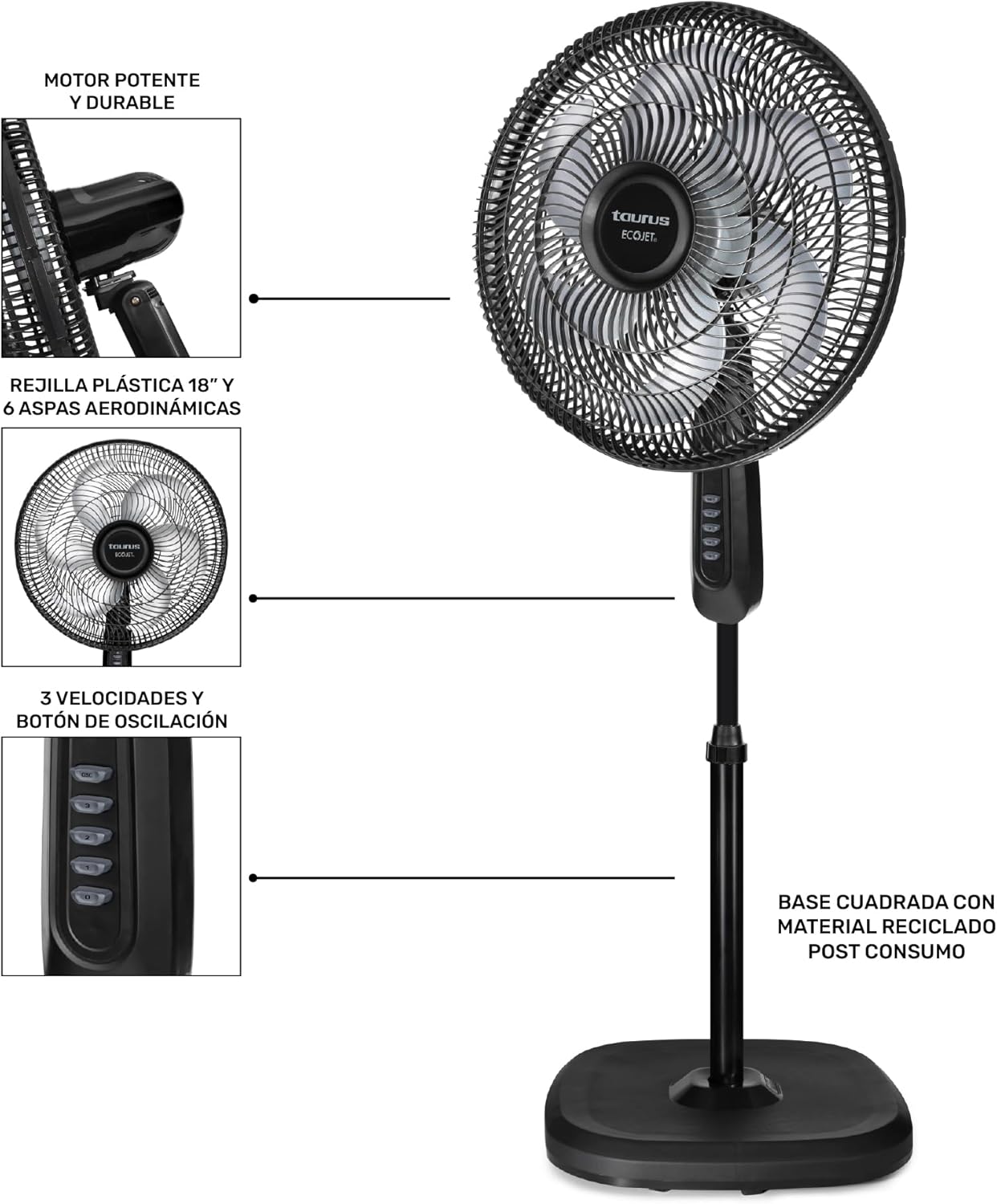
Figure 5.2: The fan offers 75-degree horizontal oscillation and an adjustable tilt head for optimal air distribution.
6. Maintenance
Regular cleaning will help maintain your fan's performance and extend its lifespan.
- Before Cleaning: Always unplug the fan from the power outlet before cleaning.
- Exterior Cleaning: Use a soft, damp cloth to wipe the exterior surfaces of the fan. Do not use abrasive cleaners or solvents, as these may damage the finish.
- Grille and Blades Cleaning: To clean the fan blades and inside the grilles, you may need to carefully remove the front grille. Refer to the assembly instructions for reverse steps. Use a soft cloth or a vacuum cleaner with a brush attachment to remove dust and debris from the blades and grilles. Ensure all parts are completely dry before reassembling and operating the fan.
- Storage: When not in use for extended periods, store the fan in a cool, dry place, preferably in its original packaging.
7. Troubleshooting
If you experience issues with your fan, please consult the following troubleshooting guide:
| Problem | Possible Cause | Solution |
|---|---|---|
| Fan does not turn on. | No power supply. Fan not plugged in. Power outlet faulty. | Ensure the fan is securely plugged into a working electrical outlet. Check the circuit breaker. Try plugging another appliance into the same outlet to verify power. |
| Weak or no airflow. | Fan speed set too low. Grilles or blades are dirty. Obstruction blocking airflow. | Increase the fan speed setting. Unplug the fan and clean the grilles and blades as per maintenance instructions. Ensure nothing is blocking the front or rear grilles. |
| Fan is making unusual noise. | Loose parts. Fan not on a stable surface. Debris inside the grille. | Unplug the fan and check for any loose components, especially the grilles and blades. Place the fan on a firm, level surface. Unplug the fan and clean any debris from the blades and grilles. |
| Oscillation not working. | Oscillation button not pressed. Internal mechanism issue. | Press the "OSC" button on the control panel. If the issue persists, contact customer support. |
8. Specifications
Key technical specifications for the Taurus Silent Power 18-inch Pedestal Fan:
- Brand: Taurus
- Model Name: SILENT POWER
- Electric Fan Design: Floor Fan (Pedestal Fan)
- Color: Black
- Product Dimensions (D x W x H): 19.7" x 17.33" x 53.15" (50 cm x 44 cm x 135 cm)
- Item Weight: 4 Kilograms
- Power Source: AC/DC
- Wattage: 90 watts
- Voltage: 127 Volts
- Number of Speeds: 3
- Noise Level: 49 Decibels
- Number of Blades: 6
- Material: Plastic
- Control Method: Touch (buttons on control panel)
- Special Features: Manual control, Oscillating, Adjustable Height, Tilt Head, ECOJET Grille
- Indoor Outdoor Usage: Indoor only
- Recommended Uses: House, Bedroom, Offices, Living room

Figure 8.1: Dimensions of the Taurus Silent Power Pedestal Fan.
9. Warranty and Support
For warranty information, please refer to the documentation included with your product at the time of purchase or visit the official Taurus website. If you require technical support or have questions not covered in this manual, please contact Taurus customer service.
You can find more information about Taurus products by visiting the Taurus Store on Amazon.