
AIMES 3133
AIMES Men's Sports Outdoor Waterproof Military Wrist Watch - Model 3133
User Instruction Manual
Introduction
This manual provides comprehensive instructions for the operation, maintenance, and troubleshooting of your AIMES Men's Sports Outdoor Waterproof Military Wrist Watch, Model 3133. This watch features a dual-display design, combining analog and digital timekeeping, along with multiple functions suitable for sports and daily use.
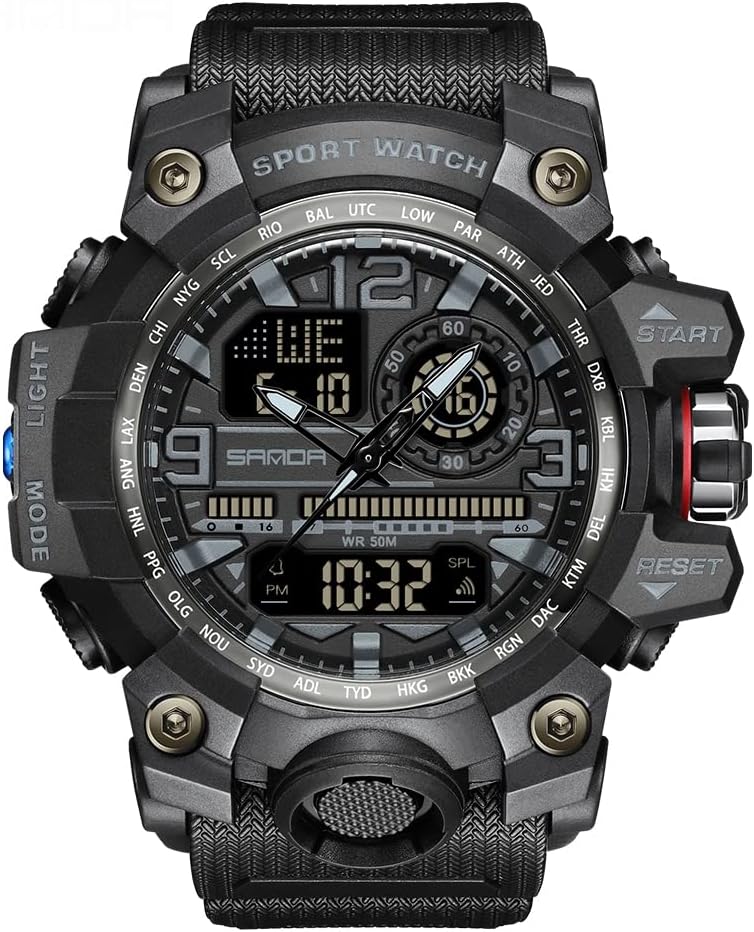
Figure 1: Front view of the AIMES 3133 Military Watch, showcasing its robust design and dual time display.
Safety Information and Precautions
- Water Resistance: The watch is waterproof to 50 meters. However, do not press any buttons underwater. Avoid use in extreme hot or cold temperatures.
- Moisture: If mist or droplets are found inside the watch surface, contact the manufacturer immediately for maintenance to prevent moisture corrosion of internal components.
- Cleaning: Clean the strap regularly with a soft cloth.
- Longevity: Too much water contact will shorten the watch's life.
Setup
1. Initial Time and Date Setting
Your watch features both analog and digital displays. The digital display allows for precise setting of time, date, and other functions.
- Identify Buttons: The watch has multiple buttons for various functions. Typically, a "MODE" button cycles through modes (Time, Alarm, Stopwatch), and "RESET" and "START" buttons are used for adjustments. The "LIGHT" button activates the backlight.
- Enter Setting Mode: Press the "MODE" button repeatedly until you reach the time setting mode (often indicated by flashing digits).
- Adjust Time: Use the "RESET" button to select the digit to adjust (hours, minutes, seconds). Use the "START" button to increase the value. The watch supports 12/24 hour format.
- Set Date and Day: Continue pressing "MODE" to cycle to date and day settings, adjusting with "RESET" and "START" as needed.
- Exit Setting Mode: Press "MODE" again to exit the setting mode and save changes.

Figure 2: Detailed view of the watch face and function buttons, essential for setup and operation.
2. Wearing the Watch
The watch features a soft and durable PU watch band. Adjust the buckle to ensure a comfortable fit on your wrist. The band is designed for both indoor and outdoor activities.

Figure 3: The watch comfortably worn on a wrist, highlighting its large face and durable strap.
Operating Instructions
1. Dual-Display Functionality
The watch combines traditional analog hands with a digital display. The analog hands show the primary time, while the digital display offers additional information and functions, including a second time zone.
2. Alarm Function
To set the alarm:
- Press "MODE" until the alarm setting mode is displayed (often indicated by "AL" or an alarm icon).
- Use "RESET" to select hours or minutes.
- Use "START" to adjust the alarm time.
- Press "MODE" to confirm and exit.
- To activate/deactivate the alarm, typically press "START" while in the alarm display mode.
3. LED Backlight
The watch features an LED backlight for clear visibility in low-light conditions. Press the "LIGHT" button (usually on the top left) to illuminate the digital display. The backlight will remain on for a few seconds.

Figure 4: The watch with its LED backlight activated, providing clear visibility in the dark.

Figure 5: Illustration of the "Night Vision Cold Light" feature, ensuring readability in darkness.
4. Stopwatch Function (Chronograph)
The chronograph function is ideal for timing activities.
- Press "MODE" until the stopwatch mode is displayed (often indicated by "ST" or "CHRO").
- Press "START" to begin timing.
- Press "START" again to pause/resume timing.
- Press "RESET" to reset the stopwatch to zero.
Video 1: Demonstration of the watch's features, including time setting and stopwatch operation.
5. Calendar (Date and Week Display)
The digital display shows the current date and day of the week. These are typically set automatically once the time and year are correctly configured.
6. 12/24 Hour Time Format
The watch allows you to switch between 12-hour (with AM/PM indicator) and 24-hour time formats. This setting is usually found within the time setting mode or by pressing a specific button (refer to the watch's specific button layout for exact operation).
Maintenance
1. Cleaning
Regular cleaning of your watch will help maintain its appearance and longevity. Use a soft, damp cloth to wipe down the watch case and strap. Avoid harsh chemicals or abrasive materials.
2. Water Exposure
While the watch is waterproof, prolonged exposure to water, especially hot water or steam, can degrade seals over time. Always ensure the crown is pushed in completely if applicable. Avoid pressing buttons when the watch is wet or submerged.
3. Battery Replacement
The watch uses a Japanese original quartz movement. When the battery needs replacement, it is recommended to take the watch to a qualified watch technician to ensure proper sealing and functionality are maintained.
Troubleshooting
| Problem | Possible Cause | Solution |
|---|---|---|
| Digital display is blank or dim. | Low battery or battery depleted. | Replace the battery. |
| Time is inaccurate. | Incorrect setting or low battery. | Re-set the time according to the "Setup" section. If problem persists, replace battery. |
| Mist or water droplets inside the watch. | Water ingress due to seal compromise or button press underwater. | Stop using the watch immediately and contact manufacturer for service. Do not attempt to open the watch. |
| Buttons are unresponsive. | Watch is wet, or internal mechanism issue. | Ensure watch is dry. If problem persists, contact support. |
Specifications
- Model Number: 3133
- Case Diameter: 2.12 inch / 54 mm
- Case Thickness: 0.63 inch / 16 mm
- Band Width: 0.87 inch / 22 mm
- Max Wear Length: 10.2 inches / 26 cm
- Min Wear Length: 7.1 inches / 18 cm
- Product Weight: 85g / 3.0oz
- Water Resistance: 50 meters (5ATM)
- Movement: Imported Japan quartz movement
- Strap Material: PU (Polyurethane)
- Back Cover: 304 Stainless Steel
- Features: Dual-display, Alarm, LED Backlight, Date, Stopwatch, Calendar (Date, Week), 12/24 Hour Time Format, Shock Resistant.
Warranty and Support
AIMES offers a 12-month warranty for this product. If you have any questions or encounter issues with your watch, please contact AIMES customer support for assistance. Please refer to the contact information provided with your purchase or on the official AIMES website.
Ask a question about this manual
Ask about setup, troubleshooting, compatibility, parts, safety, or missing instructions. Manuals+ will review the question and use this page’s manual context to help answer it.