
1. Introduction
Thank you for choosing the E-Lektron EL20-MB Mobile Sound System. This portable audio system is designed for versatile use, featuring an integrated mixer amplifier, MP3 player, FM radio, Bluetooth connectivity, and a wireless microphone. Its robust design and internal battery make it ideal for various applications, from parties to public address.
This manual provides detailed instructions for the safe and efficient operation of your EL20-MB system. Please read it thoroughly before use and retain it for future reference.

Image 1: Front view of the E-Lektron EL20-MB Mobile Sound System, showcasing the speaker grille and E-Lektron logo.
2. Safety Instructions
To ensure safe operation and prevent damage, please observe the following safety precautions:
- Power Source: Only use the provided power adapter. Ensure the voltage matches the requirements specified on the device.
- Water and Moisture: Do not expose the unit to rain, moisture, or immerse it in water. This product is not waterproof.
- Ventilation: Do not block ventilation openings. Ensure adequate airflow around the unit.
- Heat Sources: Keep the unit away from heat sources such as radiators, heat registers, stoves, or other heat-producing appliances.
- Cleaning: Disconnect the power before cleaning. Use a dry, soft cloth. Do not use liquid cleaners or aerosol cleaners.
- Servicing: Do not attempt to service this product yourself. Refer all servicing to qualified service personnel.
- Battery: The internal battery is not user-replaceable. Do not attempt to open the unit or replace the battery.
- Placement: Place the unit on a stable, flat surface to prevent it from falling.
3. Package Contents
Verify that all items are present in the package:
- 1x E-Lektron EL20-MB Mobile Sound System
- 1x Wireless Microphone
- 1x Power Adapter
- 1x Remote Control
4. Product Features
The E-Lektron EL20-MB offers a range of features for a comprehensive audio experience:
- Integrated mixer amplifier for versatile audio control.
- Built-in MP3 player with USB and Micro SD card support.
- FM radio tuner for listening to your favorite stations.
- Bluetooth wireless technology for streaming audio from compatible devices.
- Includes a wireless microphone for karaoke or public address.
- Internal rechargeable battery providing 3 to 5 hours of independent music playback.
- Robust ABS plastic housing with an extendable handle and wheels for easy transport.
- Maximum speaker output power: 100 Watts.
- Frequency response: 45.2 Hz.
- Control methods: Remote control.
- Connectivity: Auxiliary, Bluetooth, USB.
5. Controls and Connections
Familiarize yourself with the control panel and connection ports on your EL20-MB system.
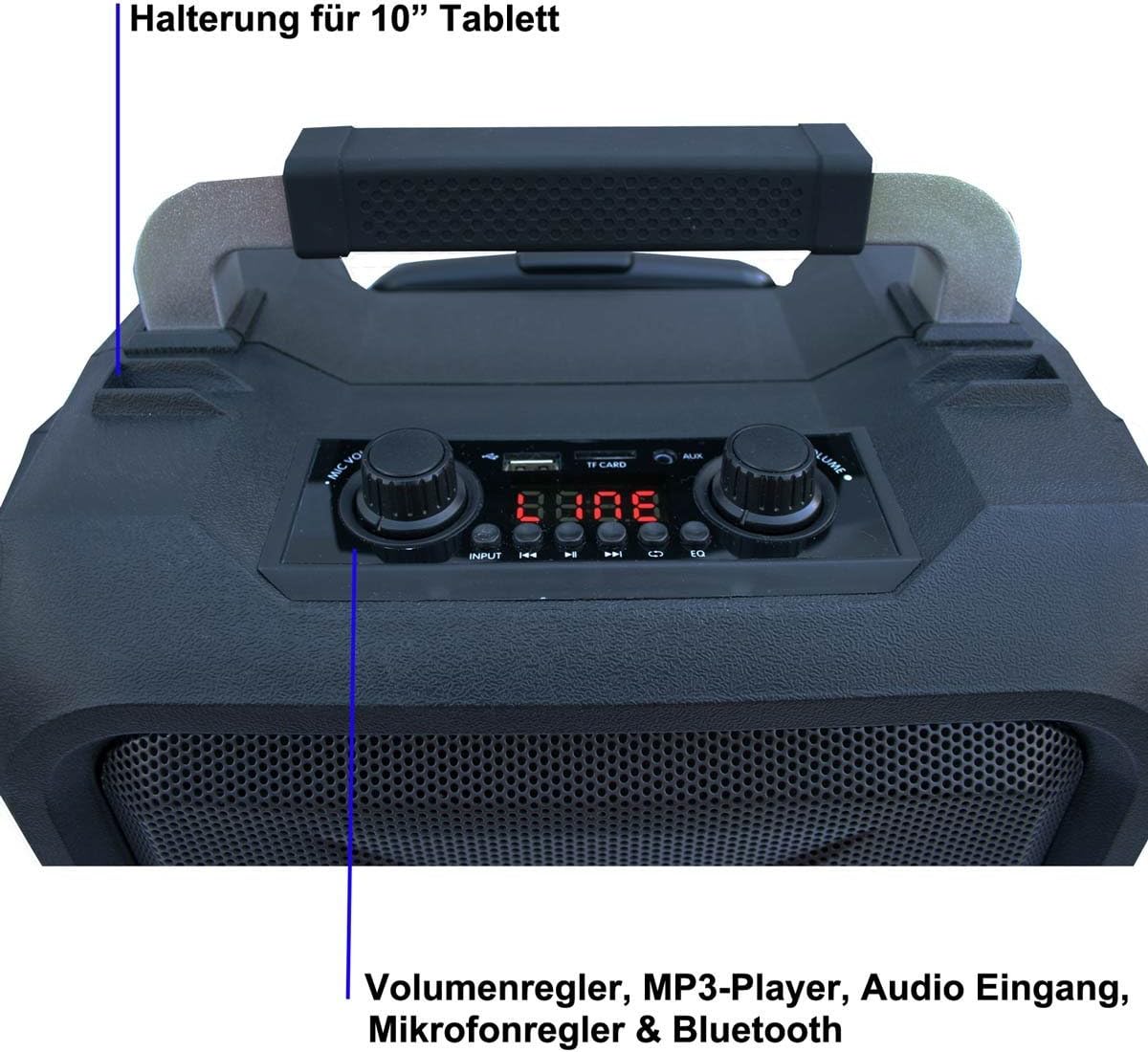
Image 2: Detailed view of the control panel, showing various inputs, volume knobs, and display.
- Display Screen: Shows current mode, track number, or FM frequency.
- USB Port: For connecting USB flash drives for MP3 playback.
- Micro SD Card Slot: For inserting Micro SD cards for MP3 playback.
- AUX Input (3.5mm): For connecting external audio devices via an auxiliary cable.
- Microphone Input (6.3mm): For connecting a wired microphone (in addition to the wireless microphone).
- Guitar Input (6.3mm): For connecting a guitar or other instrument.
- Master Volume Knob: Adjusts the overall output volume.
- Microphone Volume Knob: Adjusts the volume of the microphone.
- Echo Knob: Adjusts the echo effect for the microphone.
- Bass/Treble Knobs: Adjusts the bass and treble levels of the audio output.
- Mode Button: Switches between input modes (Bluetooth, USB, SD, FM, AUX).
- Playback Controls: Play/Pause, Previous Track, Next Track.
- Power Switch: Turns the unit ON/OFF.
- DC Input: For connecting the power adapter to charge the battery or power the unit.
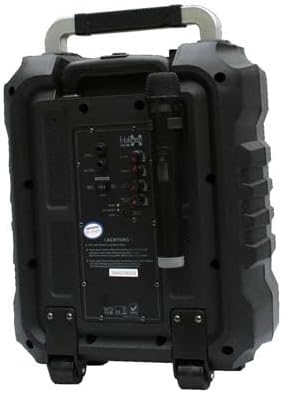
Image 3: Rear view of the sound system, showing the various ports and the wireless microphone holder.
6. Setup
6.1 Initial Charging
Before first use, fully charge the internal battery. Connect the provided power adapter to the DC input on the unit and plug it into a wall outlet. The charging indicator will illuminate. Once fully charged, the indicator may change color or turn off, depending on the model. A full charge typically takes several hours.
6.2 Powering On/Off
Locate the Power Switch on the unit. Flip it to the "ON" position to power on the system. The display will light up. To power off, flip the switch to the "OFF" position.
6.3 Transporting the Unit
The EL20-MB is designed for portability. Extend the telescopic handle and tilt the unit to roll it on its integrated wheels.

Image 4: The sound system with its extendable handle fully raised for easy transport.
7. Operating Instructions
7.1 Bluetooth Mode
- Power on the EL20-MB.
- Press the Mode button until "Bluetooth" or "BT" appears on the display. The unit will enter pairing mode, indicated by a flashing Bluetooth icon or sound.
- On your mobile device (smartphone, tablet, etc.), enable Bluetooth and search for available devices.
- Select "E-Lektron EL20-MB" from the list of devices.
- Once paired, the unit will confirm with an audible tone, and the Bluetooth indicator will stop flashing.
- You can now play audio from your device through the EL20-MB. Use your device's controls or the unit's playback controls (Play/Pause, Next/Previous) to manage music.
7.2 USB/Micro SD Playback
- Insert a USB flash drive or Micro SD card (with MP3 files) into the corresponding slot.
- Press the Mode button until "USB" or "SD" appears on the display. The unit will automatically begin playing MP3 files.
- Use the playback controls (Play/Pause, Next/Previous) on the unit or remote control to navigate tracks.
7.3 FM Radio Mode
- Press the Mode button until "FM" appears on the display.
- Press and hold the Play/Pause button to initiate an automatic station scan. The unit will scan and save available FM stations.
- Use the Next/Previous buttons to cycle through the saved stations.
7.4 Microphone Usage
- Ensure the wireless microphone has fresh batteries.
- Turn on the wireless microphone. It should automatically connect to the EL20-MB.
- Adjust the Microphone Volume knob on the unit to your desired level.
- Use the Echo knob to add an echo effect to the microphone audio.
- For a wired microphone, connect it to the 6.3mm Microphone Input.
7.5 Remote Control
The included remote control allows for convenient operation from a distance. It provides access to mode selection, playback controls, volume adjustment, and EQ presets.

Image 5: The remote control for the E-Lektron EL20-MB, showing various buttons for mode, volume, and playback.
8. Maintenance
- Cleaning: Wipe the unit with a soft, dry cloth. Do not use abrasive cleaners or solvents.
- Storage: When not in use for extended periods, store the unit in a cool, dry place. It is recommended to fully charge the battery every 3-6 months to maintain its lifespan.
- Battery Care: Avoid completely draining the battery frequently. Recharge it when the low battery indicator appears.
9. Troubleshooting
| Problem | Possible Cause | Solution |
|---|---|---|
| No power | Battery drained; Power adapter not connected; Power switch off. | Charge the battery; Connect power adapter; Turn power switch ON. |
| No sound | Volume too low; Incorrect mode selected; Device not paired (Bluetooth); Cable loose (AUX). | Increase master volume; Select correct mode; Pair Bluetooth device; Check AUX cable connection. |
| Bluetooth not connecting | Unit not in pairing mode; Device too far; Interference. | Ensure unit is in BT mode and flashing; Move device closer; Restart both devices. |
| Microphone not working | Microphone off; Batteries low; Mic volume low. | Turn on microphone; Replace batteries; Increase microphone volume. |
| Poor FM reception | Weak signal; Location interference. | Relocate the unit; Perform auto-scan again. |
10. Specifications
| Model Number | EL20-MB |
| Brand | E-Lektron |
| Dimensions (L x W x H) | 21 x 36 x 52.5 cm |
| Weight | 8.1 Kilograms |
| Material | ABS Plastic |
| Speaker Size | 8 Inches (Subwoofer diameter: 20 cm) |
| Max Output Power | 100 Watts |
| Frequency Response | 45.2 Hz |
| Connectivity Technology | Auxiliary, Bluetooth, USB |
| Wireless Communication | Bluetooth |
| Power Source | Battery Powered |
| Battery Life | 3 to 5 hours (approx.) |
| Control Method | Remote Control |
| Special Features | Radio |
| Color | Black |
11. Warranty and Support
E-Lektron provides a warranty for this product. Please refer to the warranty card included in your package for specific terms and conditions.
- Spare Parts Availability: Spare parts are guaranteed for 2 years from the date of purchase.
- For technical support or service inquiries, please contact your retailer or visit the official E-Lektron website.