
wellclima RC-7
Air Conditioner Remote Control User Manual
Model: RC-7 | Brand: wellclima
Introduction
This manual provides detailed instructions for the operation and maintenance of your wellclima Air Conditioner Remote Control, model RC-7. This remote is designed to be compatible with Airwell, Emailair, and Electra air conditioning units. It also serves as a direct replacement for several obsolete remote models, including RC3, RC4 (RC), RC4 (RCL), RC4 (RCLD), and RC5.
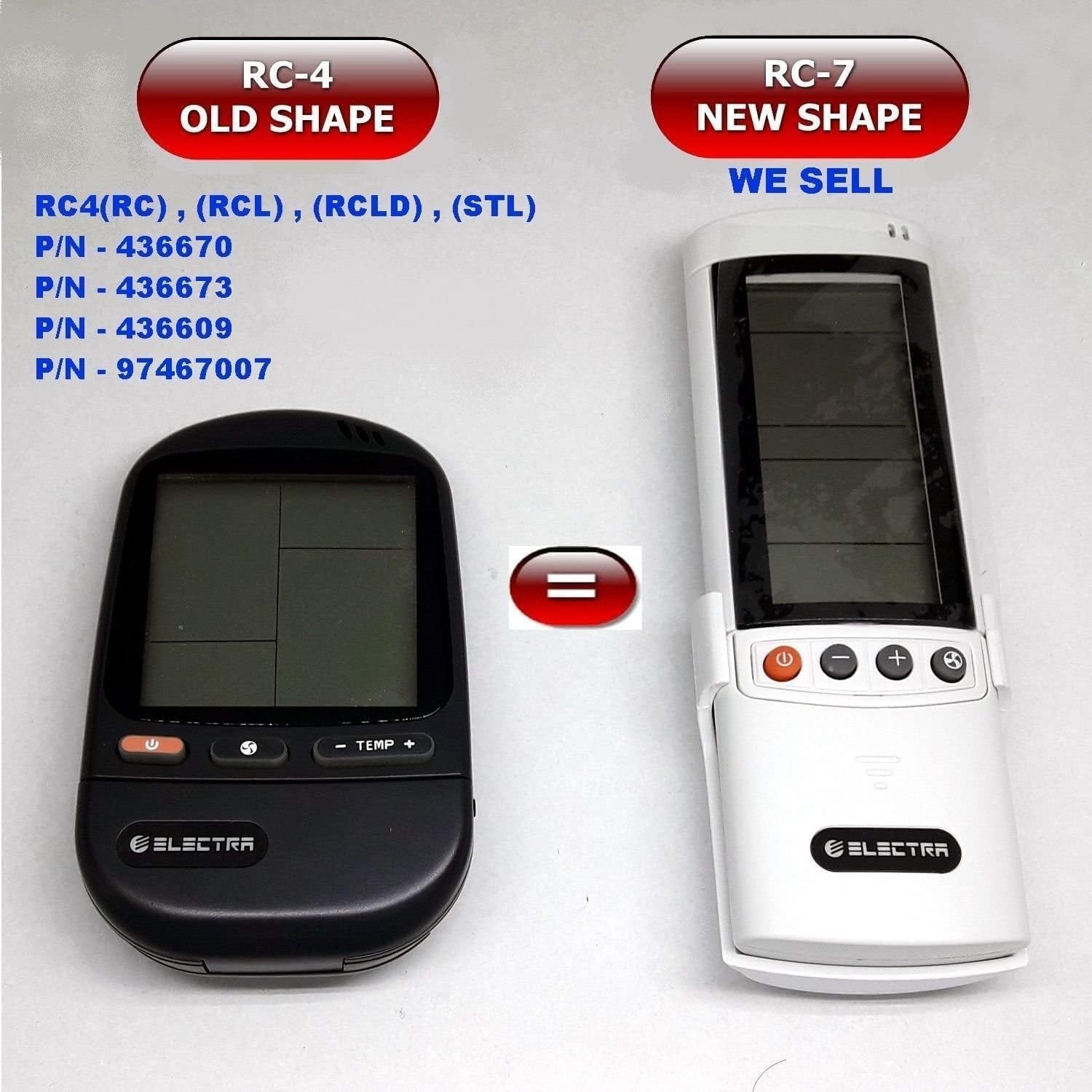
Image: Comparison of the older RC-4 remote control (left, black, rounded) and the newer RC-7 remote control (right, white, rectangular) which this manual describes. The RC-7 is a direct replacement for the RC-4 and other specified models.
Setup
1. Battery Installation
The remote control requires two (2) AAA batteries for operation. Ensure correct polarity when inserting the batteries.
- Open the battery compartment cover located on the back of the remote control.
- Insert two AAA batteries, matching the (+) and (-) terminals as indicated inside the compartment.
- Close the battery compartment cover securely.
2. Wall Mount Clip Installation
A wall mount clip is included for convenient storage of your remote control.
- Choose a suitable location on a wall, away from direct sunlight or heat sources.
- Using screws (not included) appropriate for your wall type, secure the wall mount clip to the desired position. Ensure it is level and firmly attached.
- Slide the remote control into the clip for storage.

Image: The white remote control shown alongside its matching white wall mount clip. The clip has two screw holes for mounting.
Operating Instructions
Familiarize yourself with the buttons and display on your remote control for optimal use.
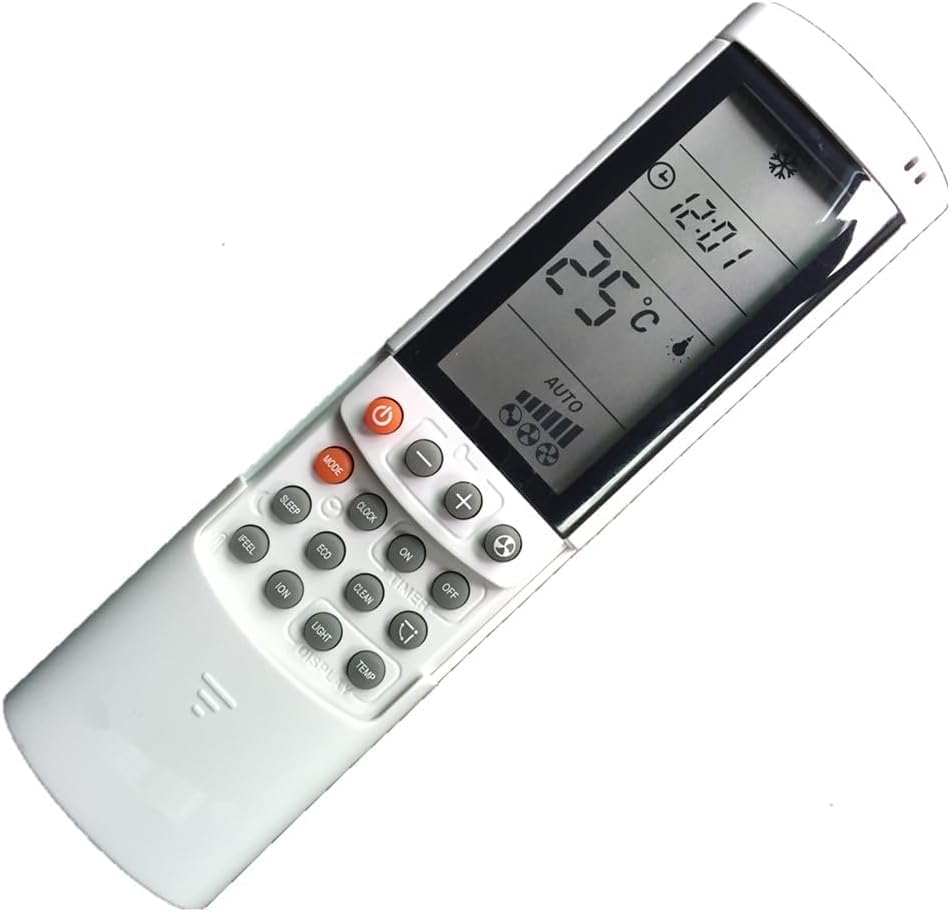
Image: The white remote control with its LCD screen illuminated, displaying a temperature of 25°C, the current time (12:01), and the 'AUTO' mode indicator. Various function buttons are visible below the screen.
Button Functions:
| Button | Function |
|---|---|
| Power (Red button with circle and line icon) | Turns the air conditioner unit ON or OFF. |
| Mode | Cycles through operating modes: Auto, Cool, Dry, Fan, Heat (if applicable). |
| Set / Temp +/- | Adjusts the desired temperature setting. |
| Fan Speed | Adjusts the fan speed (Auto, Low, Medium, High). |
| Timer | Sets the ON/OFF timer for the unit. |
| Sleep | Activates or deactivates sleep mode for energy saving and quiet operation. |
| Feel | Activates the 'I Feel' function, which senses the temperature at the remote's location. |
| Eco | Engages energy-saving mode. |
| Ion | Activates the ionizer function (if available on AC unit). |
| Clean | Initiates the self-clean function (if available on AC unit). |
| Light / Display | Turns the display light on/off or adjusts display brightness. |
| Clock | Sets the current time on the remote's display. |
| Room | May display room temperature or activate a specific room sensing feature. |
| Clear | Clears settings, often used with timer functions. |
Note: Not all functions may be available on every air conditioning unit. Refer to your air conditioner's manual for specific feature compatibility.
Maintenance
Cleaning the Remote Control
To maintain the appearance and functionality of your remote control:
- Wipe the surface with a soft, dry cloth.
- Do not use liquid cleaners, abrasive cleaners, or chemical sprays, as these can damage the remote.
Battery Replacement
Replace batteries when the display becomes dim or the remote control's range decreases. Always replace both batteries simultaneously with new AAA batteries.
Troubleshooting
| Problem | Possible Cause | Solution |
|---|---|---|
| Remote not responding to AC unit. |
|
|
| Remote display is dim or blank. |
|
|
| AC unit not performing selected function. |
|
|
Specifications
- Model Number: RC-7
- Brand: wellclima
- Manufacturer: Electra
- Compatible Devices: Air Conditioner (Airwell, Emailair, Electra)
- Power Source: 2 x AAA Batteries (required)
- Color: White
- Special Feature: Ergonomic design
- Max Number of Supported Devices: 1
- Replaces Obsolete Models: RC3, RC4 (RC), RC4 (RCL), RC4 (RCLD), RC5
Warranty and Support
Specific warranty information for this remote control is not provided in this manual. Please refer to the product packaging or contact your retailer for details regarding warranty coverage and customer support.
Related Documents - RC-7
 |
Wellclima Universal A/C Remote Control K-650E Operating Instructions Comprehensive operating instructions and setup guide for the Wellclima Universal A/C Remote Control, model K-650E. Covers quick search, manual code input, automatic search, additional functions, troubleshooting, and maintenance. |
 |
Wellclima PLUS K-209ES Universal A/C Remote Control Instruction Manual Comprehensive instruction manual for the Wellclima PLUS K-209ES Universal A/C Remote Control, detailing setup procedures, remote control functions, troubleshooting, and compatibility with various air conditioner brands. |
 |
Universal Air Conditioner Remote Control RC7/RC-7 - Compatible with ELECTRA, Airwell Information on the Universal English Version Air Conditioner Remote Control (RC7/RC-7), detailing compatible models, brands, key features, specifications, and package contents. A replacement remote for ELECTRA, Airwell, Emailair, and Elco air conditioners. |
 |
Savio Universal Remote Control RC-05 to RC-26 User Manual and Safety Information Comprehensive user manual for Savio universal remote controls (models RC-05 to RC-26), including package contents, installation, safety guidelines, and environmental disposal information. |
 |
Airwell PRIME Series Service Manual Comprehensive service manual for Airwell PRIME Series air conditioners, detailing technical specifications, operation, troubleshooting, and parts for models including PRIME 7, 9, 12, and 18, utilizing R410A and R22 refrigerants. |
 |
SAVIO Universal Remote Control User Manual (RC-05 to RC-19) User manual for SAVIO Universal Remote Controls, models RC-05 through RC-19. Covers package contents, installation, safety guidelines, warranty, and responsible disposal of electronic equipment. |