
Introduction
This manual provides detailed instructions for the setup, operation, adjustment, and maintenance of your DW MCD Machined Chain Drive Double Pedal. Designed for precision and durability, this pedal incorporates advanced features for optimal performance. Please read this manual thoroughly to ensure proper use and longevity of your equipment.
Setup and Assembly
1. Unpacking
- Carefully remove all components from the packaging.
- Verify that all parts are present: main pedal, slave pedal, drive shaft, beaters, and any included tools.
- Retain original packaging for future transport or storage.
2. Assembly
- Connect the Drive Shaft: Attach the universal drive shaft to the main pedal and the slave pedal. Ensure the connections are secure.
- Install Beaters: Insert the beaters into the beater hubs on both pedals and tighten the set screws to secure them at the desired height.
- Attach to Bass Drum: Position the main pedal against the bass drum hoop. Use the Tri-Pivot Swivel Toe Clamp to securely fasten the pedal without damaging the hoop. Adjust the clamp for optimal grip.
- Position Slave Pedal: Place the slave pedal in a comfortable playing position relative to the main pedal.

Image: The DW MCD Machined Chain Drive Double Pedal, showcasing its main and slave pedals connected by the drive shaft, with beaters installed.
Operating Instructions
The DW MCD Double Pedal is designed for responsive and powerful bass drum performance. Proper technique and adjustment are key to maximizing its potential.
Basic Operation
- Place your foot on the footboard. The pedal is activated by pressing down, causing the beater to strike the bass drum head.
- The chain drive mechanism ensures a smooth and consistent stroke.
- Experiment with different foot positions and techniques to find your preferred playing style.
Key Adjustments
The MCD pedal offers several advanced adjustment features to fine-tune its feel and response.
1. Lever Cam Adjustment
This feature allows for quick changes between different cam positions, altering the pedal's acceleration and feel. Use the integrated lever to shift between settings, from a more linear response to a more aggressive, accelerating feel.

Image: A detailed view of the pedal's cam and chain drive, highlighting the Lever Cam Adjustment mechanism.
2. V.E.R.T. (Vertical Sliding Tension Adjustment)
The V.E.R.T. system allows you to adjust the spring tension vertically, providing a wider range of tension settings and a more direct response. Loosen the locking screw and slide the spring mechanism up or down to increase or decrease tension, then re-tighten.

Image: A close-up of the pedal tower, showing the vertical spring and the V.E.R.T. adjustment slide.
3. Tri-Pivot Swivel Toe Clamp
This clamp system ensures a secure grip on various bass drum hoop thicknesses without damaging the hoop. The three pivoting contact points distribute pressure evenly. Adjust the clamp screw until the pedal is firmly attached to the hoop.

Image: A detailed view of the Tri-Pivot Swivel Toe Clamp mechanism at the base of the pedal.
4. Floating Rotor Drive System
The Floating Rotor Drive System, incorporating a universal joint, minimizes friction and ensures smooth power transfer between the main and slave pedals, contributing to a consistent and responsive feel across both pedals.
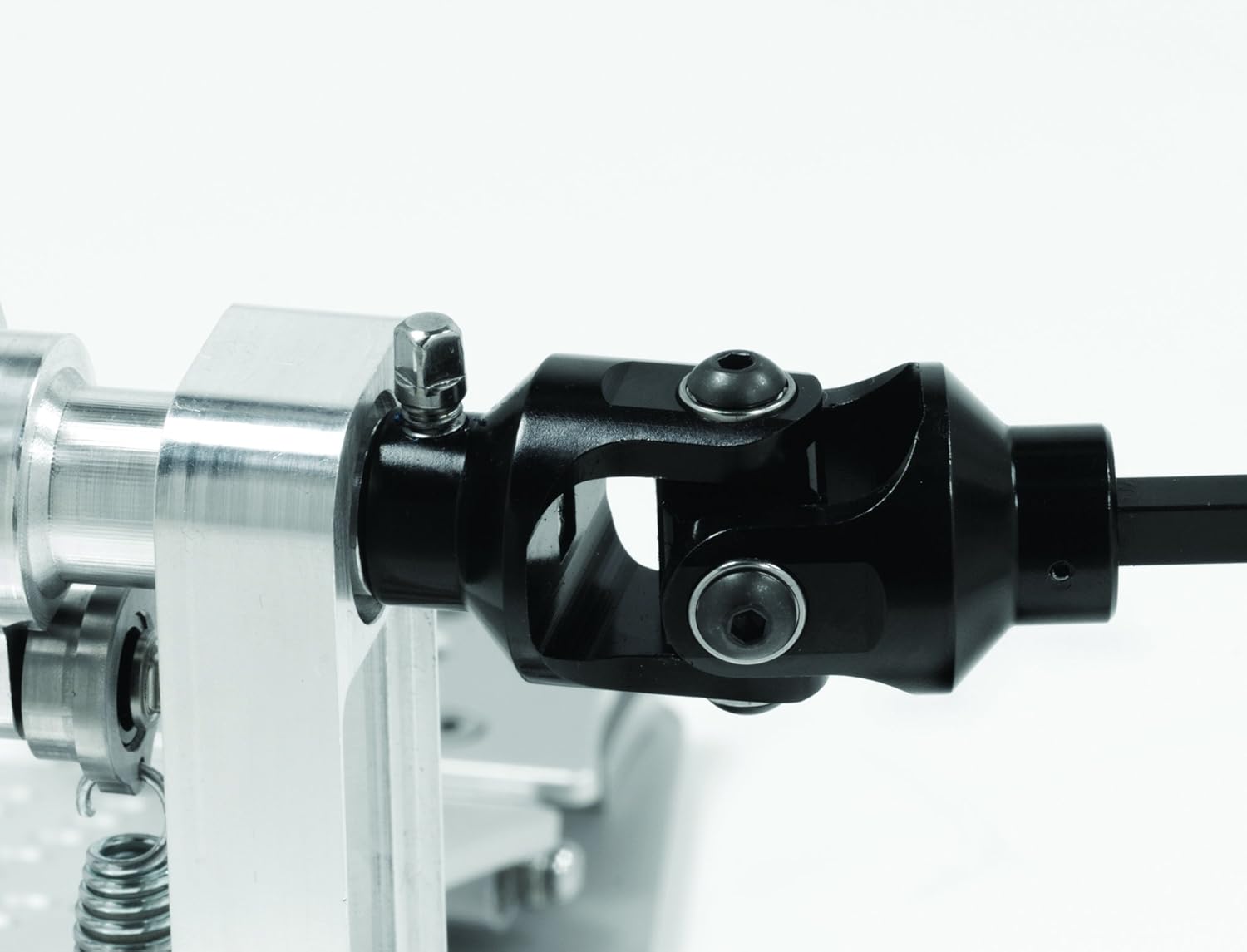
Image: A close-up of the universal joint, part of the Floating Rotor Drive System, connecting the main and slave pedals.
Maintenance
- Cleaning: Wipe down the pedal regularly with a soft, dry cloth to remove dust and debris. Avoid abrasive cleaners.
- Lubrication: Periodically apply a small amount of light machine oil to moving parts such as hinges, bearings, and the drive shaft universal joints to ensure smooth operation and prevent wear.
- Inspection: Regularly check all screws, bolts, and connections for tightness. Re-tighten as necessary to prevent loosening during play.
- Springs: Inspect springs for any signs of fatigue or damage. Replace if necessary.
- Storage: When not in use, store the pedal in a clean, dry environment, preferably in a protective case to prevent damage.
Troubleshooting
| Issue | Possible Cause | Solution |
|---|---|---|
| Squeaking or grinding noise | Lack of lubrication; loose parts; debris in mechanism. | Lubricate moving parts. Check and tighten all screws. Clean any visible debris. |
| Pedal feels sluggish or stiff | Insufficient spring tension; friction in moving parts; worn bearings. | Adjust V.E.R.T. spring tension. Lubricate hinges and bearings. Inspect for worn components. |
| Pedal slips on bass drum hoop | Toe clamp not tightened sufficiently; worn rubber pads on clamp. | Ensure Tri-Pivot Swivel Toe Clamp is securely tightened. Check rubber pads for wear and replace if necessary. |
| Beater height inconsistent | Beater set screw loose. | Re-adjust beater height and firmly tighten the set screw. |
Specifications
| Feature | Detail |
|---|---|
| Model Number | DWCPMCD2 |
| Drive Type | Chain Drive |
| Material | High-grade Aluminum |
| Item Weight | 15 pounds (approx. 6.8 kg) |
| Product Dimensions | 17 x 9 x 16 inches (approx. 43.2 x 22.9 x 40.6 cm) |
| Key Features | Adjustable, Sprocket-Less Cam w/ Gear Shift-Style Lever, V.E.R.T. Vertical Spring Adjustment, Tri-Pivot Swivel Toe Clamp (U.S. Patent No. 9240169), Interlocking Delta Hinge, Floating Rotor Drive System |
Warranty and Support
Drum Workshop (DW) products are manufactured to high standards. For specific warranty information, please refer to the warranty card included with your product or visit the official Drum Workshop website. For technical support, parts, or service inquiries, please contact DW customer service directly.
You can find more information and contact details on the Drum Workshop Store on Amazon.

Image: The protective carrying case for the DW MCD Double Pedal, designed for transport and storage.