
1. Introduction
This manual provides instructions for the proper installation and use of the Azzurri Produce CCA-623-500 Compatible VTR Input/Output Cable. This cable is designed to enhance the multimedia capabilities of compatible Clarion/Addzest HDD navigation systems by enabling video input and video output functions. Please read this manual thoroughly before installation and operation to ensure safe and correct usage.
2. Product Features
- Enables video input and video output for compatible car navigation systems.
- Allows connection of external video sources such as DVD players, terrestrial digital tuners, and smartphones.
- Features a composite video output terminal for connecting to a separate monitor.
- Designed for easy plug-and-play installation with a coupler-on connector.
3. Package Contents
- CCA Input/Output Cable x 1
Cable Wiring Details:
- Yellow RCA Connector: Video Input
- Red RCA Connector: Audio Input (Right Channel)
- White RCA Connector: Audio Input (Left Channel)
- Additional Yellow RCA Connector: Video Output
4. Compatible Navigation Models
This cable is compatible with Clarion/Addzest HDD navigation systems that support the CCA-623-500 standard. Please verify your navigation system's compatibility before purchase.
Clarion/Addzest Models:
- TSZ860
- TSZ840
- MAX940HD
- MAX760HD
- MAX750HD
- 930HD
- 740HD
- 735HD
- 560HD
- 550HD
- 540HD
- NTV850HD
- NTV840HD
- 750CCD
Note: This cable is a compatible product for the Suzuki 99000-79W40 (GCX809) AV Integrated HDD Navigation 2009 model.
5. Setup and Installation
The CCA Input/Output Cable is designed for straightforward installation. It connects between your HDD navigation unit and external devices.
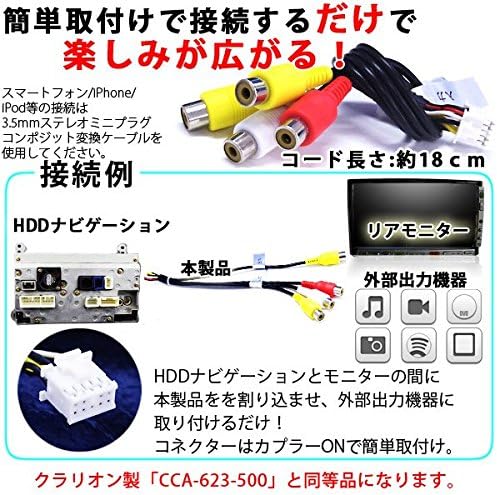
Figure 5.1: Installation Example
This diagram illustrates how to connect the VTR cable to an HDD navigation unit, a rear monitor, and various external output devices. The cable length is approximately 18 cm. For connecting smartphones or iPods, a 3.5mm stereo mini-plug composite conversion cable is required (sold separately).
- Preparation: Ensure the vehicle's power is off before beginning installation.
- Locate Navigation Unit: Access the rear of your compatible HDD navigation unit.
- Connect Cable: Plug the multi-pin connector of the CCA Input/Output Cable into the corresponding port on your navigation unit. The coupler-on design ensures a secure fit.
- Connect Input Devices: For video input, connect external devices (e.g., DVD player, digital tuner, smartphone via adapter) to the yellow (video), red (right audio), and white (left audio) RCA connectors.
- Connect Output Devices: If using a separate monitor, connect it to the dedicated yellow RCA video output connector.
- Secure Wiring: Route and secure the cable to prevent interference with vehicle operation.
Important: Please ensure to check the size, shape, and compatibility of the cable with your navigation system before purchasing or installing. Returns or refunds after modification or installation, or claims for installation costs, will not be accepted. We are not specialists, so we cannot answer questions regarding compatible vehicle models or installation methods. Thank you for your understanding.
6. Operating Instructions
Once the CCA Input/Output Cable is installed, you can utilize its functions through your navigation system.

Figure 6.1: Cable Overview and Device Compatibility
This image displays the VTR cable with its RCA connectors and a multi-pin connector. Icons represent various compatible devices such as Tuners, iPhones, Music players, Video players, Cameras, and DVD players, highlighting the cable's versatility for AV-Navigation systems.
6.1. Video Input
- Connect your external video source (e.g., DVD player, smartphone) to the yellow, red, and white RCA input connectors of the cable.
- Turn on your navigation system and the external video source.
- Select the VTR or AV input mode on your navigation system's menu. Refer to your navigation system's manual for specific instructions on selecting input sources.
- The video and audio from the external source should now be displayed and played through your navigation system.
6.2. Video Output
- Connect a separate monitor (e.g., rear seat monitor) to the yellow RCA video output connector of the cable.
- Ensure the monitor is powered on and set to the correct video input source.
- The video currently displayed on your navigation system (e.g., navigation map, DVD playback from an internal player, or video from an input source) will be simultaneously output to the connected monitor.
7. Maintenance
To ensure the longevity and optimal performance of your CCA Input/Output Cable, follow these maintenance guidelines:
- Cleaning: Gently wipe the cable and connectors with a soft, dry cloth. Avoid using harsh chemicals or abrasive materials.
- Storage: If the cable is removed, store it in a clean, dry place away from direct sunlight and extreme temperatures.
- Handling: Avoid bending or twisting the cable excessively, especially near the connectors, to prevent internal damage.
- Connection Integrity: Periodically check that all connections are secure and free from corrosion.
8. Troubleshooting
If you encounter issues with your CCA Input/Output Cable, refer to the following common problems and solutions:
| Problem | Possible Cause | Solution |
|---|---|---|
| No video or audio from input device | Incorrect input selection on navigation system; Loose cable connection; External device not powered on or faulty. | Ensure VTR/AV input is selected on navigation. Check all cable connections. Verify external device is working. |
| No video on external monitor | Monitor not powered on or incorrect input selected; Loose video output connection. | Check monitor power and input source. Ensure yellow video output RCA is securely connected. |
| Poor video/audio quality | Damaged cable; Interference; Low-quality source material. | Inspect cable for damage. Ensure proper shielding and routing away from power cables. Use high-quality source material. |
9. Specifications
| Feature | Detail |
|---|---|
| Product Type | VTR Input/Output Cable |
| Brand | Azzurri Produce |
| Model Compatibility | Clarion/Addzest HDD Navigation systems (CCA-623-500 standard) |
| Connector Type | RCA (Composite) |
| Cable Shape | Composite |
| Connector Gender | Female-Female |
| Compatible Devices | DVD Player, Smartphone, Monitor |
| Compatible Phone Model | iPhone (requires adapter) |
| Color | White (connectors) |
| ASIN | B01GDLA9U0 |
| First Available Date | 2016/05/31 |
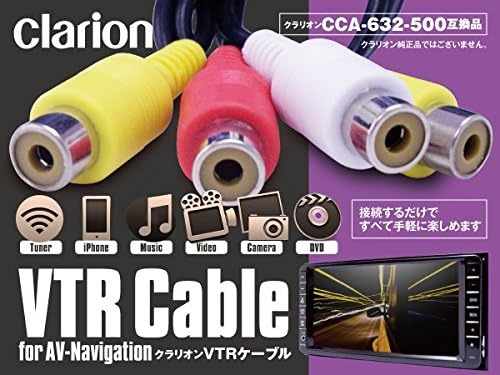
Figure 9.1: Cable Connectors
A close-up view of the RCA connectors (yellow for video, red and white for audio) and the multi-pin connector of the VTR cable, illustrating the physical interface for connection.
10. Warranty and Support
This product is designed for compatibility with specific car navigation systems. Please note the following:
- Returns or refunds will not be accepted if the product has been modified or installed.
- Claims for installation costs incurred during the setup process will not be accepted.
- For questions regarding compatible vehicle models or installation methods, please consult a professional installer or refer to your vehicle's and navigation system's specific manuals. The manufacturer does not provide specialized installation support.
For further assistance, please refer to the product listing or contact the seller directly.