1. Introduction
The LASE DB-02 is a professional dual-channel passive direct box designed to convert high-impedance (HI-Z) instrument signals into low-impedance (LO-Z) XLR signals. This makes it suitable for a wide range of applications, including live performances and studio recording, for instruments such as keyboards, acoustic and electric guitars, and basses. It is engineered to provide high sound quality and maximum rejection of external electrical interference, such as dimmer buzz, ensuring a clean and clear audio signal.
2. Key Features
- Dual Channel Design: Two independent channels for connecting multiple instruments simultaneously.
- Passive Operation: No external power supply required, simplifying setup and reducing potential noise.
- High-Quality Signal Conversion: Converts HI-Z instrument signals to LO-Z XLR balanced outputs.
- Switchable Attenuation: Offers 0dB, -20dB, and -40dB padding to handle various input levels and prevent clipping.
- Ground Lift Switch: Eliminates hum and buzz caused by ground loops.
- Robust Construction: All-metal casing with rubber feet ensures durability and stability in demanding environments.
3. Setup and Connections
Follow these steps to properly connect your LASE DB-02 Direct Box:
3.1 Front Panel Connections

The front panel features two identical channels, each with:
- Instrument Input (50K unbalanced TRS jack): Connect your instrument (e.g., guitar, bass, keyboard) here using a standard 1/4" TS or TRS cable.
- Parallel (Link) Output (50K unbalanced TRS jack): This output provides a direct, unprocessed signal from your instrument. Use it to connect to your instrument amplifier or monitor on stage, allowing you to hear your instrument while sending a clean signal to the mixer.
- Attenuation (ATT) Switch: This switch allows you to reduce the input signal level by 0dB, -20dB, or -40dB. Use this to prevent clipping or overloading the direct box or the connected mixer input, especially with high-output instruments.
3.2 Rear Panel Connections

The rear panel provides the balanced outputs and ground control:
- Balanced Output (600 balanced XLR jack): Connect this output to the XLR input of your mixing console or audio interface using a standard XLR cable. This provides a balanced, low-impedance signal suitable for long cable runs without signal degradation or noise.
- Ground Lift Switch: Engage this switch (usually labeled 'Lift' or 'On/Off') if you experience hum or buzz in your audio signal. This disconnects the ground connection between the input and output, often resolving ground loop issues.
3.3 Internal Circuitry Overview
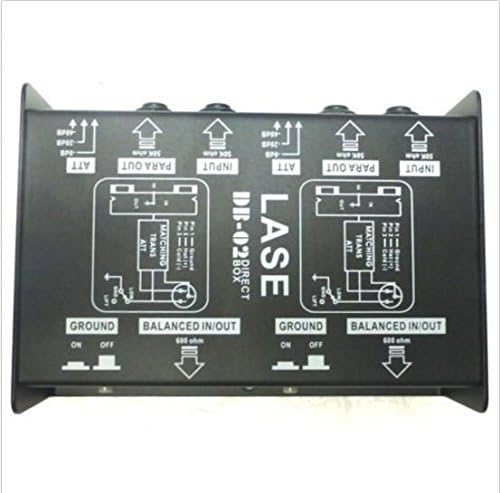
The top panel of the DB-02 illustrates the internal signal path for each channel. Each channel includes a matching transformer and attenuation circuitry to ensure optimal signal integrity and impedance matching. The ground lift switch is also indicated, highlighting its role in breaking ground loops.
4. Operating Instructions
- Connect Your Instrument: Plug your instrument into the INPUT jack of one of the DB-02's channels.
- Connect to Amplifier/Monitor (Optional): If you wish to monitor your instrument on stage, connect the PARA OUT (Parallel Output) jack to your instrument amplifier or stage monitor.
- Connect to Mixer/Audio Interface: Connect the BALANCED OUTPUT (XLR) jack to an available XLR input on your mixing console or audio interface.
- Adjust Attenuation: If your instrument has a very high output level, or if you notice clipping at the mixer input, use the ATT (Attenuation) switch to reduce the signal by -20dB or -40dB. Start with 0dB and decrease if necessary.
- Engage Ground Lift (If Needed): If you hear a persistent hum or buzz in your audio signal, toggle the GROUND LIFT switch. This often eliminates noise caused by ground loops.
- Verify Signal: Check the signal level at your mixer or audio interface to ensure it is clean and not clipping. Adjust gain levels on your mixer as needed.
5. Troubleshooting
- No Sound:
- Ensure all cables are securely connected.
- Check the volume levels on your instrument, amplifier, and mixer.
- Verify that the correct input channel is selected on your mixer/audio interface.
- Since the DB-02 is passive, it does not require power. If using an active DI box in another setup, ensure it is powered.
- Hum or Buzz:
- Engage the GROUND LIFT switch on the DB-02.
- Try using different power outlets for your equipment to isolate potential ground loop sources.
- Ensure all cables are in good condition and properly shielded.
- Distorted Sound/Clipping:
- Activate the ATT (Attenuation) switch to -20dB or -40dB to reduce the input signal level.
- Reduce the output volume of your instrument.
- Lower the gain on the input channel of your mixer/audio interface.
6. Specifications
| Feature | Description |
|---|---|
| Model Number | LASE DB-02 |
| Type | Dual Channel Passive Direct Box |
| Instrument Input | 50K unbalanced TRS jack |
| Parallel (Link) Output | 50K unbalanced TRS jack |
| Balanced Output | 600 balanced XLR jack |
| Attenuation (ATT) | 0dB, -20dB, -40dB switchable |
| Ground Lift | Switchable ground lift |
| Construction | All metal with rubber feet |
| Dimensions (W*H*D) | 5.5" x 3.5" x 1.5" (13.97 cm x 8.89 cm x 3.81 cm) |
| Item Weight | 1 pound (0.45 kg) |
| Connector Type | XLR; TRS jack |
7. Maintenance
The LASE DB-02 is built for durability and requires minimal maintenance. To ensure its longevity and optimal performance:
- Keep the unit clean and free from dust and debris. Use a soft, dry cloth for cleaning.
- Avoid exposing the unit to extreme temperatures, moisture, or direct sunlight.
- Handle with care to prevent physical damage, although its robust metal construction is designed to withstand typical stage and studio use.
- Regularly check cables for wear and tear to prevent signal issues.
8. Warranty and Support
For warranty information, technical support, or service inquiries, please refer to the documentation included with your purchase or contact LASE customer service directly. Keep your proof of purchase for warranty claims.