
Important Safety Information
Please read and understand all instructions before beginning installation. Failure to do so may result in electric shock, fire, or other injuries that could be fatal or cause property damage. All electrical connections must be in accordance with local codes, ordinances, or the National Electric Code (NEC). If you are unfamiliar with electrical wiring, consult a qualified electrician.
- Always disconnect power at the main fuse or circuit breaker box before beginning installation or performing any maintenance.
- This fixture is designed for indoor use only.
- Ensure the fixture is securely mounted to a structural component of the ceiling.
- Use only the specified bulb type and wattage. Do not exceed the maximum wattage of 100 watts.
- This product is UL Listed and meets CSA standards, ensuring compliance with safety regulations.
- WARNING: This product can expose you to chemicals including lead, which is known to the State of California to cause cancer and birth defects or other reproductive harm. For more information go to www.P65Warnings.ca.gov.
Package Contents
Verify that all components are present before proceeding with installation.
- One (1) Millennium One Light Flushmount Ceiling Light Fixture (Model 5131-SN)
- Mounting Hardware (typically includes mounting strap, outlet box screws, wire connectors, decorative nuts)
- Glass Diffuser
Note: Light bulbs are not included and must be purchased separately.
Tools Required (Not Included)
- Phillips Head Screwdriver
- Flat Head Screwdriver
- Wire Strippers
- Electrical Tape
- Ladder
Setup and Installation
It is recommended that installation be performed by a qualified electrician.
- Turn Off Power: Before starting, ensure the power to the circuit at the main fuse box or circuit breaker is completely off.
- Prepare Mounting: Remove the existing fixture (if any) and its mounting strap from the outlet box. Attach the new mounting strap to the outlet box using the provided outlet box screws. Ensure the strap is securely fastened.
- Wiring Connections: Carefully connect the fixture's wires to the corresponding wires from the outlet box.
- Connect the black (hot) wire from the fixture to the black (hot) wire from the outlet box.
- Connect the white (neutral) wire from the fixture to the white (neutral) wire from the outlet box.
- Connect the ground (bare copper or green) wire from the fixture to the ground wire from the outlet box.
- Mount Fixture: Carefully tuck all wires into the outlet box. Align the fixture's base with the mounting strap screws and secure the fixture to the ceiling using the decorative nuts.
- Install Bulb: Insert one (1) standard incandescent or compatible LED bulb (not included) into the socket. Do not exceed 100 watts.
- Attach Glass Diffuser: Secure the glass diffuser to the fixture according to the specific design (typically by twisting or using small screws/clips).
- Restore Power: Once installation is complete and all components are secure, restore power at the main fuse box or circuit breaker.
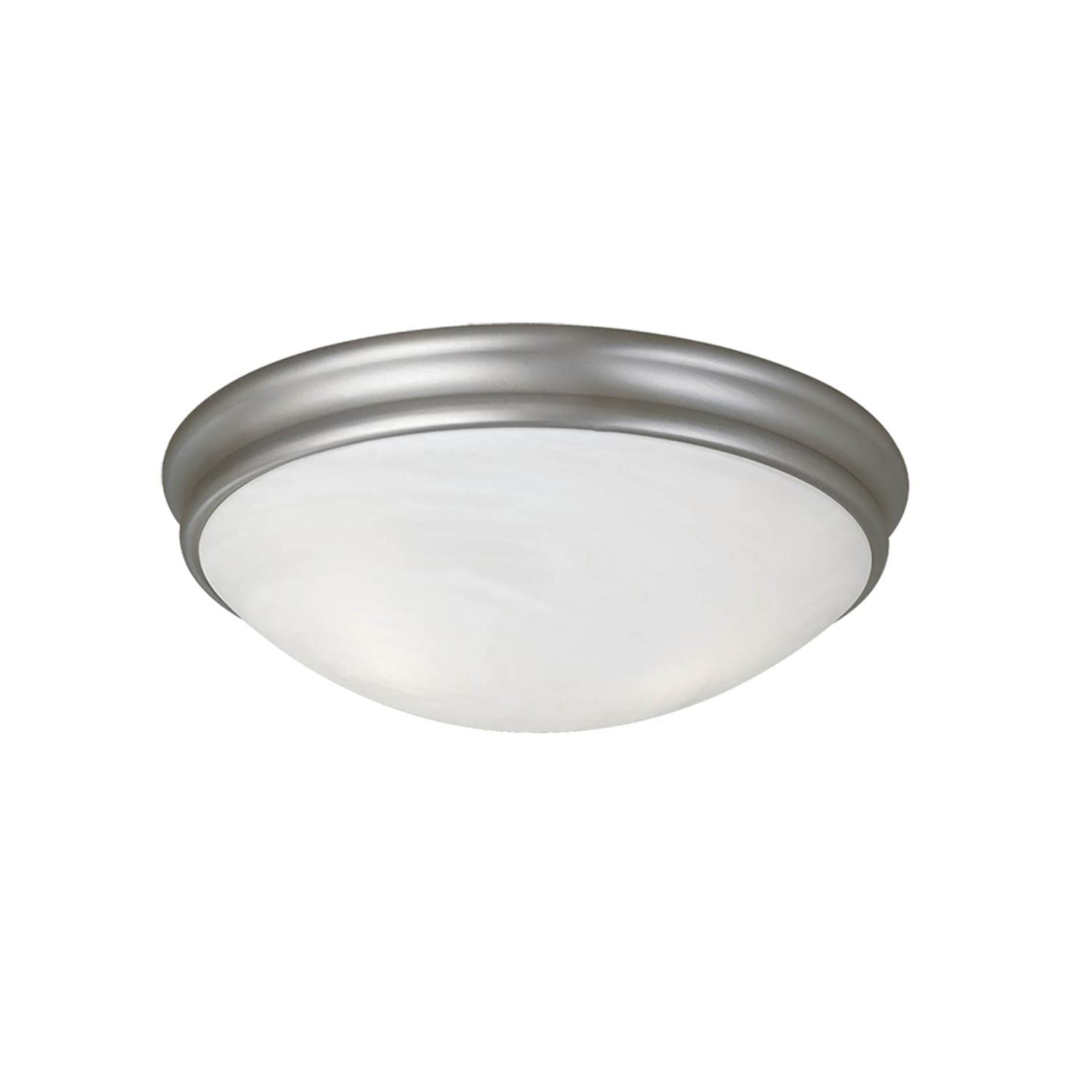
Figure 1: Millennium One Light Flushmount 5131-SN. This image displays the flushmount fixture with its satin nickel metal base and a domed, opaque white glass diffuser covering the light source.
Operating Instructions
The Millennium One Light Flushmount fixture operates via a standard wall switch (Controller Type: Push Button). Ensure the wall switch connected to the fixture's circuit is in the 'ON' position to provide power to the light.
- Dimmer Compatibility: This fixture is compatible with standard wall dimmers. Ensure that any dimmer switch used is rated for the type and wattage of the bulb installed.
Maintenance
- Cleaning: To clean the fixture, ensure power is off. Wipe the metal finish with a soft, dry cloth. For the glass diffuser, use a mild glass cleaner on a soft cloth. Avoid abrasive cleaners or solvents that may damage the finish.
- Bulb Replacement: Ensure power is off before replacing the bulb. Allow the bulb to cool completely. Carefully remove the glass diffuser, unscrew the old bulb, and screw in a new bulb of the correct type and wattage (max 100 watts). Reattach the glass diffuser.
Troubleshooting
| Problem | Possible Cause | Solution |
|---|---|---|
| Light does not turn on. | No power to the fixture. | Check the circuit breaker or fuse. Ensure the wall switch is in the 'ON' position. |
| Light bulb is faulty. | Replace the light bulb. Ensure it is screwed in correctly. | Replace the light bulb. Ensure it is screwed in correctly. |
| Loose wiring connection. | Turn off power at the circuit breaker. Check all wire connections and re-secure if necessary. Consult a qualified electrician if unsure. | Turn off power at the circuit breaker. Check all wire connections and re-secure if necessary. Consult a qualified electrician if unsure. |
| Light flickers. | Loose bulb or wiring. | Ensure bulb is tightly screwed in. Turn off power and check wiring connections. |
| Incompatible dimmer switch. | Ensure the dimmer switch is compatible with the bulb type (e.g., LED dimmer for LED bulbs). | Ensure the dimmer switch is compatible with the bulb type (e.g., LED dimmer for LED bulbs). |
Specifications
| Attribute | Detail |
|---|---|
| Brand | ML Lighting |
| Model Number | 5131-SN |
| Fixture Type | Flushmount, Close to Ceiling |
| Finish | Satin Nickel |
| Material | Metal, Plastic (for fixture body); Opaque Glass (for diffuser) |
| Dimensions (L x W x H) | 10" x 10" x 4.5" |
| Item Weight | 4 Pounds |
| Number of Light Sources | 1 |
| Max Wattage | 100 watts |
| Voltage | 120 Volts |
| Indoor/Outdoor Usage | Indoor |
| Certifications | UL Listed, Meets CSA Standards |
| Dimmer Compatibility | Compatible with standard wall dimmers |
| UPC | 842639005342 |
Warranty Information
This ML Lighting product is covered by a 1-year limited manufacturer's warranty from the date of purchase. This warranty covers defects in materials and workmanship under normal use. It does not cover damage resulting from improper installation, accident, misuse, abuse, or normal wear and tear.
For warranty claims or further details, please retain your proof of purchase and contact customer support.
Customer Support
If you have any questions regarding the installation, operation, or maintenance of your Millennium One Light Flushmount fixture, please contact ML Lighting customer support. Please have your model number (5131-SN) and proof of purchase available when contacting support.
For the most current contact information, please visit the official ML Lighting website or refer to the packaging.