
XOMAX XM-2CDB620
XOMAX XM-2CDB620 Car Radio CD-Receiver User Manual
Model: XM-2CDB620 | Brand: XOMAX
1. Introduction
This manual provides detailed instructions for the installation, operation, and maintenance of your XOMAX XM-2CDB620 Car Radio CD-Receiver. Please read this manual thoroughly before using the device to ensure proper functionality and to prevent damage.
2. Safety Information
- Professional installation by a qualified technician is recommended to ensure correct wiring and prevent damage to the vehicle's electrical system.
- Do not operate the device in a way that distracts you from driving. Always prioritize road safety.
- Avoid exposing the unit to extreme temperatures, direct sunlight, or moisture.
- Do not attempt to disassemble or modify the unit. This may void the warranty and cause damage.
- Ensure proper ventilation around the unit to prevent overheating.
3. Package Contents
Please check that all items listed below are included in your package:

Image: Contents of the XOMAX XM-2CDB620 package, showing the car radio, remote control, mounting frame, trim, mounting material, and user manual.
- Car Radio Unit
- Remote Control (battery not included)
- 2-DIN Mounting Frame (pre-installed on device)
- 2-DIN Matching Trim (pre-installed on device)
- Mounting Material
- Installation Manual (English/German)
4. Product Overview
4.1 Front Panel

Image: Front panel of the XOMAX XM-2CDB620 car radio, highlighting the central display, rotary volume/selection knob, and buttons for functions like MUTE, PTY, MODE, BAND, CLK, EQ, INT, RPT, RDM, AUX IN, AMS, USB, and SD card slot.
The front panel features a clear display, a central rotary knob for volume and selection, and various buttons for controlling functions such as mode selection, radio band, clock, equalizer, track controls, and media source selection (CD, USB, SD, AUX). An SD card slot and USB port are also located on the front for convenient media access.
4.2 Rear Connections

Image: Rear panel of the XOMAX XM-2CDB620 car radio, detailing the various audio input/output ports, subwoofer connections, radio antenna input, and the ISO connector block. Dimensions are also indicated.
The rear of the unit provides essential connections for power, speakers, antenna, and external audio devices:
- 1 & 2: Subwoofer Connections - For connecting external subwoofers.
- 3 & 6: AUX Audio Input (L/R) - For connecting external audio sources via RCA.
- 4, 5, 7, 8: Audio Output (FL/RL/FR/RR) - RCA outputs for front left, rear left, front right, and rear right speakers.
- 9: Radio Antenna Connection - For connecting the vehicle's radio antenna.
- 10: ISO Socket - Standard connector for power and speaker wiring.
4.3 Dimensions
The unit features a standard Double DIN mounting size. Refer to the diagram below for detailed dimensions (all measurements in millimeters):
Image: Technical drawing illustrating the dimensions of the XOMAX XM-2CDB620 car radio, including its width (187mm front, 180mm body), height (110mm front, 100mm body), and depth (150mm).
5. Setup and Installation
Important: Disconnect the vehicle's battery before beginning installation to prevent electrical shorts and damage.
5.1 Mounting the Unit
- Remove the existing car radio from your vehicle's dashboard.
- Insert the supplied 2-DIN mounting frame into the dashboard opening. Secure it firmly.
- Connect the wiring harnesses as described in the next section.
- Slide the XOMAX XM-2CDB620 unit into the mounting frame until it clicks into place.
- Attach the decorative trim around the unit if it's not already pre-installed.
5.2 Wiring Connections
Use the standard ISO connector for power and speaker connections. Ensure all connections are secure to prevent intermittent issues.
- Power: Connect the ISO power harness to the vehicle's corresponding power wires (constant 12V, ignition 12V, ground).
- Speakers: Connect the ISO speaker harness to the vehicle's speaker wires, ensuring correct polarity for each speaker.
- Antenna: Connect the vehicle's radio antenna cable to the antenna input on the rear of the unit.
- Subwoofer (Optional): If using external subwoofers, connect them to the dedicated subwoofer RCA outputs on the rear panel.
- AUX-IN (Optional): For external audio devices, connect them to the AUX Audio Input RCA ports.
6. Operating Instructions
6.1 Basic Operation
- Power On/Off: Press the MODE/ⓘ button to turn the unit on or off.
- Volume Control: Rotate the central knob to adjust the volume level.
- Mode Selection: Press the MODE button repeatedly to cycle through available sources (Radio, CD, USB, SD, AUX, Bluetooth).
6.2 Radio (FM RDS)
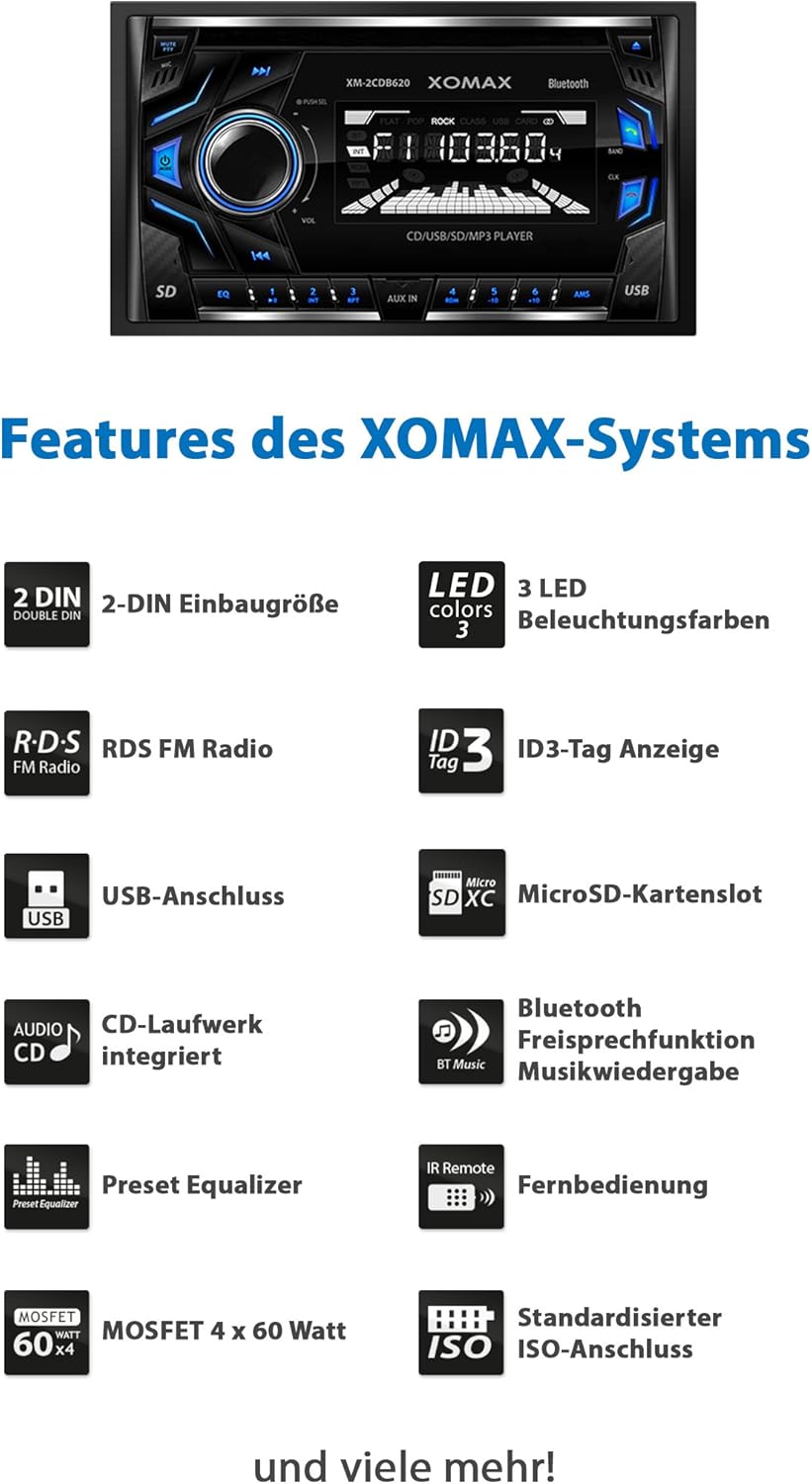
Image: The car radio display showing FM RDS (Radio Data System) information, including the frequency and various RDS functions like PTY, EON, and AF.
- Band Selection: Press the BAND button to switch between FM1, FM2, FM3.
- Automatic Station Search: Press and hold the AMS button for automatic scanning and saving of stations.
- Manual Tuning: Use the ◀◀ or ▶▶ buttons for fine-tuning.
- RDS Functions: The unit supports RDS features such as PTY (Program Type), EON (Enhanced Other Networks), AF (Alternative Frequencies), and REG (Regional).
6.3 CD/USB/Micro SD Playback

Image: Demonstrates how to insert an SD card into the dedicated slot, connect a USB drive to the USB port, and plug an AUX cable into the front AUX-IN jack for media playback.
- Inserting Media: Insert a CD into the CD slot, a USB drive into the USB port, or a Micro SD card into the SD slot. The unit will automatically switch to the corresponding mode.
- Play/Pause: Press the ▶/‖‖ button.
- Skip Track: Press the ▶▶ button for next track, ◀◀ for previous track.
- Repeat/Random: Use the RPT and RDM buttons for repeat and random playback modes.
6.4 Bluetooth Functionality

Image: The XOMAX XM-2CDB620 car radio displaying its Bluetooth capabilities, shown alongside smartphones indicating hands-free calling and music streaming functionality.
- Pairing: Enable Bluetooth on your mobile device and search for "XOMAX" or "XM-2CDB620". Select the device to pair.
- Hands-free Calling: Once paired, you can make and receive calls through the car radio. Use the ☎ button to answer/end calls.
- Music Streaming: Play audio from your paired device wirelessly through the car radio.
6.5 AUX-IN
Connect external audio devices (e.g., MP3 players, smartphones) to the 3.5mm AUX-IN jack on the front panel or the RCA AUX inputs on the rear. Select AUX mode using the MODE button.
6.6 Audio Settings & Illumination

Image: The XOMAX XM-2CDB620 car radio demonstrating its customizable illumination, with examples of blue, red, and green lighting. The image also highlights the subwoofer connection capability.
- Equalizer: Press the EQ button to cycle through preset equalizer settings (e.g., Pop, Rock, Classic).
- Subwoofer Output: The unit features two dedicated subwoofer outputs for enhanced bass. Adjust subwoofer levels through the audio settings menu.
- Illumination Colors: The unit offers 3 adjustable illumination colors (blue, red, green) for the buttons and display. Refer to the settings menu to change the color.
7. Maintenance
- Cleaning the Unit: Use a soft, dry cloth to wipe the front panel. Do not use abrasive cleaners or solvents.
- CD Slot Care: Avoid inserting bent, scratched, or dirty CDs. Periodically use a CD lens cleaner disc to maintain optimal playback.
- Connections: Periodically check all wiring connections to ensure they are secure and free from corrosion.
8. Troubleshooting
| Problem | Possible Cause | Solution |
|---|---|---|
| No power | Blown fuse; incorrect wiring; loose connection. | Check vehicle's fuse box and the unit's fuse. Verify power wiring. Ensure connections are secure. |
| No sound | Volume too low; mute activated; incorrect speaker wiring; faulty speakers. | Increase volume. Deactivate mute. Check speaker connections and polarity. Test with known good speakers. |
| Cannot read CD/USB/SD | Damaged media; unsupported file format; dirty lens/port. | Try different media. Ensure files are MP3/WMA. Clean CD lens or USB/SD port. |
| Bluetooth not connecting | Bluetooth not enabled; device not in pairing mode; interference. | Ensure Bluetooth is on for both devices. Put unit in pairing mode. Move closer to the unit. |
| Radio reception poor | Antenna not connected; damaged antenna; weak signal area. | Check antenna connection. Replace antenna if damaged. Try tuning in a different location. |
9. Specifications

Image: A visual summary of the XOMAX XM-2CDB620's features, including its Double DIN size, customizable LED illumination, RDS FM radio, ID3-Tag support, USB and MicroSD connectivity, integrated CD player, Bluetooth hands-free and music streaming, preset equalizer, infrared remote control, MOSFET 4x60 Watt amplifier, and standard ISO connection.
| Feature | Detail |
|---|---|
| Brand | XOMAX |
| Model | XM-2CDB620 |
| Product Dimensions | 24.7 x 24.4 x 17.4 cm |
| Product Weight | 2.07 kg |
| Compatible Devices | Speaker |
| Other Features | Subwoofer output |
| Color Display | No |
| Audio Encoding | Stereo |
| Audio Output Mode | Stereo |
| Audio Output Type | Integrated microphone |
| Output Power | 240 Watts (MOSFET 4x60 Watts) |
| Batteries Included | No |
| Batteries Required | No |
| Connectivity Technology | Auxiliary, Bluetooth, RCA, USB |
| Media Type | WMA, MP3, CD, USB, Micro SD (up to 128 GB) |
| Rechargeable Battery Included | No |
| Color | Multicolor (3 adjustable illumination colors: blue, red, green) |
10. Warranty and Support
For warranty information, technical support, or service inquiries, please refer to the warranty card included with your product or visit the official XOMAX website. Keep your proof of purchase for any warranty claims.