
1. Introduction
Welcome to the user manual for your Be Mix HT1160 Bluetooth Speaker. This guide provides detailed instructions to help you set up, operate, and maintain your speaker, ensuring you get the best audio experience. Please read this manual thoroughly before using the product and keep it for future reference.
The Be Mix HT1160 is a portable Bluetooth speaker designed for wireless audio playback. It features Bluetooth connectivity for streaming from smartphones, tablets, or MP3 players, and includes an integrated radio function. The speaker has a vintage-inspired design.
2. Safety Information
To ensure safe and proper operation, please observe the following safety precautions:
- Do not expose the speaker to extreme temperatures, direct sunlight, or high humidity.
- Avoid dropping or subjecting the speaker to strong impacts.
- Do not disassemble, repair, or modify the unit yourself. Refer all servicing to qualified personnel.
- Keep the speaker away from water and other liquids. Although specifications indicate it is waterproof, avoid submerging it.
- Use only the specified power adapter or cable for charging.
- Clean the speaker with a soft, dry cloth. Do not use abrasive cleaners or solvents.
3. Package Contents
Please check that all items are present:
- Be Mix HT1160 Bluetooth Speaker
- Power Cable (specific type not detailed, assume standard AC cable)
- User Manual (this document)
4. Product Overview
Familiarize yourself with the speaker's components and controls.
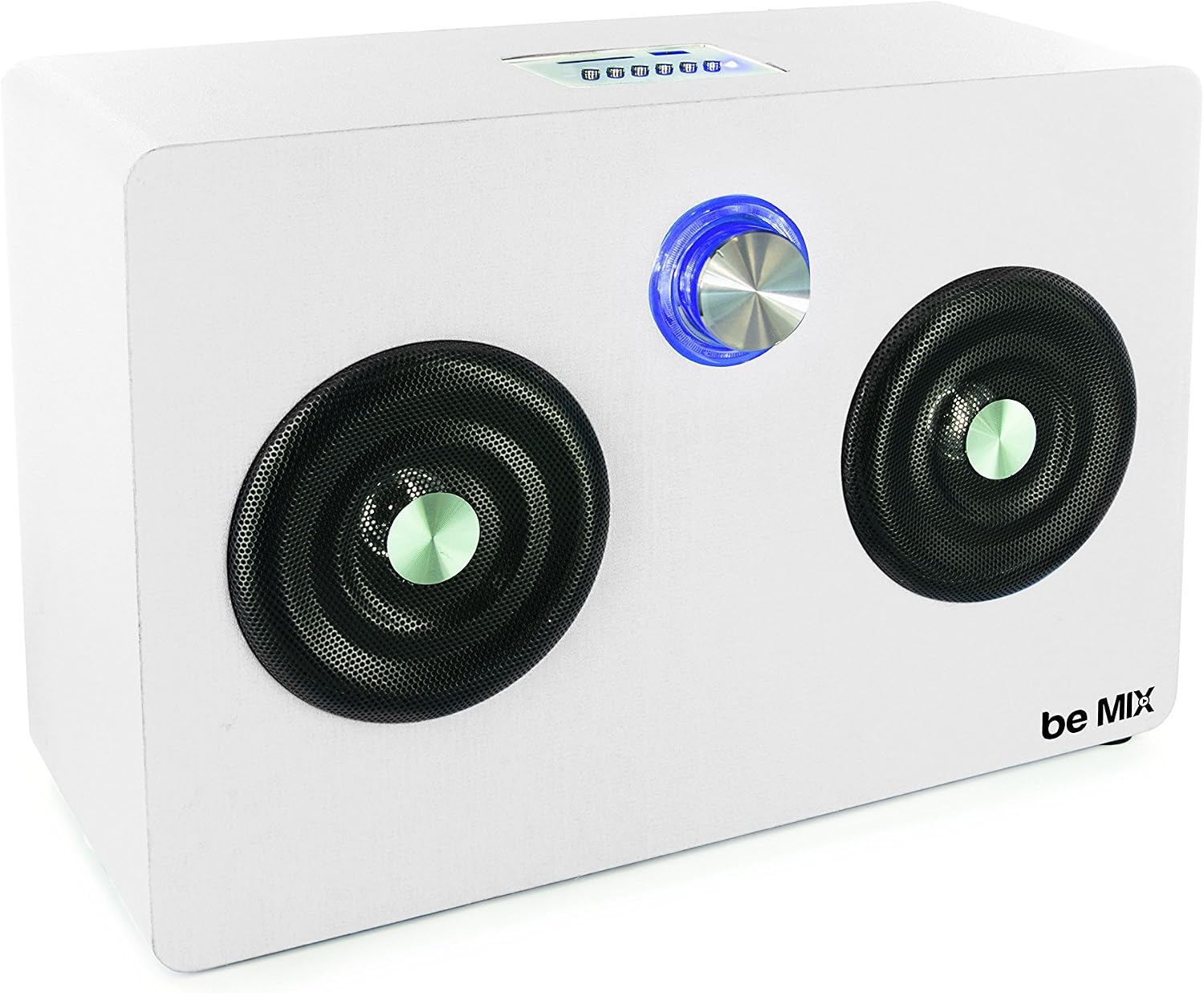
Figure 4.1: Front View of the Be Mix HT1160 Speaker. This image displays the speaker's front panel, featuring two main speaker grilles and a central illuminated volume knob. The 'be Mix' logo is visible on the lower right.

Figure 4.2: Be Mix HT1160 Packaging. The packaging highlights key features such as Bluetooth connectivity, radio function, and compatibility with smartphones and tablets. It also shows the top control panel with USB and SD card slots.
Controls and Ports (Refer to Figure 4.1 and 4.2 for visual reference):
- Volume Knob: Located centrally on the front panel, used to adjust the audio volume. It may also have an illuminated ring.
- Top Control Panel: (As indicated on packaging) Includes buttons for playback control (Play/Pause, Skip tracks), mode selection, and potentially a power button.
- USB Port: For playing audio from USB flash drives.
- SD Card Slot: For playing audio from SD memory cards.
- Power Input: For connecting the power cable.
5. Setup
5.1 Power Connection
- Ensure the speaker is placed on a stable, flat surface (tabletop mounting).
- Connect the provided power cable to the power input port on the speaker.
- Plug the other end of the power cable into a standard electrical outlet.
5.2 Powering On/Off
Locate the power button on the top control panel. Press and hold (or press once, depending on design) to turn the speaker ON. Repeat the action to turn the speaker OFF.
6. Operating Instructions
6.1 Bluetooth Pairing
- Turn on the Be Mix HT1160 speaker. It should automatically enter Bluetooth pairing mode, indicated by a flashing LED light (location of LED not specified, typically near controls).
- On your smartphone, tablet, or other Bluetooth-enabled device, go to the Bluetooth settings.
- Search for available devices. You should see 'Be Mix HT1160' or a similar name appear in the list.
- Select 'Be Mix HT1160' to connect. Once connected, the LED indicator will typically stop flashing and remain solid, and you may hear an audible confirmation tone.
- You can now play audio from your device through the speaker.
6.2 Radio Function
- Press the 'Mode' button (if available) on the speaker's control panel until 'FM Radio' mode is selected.
- The speaker will automatically scan for available radio stations.
- Use the 'Next/Previous' buttons to navigate between saved stations or manually tune.
6.3 SD Card / USB Playback
- Insert a USB flash drive into the USB port or an SD card into the SD card slot.
- The speaker should automatically detect the storage device and switch to USB/SD mode, or you may need to press the 'Mode' button.
- Audio files (e.g., MP3) stored on the device will begin playing automatically. Use the playback control buttons (Play/Pause, Next/Previous) to manage your music.
7. Maintenance
7.1 Cleaning
To keep your speaker in optimal condition:
- Wipe the exterior surfaces with a soft, dry, lint-free cloth.
- Do not use liquid cleaners, aerosols, or solvents, as these may damage the finish or internal components.
- Ensure all ports are free of dust and debris.
7.2 Storage
When not in use for extended periods, store the speaker in a cool, dry place, away from direct sunlight and extreme temperatures.
8. Troubleshooting
If you encounter issues with your Be Mix HT1160 speaker, refer to the table below for common problems and solutions.
| Problem | Possible Cause | Solution |
|---|---|---|
| Speaker does not power on. | No power connection. | Ensure the power cable is securely connected to both the speaker and a working power outlet. |
| No sound from speaker. | Volume too low; Incorrect mode selected; Device not connected. | Increase volume on both the speaker and the connected device. Check that the correct input mode (Bluetooth, SD, USB, Radio) is selected. Re-pair Bluetooth device if necessary. |
| Bluetooth pairing fails. | Speaker not in pairing mode; Device too far; Interference. | Ensure speaker is in pairing mode. Move device closer to speaker (within 10 meters). Turn off other Bluetooth devices to reduce interference. |
| Radio reception is poor. | Weak signal; Antenna not extended (if applicable). | Reposition the speaker to improve signal. If an external antenna is present, extend it fully. |
| SD/USB playback not working. | Incorrect file format; Corrupted files; Improperly inserted card/drive. | Ensure audio files are in a compatible format (e.g., MP3). Reinsert the SD card or USB drive. Try a different card/drive. |
9. Specifications
| Feature | Detail |
|---|---|
| Brand | Be Mix |
| Model Number | HT1160 (also referred to as 'Enceinte bluetooth fun') |
| Connectivity Technology | Bluetooth, SD Card, USB |
| Special Features | Bluetooth, Radio |
| Compatible Devices | Smartphone, Tablet |
| Power Source | Electric Cable |
| Power Consumption | 13 Watts |
| Max Speaker Output Power | 3 Watts |
| Product Dimensions (L x W x H) | 35 x 13 x 23.8 cm |
| Product Weight | 2.54 Kilograms |
| Color | White |
| Mounting Type | Tabletop |
| Waterproof | Yes (as per specifications, typically implies splash resistance for this product type) |
10. Warranty and Support
Specific warranty information for the Be Mix HT1160 Bluetooth Speaker is not available in the provided product details. For warranty claims or technical support, please refer to the retailer where the product was purchased or contact Be Mix customer service directly through their official channels.
Please retain your proof of purchase for any warranty-related inquiries.