
Introduction
This manual provides detailed instructions for the safe and effective use of the Import DM3-120 Black 3-Level Touch Pad 3 Outlet Receptacle Dimmer. This device is designed to control the brightness of lighting fixtures by providing three distinct dimming levels and an off state.
The dimmer operates at 120VAC, 60Hz, with a maximum load of 200W (Tungsten or Resistive) and a minimum load of 50W. It is intended for indoor use only.
Important Compatibility Note: This dimmer is designed for use with Halogen and Incandescent Bulbs ONLY. It is not compatible with LED lights, motors, or other electronic devices.
Safety Information
Please read all safety warnings and instructions carefully before installing or using this product. Failure to follow these instructions may result in electric shock, fire, or serious injury.
- Indoor Use Only: This device is designed exclusively for indoor applications. Do not expose to moisture or outdoor elements.
- Voltage and Wattage Limits: Do not exceed the maximum load of 200W or go below the minimum load of 50W. Operate only with 120VAC, 60Hz power supply.
- Compatible Bulb Types: Use only with Halogen and Incandescent bulbs. Do not connect LED bulbs, fluorescent bulbs, motors, or other electronic devices.
- Electrical Safety: Ensure the power source is disconnected before installation or maintenance. Do not attempt to repair or modify the device. Refer all servicing to qualified personnel.
- Fuse Protection: The unit features fuse-protected appliance control. An extra fuse is included for convenience. If the dimmer stops functioning, check and replace the fuse if necessary.
- Placement: Position the dimmer and its outlets in a stable location, away from heat sources, water, and flammable materials.
Package Contents
Verify that all components are present before proceeding with installation:
- 1 x DM3-120 Black 3-Level Touch Pad 3 Outlet Receptacle Dimmer
- 1 x Extra Fuse
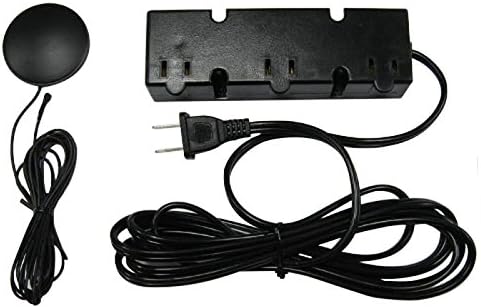
Figure 1: Overview of the DM3-120 Black Dimmer components, including the circular touch pad, the power cord, and the rectangular three-outlet receptacle.
Setup
Follow these steps to set up your dimmer:
- Unpack: Carefully remove the dimmer from its packaging.
- Placement: Choose a suitable indoor location for the dimmer. The touch pad has a peel-and-stick adhesive on the bottom, allowing it to be securely placed on a flat surface. Ensure the power cord and the cord leading to the outlets can reach their intended positions without strain.
- Connect Lights: Plug your incandescent or halogen lamps into the three 2-prong outlets located on the end of the dimmer receptacle. Ensure the total wattage of all connected lamps is between 50W and 200W.
- Power Connection: Plug the dimmer's 2-prong power cord into a standard 120VAC 60Hz wall outlet.
Operating Instructions
The DM3-120 dimmer features a simple touch-sensitive control for adjusting light levels.
- Turning On/Adjusting Brightness:
- From the OFF state, touch the pad once to turn the lights on to the Low brightness level.
- Touch the pad a second time to increase the brightness to the Medium level.
- Touch the pad a third time to reach the High brightness level.
- Turning Off: Touch the pad a fourth time from the High brightness level to turn the lights OFF.
- Cycle: The dimmer cycles through Low → Medium → High → Off with each successive touch.
Maintenance
To ensure the longevity and proper functioning of your dimmer, follow these maintenance guidelines:
- Cleaning: Disconnect the dimmer from the power outlet before cleaning. Use a soft, dry cloth to wipe the surface. Do not use liquid cleaners, aerosols, or abrasive materials.
- Fuse Replacement: If the dimmer stops working, it may be due to a blown fuse.
- Unplug the dimmer from the wall outlet.
- Locate the fuse compartment (refer to product diagram if available, typically near the power cord entry).
- Carefully remove the old fuse and replace it with the included extra fuse of the same rating.
- Close the fuse compartment securely before plugging the dimmer back in.
- Storage: When not in use for extended periods, store the dimmer in a cool, dry place, away from direct sunlight and extreme temperatures.
Troubleshooting
If you encounter issues with your DM3-120 dimmer, refer to the following common problems and solutions:
| Problem | Possible Cause | Solution |
|---|---|---|
| Lights do not turn on. |
|
|
| Lights flicker or do not dim properly. |
|
|
| Dimmer turns on/off by itself. |
|
|
Specifications

Figure 2: Product label displaying technical specifications and certifications.
| Feature | Detail |
|---|---|
| Model Number | DM3-120 Black |
| Manufacturer | Import |
| Voltage | 120 Volts AC |
| Frequency | 60 Hz |
| Maximum Load | 200 Watts (Tungsten or Resistive) |
| Minimum Load | 50 Watts |
| Current | 1.85 Amps |
| Number of Outlets | 3 (2-prong) |
| Dimming Levels | 3 (Low, Medium, High) + Off |
| Switch Style | Touch Switch |
| Mounting Type | Plug-In Mount |
| Compatible Devices | Incandescent Bulbs, Halogen Bulbs ONLY |
| Certification | ETL Listed |
| Item Weight | 9.9 ounces |
| Package Dimensions | 8.11 x 3.94 x 1.73 inches |
| Color | Black |
| Power Plug Type | Type A - 2 pin (North American) |
| Environment | Indoor Use Only |
Warranty and Support
For warranty information or technical support, please contact the manufacturer, Import, or your retailer. Keep your purchase receipt as proof of purchase.
While specific warranty details are not provided in this manual, most electronic devices come with a limited warranty covering defects in materials and workmanship. Please refer to the product packaging or the retailer's website for specific warranty terms and conditions.
For further assistance, you may also refer to the product's listing page on Amazon.com for any available contact information or FAQs.
Online Resource: For additional information or to purchase replacement parts, visit the product page on Amazon.com.