
1. Product Overview
The Clarke VP600 is a commercial canister vacuum designed for efficient cleaning in various environments such as hotels, schools, retail stores, and offices. This vacuum features a sleek design, maneuverable caster wheels to reduce drag, and user-friendly controls. It is equipped with an 800-watt motor, a 33-foot power cord, and a HEPA filtration system for effective dust collection.

Figure 1.1: Front view of the Clarke VP600 Canister Vacuum with accessories.
2. Important Safety Information
Read all instructions before using this appliance. Failure to follow these instructions may result in electric shock, fire, or serious injury.
- Always unplug the vacuum cleaner from the electrical outlet before servicing or cleaning.
- Do not use the vacuum cleaner on wet surfaces or to pick up liquids.
- Do not pick up flammable or combustible materials, such as gasoline, or use in areas where they may be present.
- Do not pick up anything that is burning or smoking, such as cigarettes, matches, or hot ashes.
- Keep hair, loose clothing, fingers, and all parts of the body away from openings and moving parts.
- Do not use without dust container and/or filters in place.
- Inspect the power cord for damage before each use. Do not use if the cord is damaged.
- Use only as described in this manual. Use only manufacturer's recommended attachments.
3. Package Contents
Verify that all items are present in the package:
- Clarke VP600 Canister Vacuum Unit
- Flexible Hose
- Telescopic Aluminum Wand
- Floor Nozzle
- Dust Brush Attachment (stored on board)
- Crevice Tool Attachment (stored on board)
- HEPA Filter (pre-installed)
- Assembly Guide
4. Setup
Follow these steps to assemble your Clarke VP600 Canister Vacuum:
- Attach the Flexible Hose: Insert the end of the flexible hose into the suction inlet on the main vacuum unit until it clicks securely into place.
- Connect the Telescopic Wand: Attach the handle end of the flexible hose to the telescopic aluminum wand. Ensure a firm connection.
- Attach the Floor Nozzle: Connect the desired floor nozzle or attachment to the end of the telescopic wand.
- Power Cord: Unwind the 33-foot power cord from the storage area. Ensure the cord is fully extended before plugging into an appropriate electrical outlet.
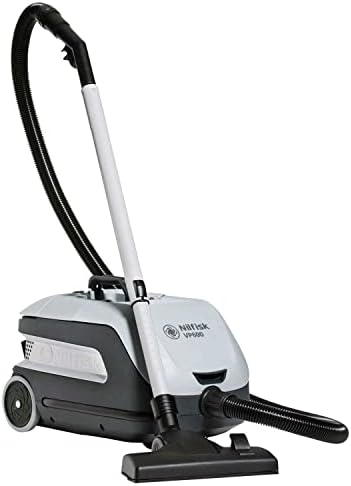
Figure 4.1: Main vacuum unit with hose and wand components ready for assembly.
5. Operating Instructions
Operating the VP600 is straightforward:
- Power On/Off: Locate the large, step-on power button on the main unit. Press it once to turn the vacuum on. Press it again to turn it off.
- Adjusting Power Levels: The vacuum features two power levels. Use the control on the unit (or handle, if applicable) to switch between standard and power boost modes.
- Using Attachments: The dust brush and crevice tool are stored on board for easy access. Detach them from their storage slots and connect them to the end of the telescopic wand or directly to the hose handle for specialized cleaning tasks.
- Telescopic Wand: Adjust the length of the aluminum telescopic wand by pressing the release button and extending or retracting it to a comfortable height. This allows for cleaning without excessive bending.
- Airflow Bypass: An airflow bypass is built into the handle. This feature allows you to quickly reduce suction to avoid picking up delicate objects or to release items accidentally suctioned.
- Recommended Use: The VP600 is suitable for cleaning bare floors, carpets, hard floors, and rugs in home and office environments.
6. Maintenance
Regular maintenance ensures optimal performance and extends the life of your vacuum cleaner.
6.1 Emptying the Dust Container
- The VP600 is a bagless system. When the dust container is full, or suction power decreases, it needs to be emptied.
- Unplug the vacuum from the power outlet.
- Locate the easy-access magnetic closing lid on the main unit. Open the lid to access the dust container.
- Carefully remove the dust container and empty its contents into a waste bin.
- Clean the inside of the dust container with a damp cloth if necessary, and ensure it is completely dry before reinserting.
6.2 Cleaning/Replacing the HEPA Filter
- The VP600 uses a HEPA filtration system. The filter should be checked regularly and cleaned or replaced as needed.
- Unplug the vacuum. Open the magnetic lid and remove the dust container.
- Locate the HEPA filter. Gently tap the filter over a waste bin to remove loose dust.
- If the filter is washable (check your specific filter instructions), rinse it under cool running water until the water runs clear. Allow it to air dry completely for at least 24 hours before reinserting. Do not use a dryer or heat.
- Replace the filter if it is damaged or if cleaning does not restore suction power.
6.3 Cleaning Attachments and Hose
- Periodically check the floor nozzle, dust brush, crevice tool, and hose for blockages or debris.
- Remove any tangled hair, lint, or larger debris from the attachments.
- If the hose is blocked, carefully remove it from the unit and attempt to clear the obstruction using a blunt object (e.g., a broom handle). Do not use sharp objects that could puncture the hose.
7. Troubleshooting
Refer to this section for common issues and their solutions.
| Problem | Possible Cause | Solution |
|---|---|---|
| Vacuum does not turn on | No power to the outlet; Power cord not fully plugged in; Damaged power cord. | Check the power outlet; Ensure the cord is securely plugged in; Inspect the cord for damage and contact service if damaged. |
| Low suction power | Dust container full; Filter clogged; Hose or attachment blocked; Airflow bypass open. | Empty the dust container; Clean or replace the HEPA filter; Clear any blockages in the hose or attachments; Ensure airflow bypass is closed. |
| Items getting stuck in wand | Large debris being vacuumed; Insufficient airflow. | Avoid vacuuming excessively large items; Ensure dust container is not full and filter is clean to maintain optimal airflow. Clear any obstructions in the wand. |
| Unusual noise | Blockage in hose/attachments; Motor issue. | Check for and clear any blockages; If noise persists, discontinue use and contact customer support. |
8. Specifications
| Brand | Clarke |
| Model Name | VP600 (B2028726) |
| Form Factor | Canister |
| Special Feature | Bagless |
| Filter Type | HEPA Filter |
| Wattage | 800 watts |
| Noise Level | 47 Decibels (Power Boost 54 dbA) |
| Cord Length | 33 feet |
| Product Dimensions | 18.9"L x 11.8"W x 10.6"H |
| Item Weight | 15.4 pounds |
| Controller Type | Push Button |
| Number of Power Levels | 2 |
| Recommended Uses | Bare Floor, Carpet, Hard Floor, Home, Office, Rug |
9. Warranty and Support
Specific warranty information for the Clarke VP600 Canister Vacuum is not provided in this manual. Please refer to the warranty card included with your purchase or visit the official Clarke website for detailed warranty terms and conditions.
For technical support, replacement parts, or further assistance, please contact Clarke customer service through their official channels. Keep your model number (B2028726) and purchase date ready when contacting support.


