
1. Introduction
This manual provides essential information for the safe and effective use of the GE EntelliGuard G Drawout Substructure, Model GA08M2S. This substructure is designed to accommodate 800A GE EntelliGuard G circuit breakers, facilitating both manual and electrically operated breaker installations. Please read this manual thoroughly before installation, operation, or maintenance.
2. Safety Information
WARNING: Installation, operation, and maintenance of this equipment should only be performed by qualified personnel. Failure to follow these instructions can result in serious injury, death, or property damage.
- Always disconnect power before working on or near the equipment.
- Use appropriate personal protective equipment (PPE) at all times.
- Ensure all local and national electrical codes are followed.
- Do not operate equipment that appears damaged.
- Refer to the circuit breaker's specific manual for its operational safety guidelines.
3. Product Description and Components
The GA08M2S is an 800A drawout substructure for GE EntelliGuard G circuit breakers. It provides the mechanical and electrical interface for the breaker to be safely inserted, connected, and withdrawn from the electrical system.

Figure 3.1: Overall view of the GA08M2S EntelliGuard G Drawout Substructure, showing its robust construction and primary components. The unit is positioned on a wooden pallet, indicating its industrial nature.

Figure 3.2: Detailed view of the product nameplate, displaying key specifications such as "EntelliGuard G Substructure for Low Voltage Circuit Breaker," "Max Current 800A," "600 Volts AC," "50/60Hz," "3 Poles," and the model number "GA08M2S." It also shows UL listing information and manufacturing details.
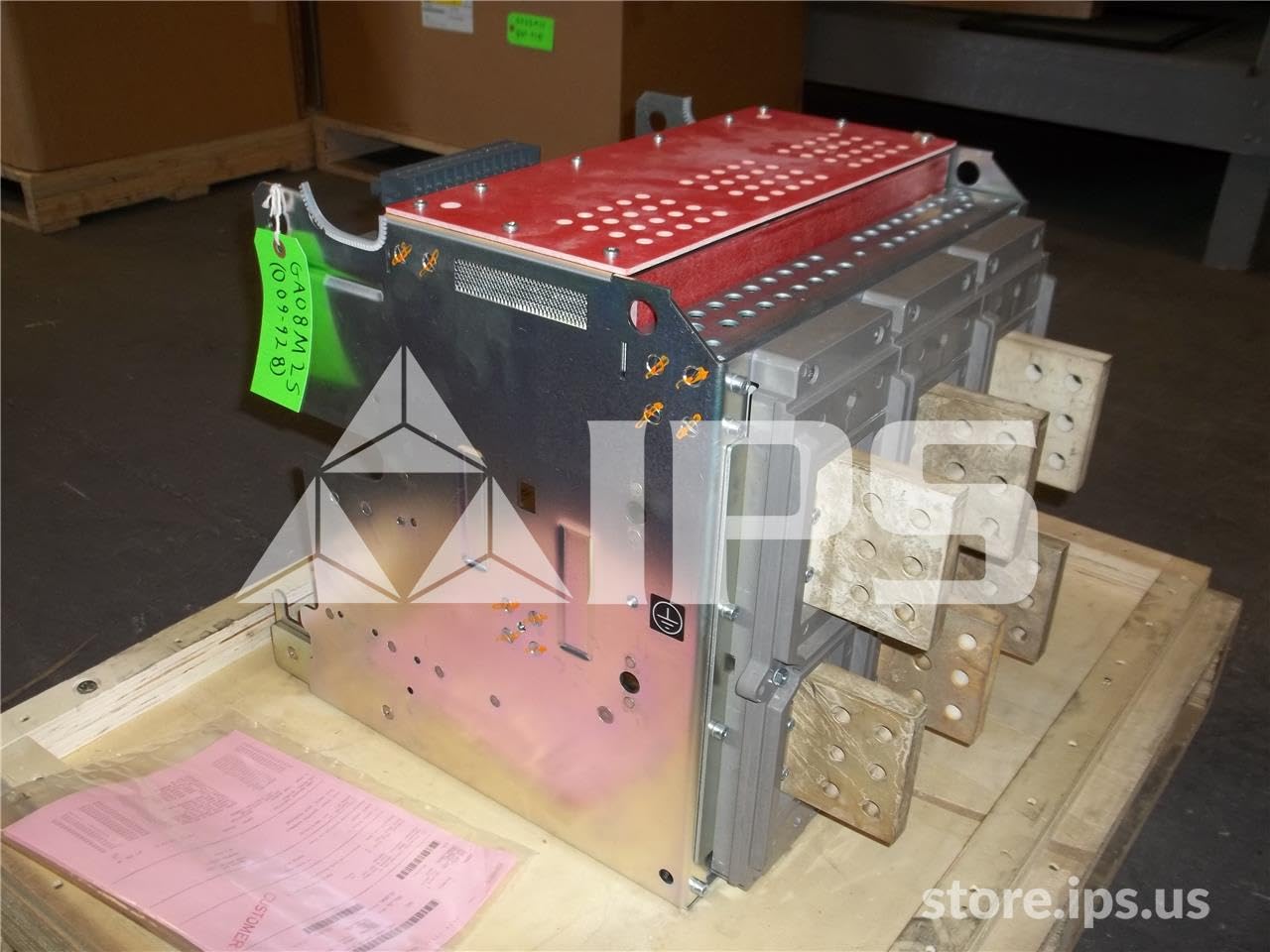
Figure 3.3: Side perspective of the GA08M2S substructure, illustrating the robust copper connection points and the overall structural integrity designed for high-current applications. The red top cover is visible.

Figure 3.4: Rear-side view of the GA08M2S substructure, providing a clearer look at the busbar connections and the sturdy frame that supports the drawout mechanism for the circuit breaker.
Key Features:
- Designed for 800A GE EntelliGuard G circuit breakers.
- Facilitates drawout functionality for easy installation and maintenance.
- Compatible with both manually and electrically operated breakers.
- Robust copper construction for reliable electrical conductivity.
4. Setup and Installation
Installation of the GA08M2S substructure requires specialized knowledge and should only be performed by certified electricians or qualified industrial technicians. Refer to the detailed installation drawings and wiring diagrams provided with the product for specific instructions.
General Installation Steps:
- Preparation: Ensure the installation site is clean, dry, and free from obstructions. Verify that all necessary tools and safety equipment are available.
- Mounting: Securely mount the substructure to a stable, level surface or within an appropriate enclosure using suitable fasteners. Ensure proper alignment.
- Electrical Connections: Connect the main power cables to the designated terminals on the substructure. Pay close attention to phase sequence and torque specifications for all connections.
- Grounding: Establish a proper ground connection for the substructure as per local electrical codes.
- Breaker Insertion: Carefully insert the GE EntelliGuard G circuit breaker into the drawout mechanism of the substructure. Follow the breaker's specific manual for insertion procedures.
- Testing: Before energizing, perform continuity and insulation resistance tests to ensure all connections are secure and correct.
Note: Always consult the specific wiring diagrams and torque specifications for your application.
5. Operating Instructions
The GA08M2S substructure itself does not have operational controls; its function is to house and connect the circuit breaker. Operation primarily involves the insertion, withdrawal, and status monitoring of the associated GE EntelliGuard G circuit breaker.
Breaker Operation (General):
- Insertion: Use the drawout mechanism to fully insert the breaker into the connected position. Ensure all primary and secondary contacts are properly engaged.
- Withdrawal: Follow the breaker's specific procedure for safe withdrawal, typically involving racking out the breaker to a disconnected or test position before complete removal.
- Status Indication: The substructure provides visual cues for the breaker's position (e.g., connected, test, disconnected). Always verify the physical position.
- Manual/Electrical Operation: The substructure supports both manual and electrically operated breakers. Refer to the breaker's manual for specific operating procedures (e.g., closing, tripping).
For detailed operational procedures of the circuit breaker, refer to the GE EntelliGuard G circuit breaker instruction manual.
6. Maintenance
Regular maintenance is crucial for the longevity and safe operation of the GA08M2S substructure and the associated circuit breaker. All maintenance should be performed by qualified personnel with power disconnected.
Recommended Maintenance Schedule:
- Annual Inspection:
- Visually inspect for any signs of damage, corrosion, or overheating.
- Check all bolted connections for tightness using a calibrated torque wrench.
- Clean dust and debris from the substructure and contact areas using a dry, non-conductive cloth or vacuum.
- Every 3-5 Years (or as required by operating conditions):
- Perform contact resistance measurements on primary and secondary contacts.
- Inspect the drawout mechanism for smooth operation and lubricate if necessary with approved lubricants.
- Verify proper grounding connections.
Important: Do not use abrasive cleaners or solvents that could damage the material or coatings.
7. Troubleshooting
This section provides general troubleshooting guidance. For specific issues related to the circuit breaker, consult its dedicated manual.
| Problem | Possible Cause | Solution |
|---|---|---|
| Breaker not inserting smoothly | Misalignment; Obstruction; Damaged mechanism | Check alignment; Remove obstruction; Inspect for damage and repair/replace if necessary. |
| Loose electrical connections | Improper torque during installation; Vibration | (Power Off) Re-torque all connections to specifications. |
| Overheating at connection points | Loose connections; Overload; Contamination | (Power Off) Check and re-torque connections; Verify load is within limits; Clean contacts. |
If the problem persists after attempting these solutions, contact qualified service personnel or GE technical support.
8. Specifications
| Attribute | Detail |
|---|---|
| Model | GA08M2S |
| Brand | GE |
| AC Adapter Current | 800 Amps |
| Material | Copper |
| Product Dimensions | 30 x 30 x 35 inches |
| Weight | 150 Pounds |
| Manufacturer | General Electric |
| ASIN | B01FG300Q4 |
9. Warranty and Support
For specific warranty information regarding your GE EntelliGuard G Drawout Substructure, please refer to the documentation provided at the time of purchase or contact General Electric directly. Warranty terms may vary based on region and distributor.
For technical support, service, or to inquire about replacement parts, please contact GE Industrial Solutions customer service or your authorized GE distributor. You can often find contact information on the official GE website or through your original supplier.
GE Official Website: www.ge.com