
1. Introduction
This manual provides essential instructions for the safe installation, operation, and maintenance of your BFT ICARO Slide Gate Opener. The ICARO series is designed for intensive use, offering robust performance and reliability for sliding gates. Please read this manual thoroughly before proceeding with any installation or operation to ensure proper function and to prevent damage or injury.
The BFT ICARO Slide Gate Opener features a monoblock gear motor structure, ensuring maximum resistance and performance in various environmental conditions. It includes proximity limit switches for accurate gate positioning and a control unit with a programming display and D-Track torque, speed, and position management system. An incorporated dual-channel radio receiver simplifies remote control integration.
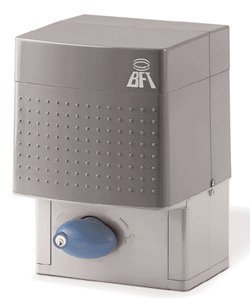
Figure 1: BFT ICARO Slide Gate Opener main unit. This image shows the compact design and robust casing of the gate opener.
2. Safety Information
WARNING: Failure to follow these safety instructions could result in serious injury or death, and/or damage to the product or property.
- Installation and repair must be performed by qualified personnel only.
- Ensure the power supply is disconnected before performing any maintenance or repair work.
- Keep hands, feet, and clothing clear of the gate and opener while the system is in operation.
- Do not allow children to play with or operate the gate opener controls.
- Regularly inspect the gate and opener for signs of wear, damage, or misalignment.
- Install safety devices such as photocells and safety edges to prevent entrapment.
- Ensure the gate moves freely and is properly balanced before installing the opener.
3. Setup and Installation
This section outlines the general steps for installing the BFT ICARO Slide Gate Opener. For detailed diagrams and specific wiring instructions, refer to the separate installation guide provided with your product.
3.1 Site Preparation
- Ensure the gate track is clean and free of obstructions.
- Verify the gate slides smoothly by hand and is properly aligned.
- Prepare a stable concrete base for mounting the opener unit, ensuring it is level and positioned correctly relative to the gate.
3.2 Mounting the Opener
- Securely fasten the opener unit to the prepared concrete base using appropriate anchor bolts.
- Ensure the pinion gear is correctly aligned with the gate's rack, maintaining a small clearance (approx. 1-2 mm) to allow for thermal expansion.
3.3 Electrical Connections
- Connect the main power supply (230 V, 60 Hz single-phase) to the control unit, ensuring all connections comply with local electrical codes.
- Wire all safety devices (photocells, safety edges) to the control unit as per the wiring diagram.
- Connect any accessories such as remote receivers or keypads.
3.4 Initial Programming
- Power on the unit. The integrated LEO B CBB control panel will display programming options.
- Follow the on-screen instructions to perform an auto-setup cycle, which will detect the gate's travel limits and adjust motor parameters.
- Test all safety devices to ensure they function correctly before operating the gate automatically.
4. Operating Instructions
The BFT ICARO Slide Gate Opener can be operated using various methods, including remote controls, keypads, or other access control systems connected to the integrated dual-channel radio receiver.
4.1 Automatic Operation
- Press the designated button on your remote control or keypad to initiate gate movement.
- The gate will open or close to its programmed limit. A second press during movement will typically stop the gate. A third press will reverse its direction.
- The D-Track system continuously monitors torque, speed, and position, ensuring smooth and safe operation.
4.2 Manual Release
In case of power failure or malfunction, the gate can be operated manually.
- Locate the manual release knob on the opener unit.
- Insert the provided key (if applicable) and turn the knob to disengage the motor.
- The gate can now be pushed open or closed by hand.
- To re-engage the motor, turn the knob back to its original position and remove the key.
5. Maintenance
Regular maintenance ensures the longevity and reliable operation of your BFT ICARO Slide Gate Opener. Perform these checks periodically.
5.1 Monthly Checks
- Gate Movement: Manually slide the gate to ensure it moves freely without excessive friction or binding.
- Safety Devices: Test photocells and other safety sensors by obstructing their path during gate operation. The gate should stop or reverse.
- Mounting Hardware: Inspect all mounting bolts and fasteners for tightness.
5.2 Bi-Annual Checks (Recommended by Qualified Technician)
- Lubrication: Lubricate the gate wheels, bearings, and any moving parts of the gate itself. The opener's internal gears are typically self-lubricating.
- Electrical Connections: Inspect all wiring for signs of wear, corrosion, or loose connections.
- Limit Switches: Verify the proper functioning and adjustment of the electromechanical limit switches.
- D-Track System: A technician can verify the optimal performance of the D-Track torque management system.
Note: Always disconnect power before performing any maintenance that requires opening the opener's casing.
6. Troubleshooting
This section provides solutions to common issues you might encounter. For more complex problems, contact a qualified technician.
| Problem | Possible Cause | Solution |
|---|---|---|
| Gate does not move. | No power; Safety device activated; Manual release engaged; Remote battery dead. | Check power supply and circuit breaker; Inspect safety sensors for obstructions; Disengage manual release; Replace remote battery. |
| Gate stops unexpectedly. | Obstruction detected by safety device; Motor overload; Limit switch issue. | Clear obstructions; Check gate for free movement; Consult technician for motor or limit switch issues. |
| Remote control not working. | Dead battery; Out of range; Remote not programmed. | Replace battery; Move closer to the receiver; Refer to programming instructions for your remote. |
| Gate opens/closes partially. | Limit switches misaligned; Obstruction. | Check for obstructions; Re-adjust limit switches (refer to setup section or technician). |
7. Technical Specifications
| Feature | Detail |
|---|---|
| Model Number | BFT-ICARO-SLIDE-GATE-OPENER-EM |
| Control Panel | LEO B CBB (incorporated) |
| Operator Type | Irreversible |
| Power Supply | 230 V, 60 Hz single-phase |
| Absorbed Power | 1 hp (750 W) |
| Thermal Protection | Integrated |
| Pinion Pitch | 4 mm (25 teeth) |
| Leaf Speed | 7.9 inches per second |
| Output Rotational Speed | 37 rpm |
| Impact Reaction | Electronic clutch with encoder (D-Track) |
| Limit Switches | Electromechanical |
| Manual Release | Mechanical release with knob |
| Operating Cycle | Intensive use |
| Environmental Conditions | 5°F to 140°F (-15°C to 60°C) |
| Degree of Protection | IP24 |
| Operator Weight | 56 lbs (25.4 kg) |
| Frequency of Use | Very intensive |
8. Warranty and Support
8.1 Warranty Information
For detailed warranty terms and conditions, please refer to the warranty card included with your product or visit the official BFT website. Warranty coverage typically includes defects in materials and workmanship under normal use for a specified period from the date of purchase.
Keep your proof of purchase for any warranty claims.
8.2 Technical Support
If you encounter issues that cannot be resolved using the troubleshooting guide, or require professional assistance, please contact your authorized BFT dealer or the manufacturer's technical support department.
Manufacturer: BFT
Please have your model number (BFT-ICARO-SLIDE-GATE-OPENER-EM) and purchase date ready when contacting support.


