
Introduction
The Canon Speedlite 600EX II-RT is designed to provide powerful and responsive flash performance with advanced wireless communication capabilities. This unit offers improved continuous performance, enabling faster firing rates. It incorporates new Quick Flash settings and a flash-readiness indicator to ensure reliable shutter operation. The Speedlite 600EX II-RT features enhanced button and dial controls, a dust- and water-resistant body, and includes accessories for various lighting effects. This manual provides essential information for setting up, operating, and maintaining your Speedlite.

Front view of the Canon Speedlite 600EX II-RT flash unit, showcasing its main flash head and infrared assist beam window.
Key Features
- Improved Continuous Flash Performance: Offers approximately 1.1 to 1.5 times faster continuous flash performance, and up to 2.0 times faster when used with the optional Compact Battery Pack CP-E4N.
- Wireless Flash Shooting Support: Supports both radio and optical transmission, providing extended functional range for diverse flash setups.
- Multiple Flash System: Allows control of up to five groups of flashes for complex lighting arrangements.
- Power Source: Operates on four AA-size/LR6 alkaline or AA/HR6 Ni-MH batteries.
- Durable Construction: Features a refined dust- and water-resistant body for reliable use in various environments.
What's in the Box
Upon unboxing your Canon Speedlite 600EX II-RT, verify that all the following items are included:
- Speedlite 600EX II-RT unit
- Soft Case
- Mini Stand
- Bounce Adapter
- Color Filter (SCF-E3OR1 and SCF-E3OR2)
- Instruction Manual (this document)
- Warranty Card
Setup
1. Installing Batteries
Open the battery compartment door located on the side of the Speedlite. Insert four AA-size alkaline or Ni-MH batteries, ensuring correct polarity (+/-) as indicated inside the compartment. Close the battery door securely until it latches.
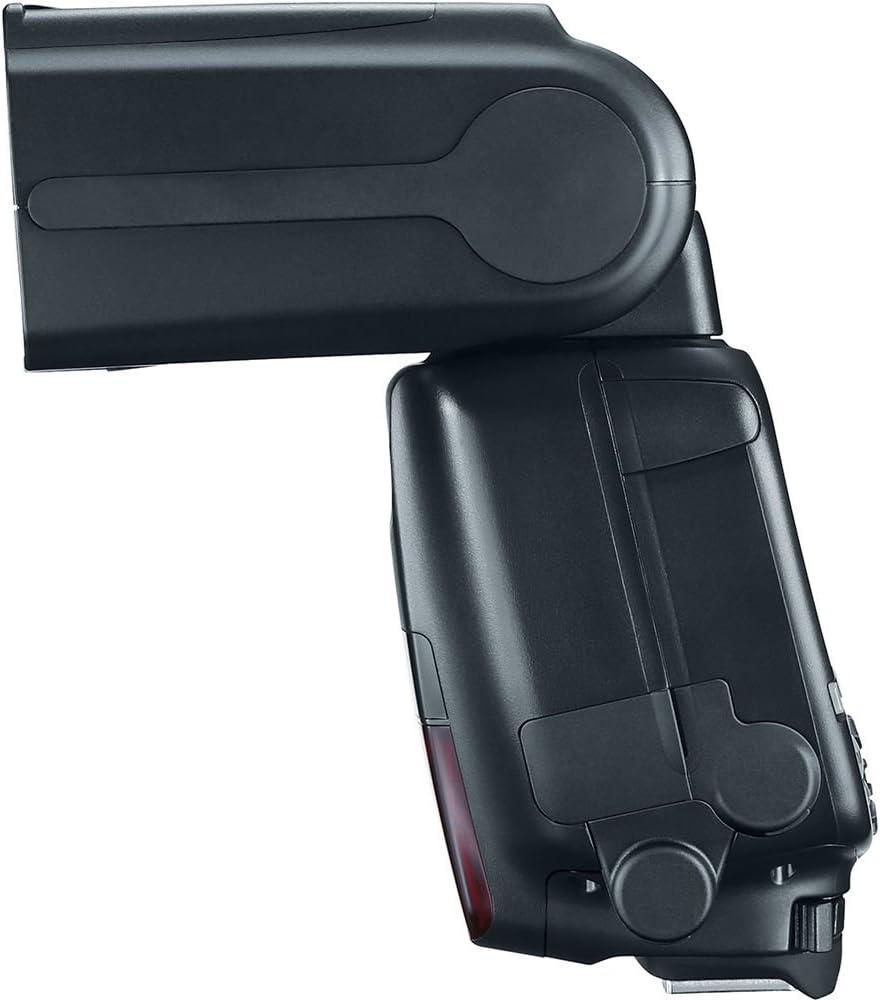
Side view of the Speedlite, illustrating the location of the battery compartment.
2. Attaching to Camera
Slide the Speedlite's mounting foot into your camera's hot shoe until it clicks into place. Rotate the locking lever to secure the flash unit firmly to the camera. Ensure a snug fit to maintain proper electrical contact.
3. Initial Power On
Flip the power switch to the 'ON' position. The LCD panel will illuminate, and the flash-readiness indicator will light up when the flash is charged and ready to fire.
Video demonstrating the physical details, ports, and build quality of the Canon 600EX II-RT Speedlite, including battery installation and head articulation.
Operating the Speedlite
1. Control Panel Overview
The rear LCD panel and buttons allow for comprehensive control over the Speedlite's functions. Use the 'MODE' button to cycle through flash modes (E-TTL II/E-TTL, Manual, Multi, etc.). The 'SEL/SET' dial and surrounding buttons are used for navigating menus and adjusting settings.
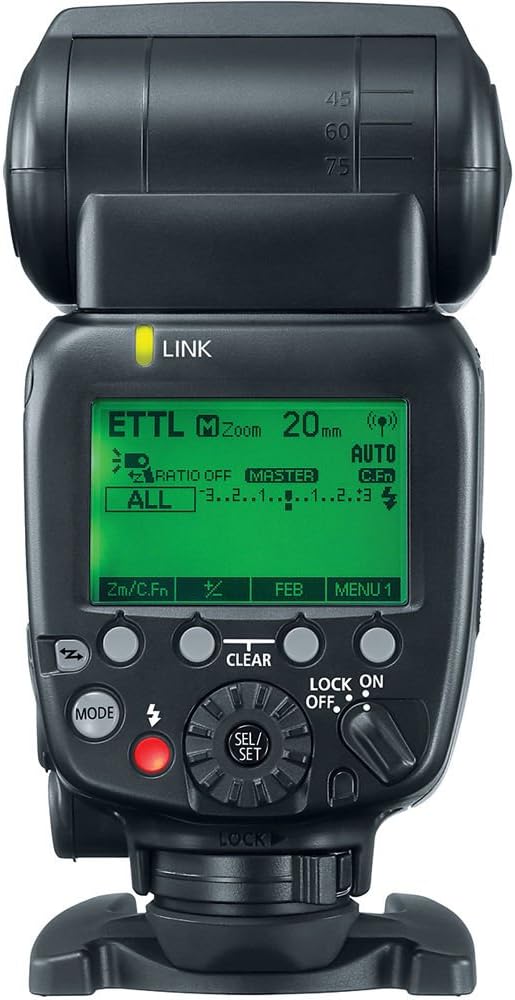
Rear view of the Speedlite, highlighting the LCD display and control interface.
2. Adjusting Flash Head Angle
The flash head can be rotated horizontally and vertically to bounce light off ceilings or walls for softer illumination. Press the release button on the side of the flash head to adjust its angle. Ensure the head locks into position after adjustment.

Illustrative sequence of the Speedlite's flash head rotation capabilities.
3. Using the Built-in Bounce Card and Wide Panel
The Speedlite includes a built-in bounce card and wide panel. Pull out the white panel from the flash head to use the bounce card, which helps create catchlights in subjects' eyes when bouncing the flash. The wide panel can be extended to cover wider focal lengths, ensuring even light distribution.

Front view of the Speedlite with the bounce card extended for softer light.
4. Wireless Flash Operation
The 600EX II-RT supports both radio and optical wireless transmission. To use wireless functions, set the Speedlite to Master or Slave mode via the control panel. Refer to your camera's manual for specific settings related to external flash control.
5. Using Color Filters
Attach the included color filters to the flash head to adjust the color temperature of the flash output, matching ambient light or creating creative effects.

Speedlite with an orange color filter, used to adjust flash color temperature.
Maintenance
Cleaning
Wipe the Speedlite body with a soft, dry cloth. For stubborn dirt, use a cloth lightly dampened with water. Do not use organic solvents such as paint thinner or benzine. Clean the electrical contacts on the mounting foot with a clean, dry cloth to ensure proper communication with the camera.
Storage
When storing the Speedlite for extended periods, remove the batteries to prevent leakage and corrosion. Store the unit in a cool, dry place away from direct sunlight and extreme temperatures. Use the provided soft case for protection.
Troubleshooting
- Flash Not Firing: Check battery levels and ensure they are inserted correctly. Verify the Speedlite is securely mounted to the camera's hot shoe. Confirm the flash is powered on and the flash-readiness indicator is lit.
- Incorrect Exposure: Ensure the flash mode (E-TTL II/E-TTL or Manual) is appropriate for your shooting conditions. Adjust flash output compensation if necessary. Check camera settings for flash synchronization.
- Wireless Communication Issues: Verify that both the master and slave units are set to the correct channel and group. Ensure there are no obstructions between the units. Check for interference from other radio devices.
- Overheating: Continuous rapid firing can cause the flash head to overheat. If the overheating warning appears, allow the flash to cool down before resuming use.
Specifications
| Feature | Specification |
|---|---|
| Product Dimensions | 4.8 x 3.1 x 5.6 inches |
| Item Weight | 1.29 pounds |
| Item Model Number | 600EX II-RT |
| Batteries Required | 4 AA batteries |
| Battery Life | Approximately 100-700 flashes (depending on battery type and usage) |
| Compatible Mountings | Canon |
| Camera Flash Type | Shoe Mount, Slave |
| Flash Sync Speed | 1/200 (varies by camera model) |
| Manufacturer | Canon Cameras US |
Warranty and Support
For warranty information and technical support, please refer to the Warranty Card included in your product packaging or visit the official Canon website. Keep your proof of purchase for warranty claims.
Online Resources: For additional support, firmware updates, and detailed guides, visit the Canon Store.