
Introduction
The Xtenzi iX4Pro Lavalier Microphone is designed to capture high-quality audio with your smartphone or tablet. This omnidirectional microphone ensures clear and accurate voice reproduction, making it ideal for recording videos, interviews, and more. Its compact and lightweight design offers optimum portability and comfort.
Package Contents
Upon opening your iX4Pro microphone package, please verify that all the following components are included:
- iX4Pro Lavalier Microphone with attached cable and clip
- Two windscreens
- Two clips
- Extended microphone wire length
- Velvet protection bag
- Smart Conversion Adapter Cable (for ultimate connection with all devices)

Image: The iX4Pro microphone, velvet pouch, spare clip, and windscreen, illustrating the complete package contents.

Image: Close-up of the two additional clips and two windscreens included with the iX4Pro microphone.
Setup
- Attach the Microphone: Securely clip the iX4Pro microphone to your clothing, approximately 6-8 inches (15-20 cm) from your mouth, for optimal sound capture. Ensure the microphone is facing the sound source.
- Connect to Device: The iX4Pro microphone features a 3.5mm TRRS jack.
- For most smartphones and tablets (Apple iPhone, iPad, iPod Touch, Android & Windows Smartphones), simply plug the 3.5mm TRRS jack directly into your device's headphone/microphone port.
- If your device requires it, use the included Smart Conversion Adapter Cable to ensure proper connection and functionality.
- Secure the Cable: Route the microphone cable discreetly and securely to prevent accidental disconnections or noise from cable movement.

Image: The iX4Pro microphone's 3.5mm TRRS jack plugged into a smartphone, demonstrating the connection process.
Operating Instructions
The iX4Pro is an omnidirectional microphone, meaning it picks up sound equally from all directions. This feature is beneficial for capturing ambient sound or when the sound source is not directly in front of the microphone.
- Recording Audio: Once connected, open your preferred audio or video recording application on your smartphone or tablet. The device should automatically recognize the external microphone.
- Monitor Sound (if possible): If your device or recording application allows, use headphones to monitor the audio input to ensure optimal sound levels and clarity.
- Start Recording: Begin your recording as you normally would within your chosen application.
- Windscreen Usage: For outdoor recordings or in windy conditions, attach one of the included windscreens to the microphone to reduce unwanted wind noise and improve audio clarity.
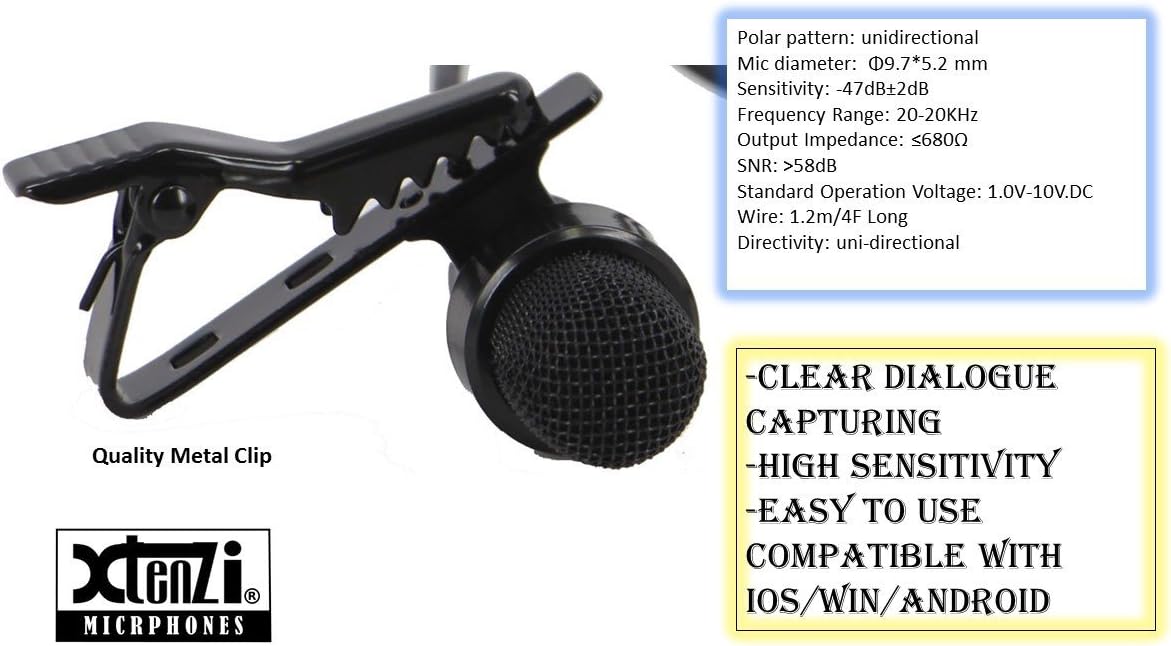
Image: A detailed view of the iX4Pro microphone's quality metal clip and key specifications, highlighting its omnidirectional polar pattern and compatibility.
Maintenance
Proper maintenance will extend the life and performance of your iX4Pro microphone.
- Cleaning: Gently wipe the microphone body and cable with a soft, dry cloth. Do not use liquid cleaners or solvents.
- Windscreen Care: The foam windscreens can be gently hand-washed with mild soap and water, then air-dried completely before reattaching.
- Storage: When not in use, store the microphone in its velvet protection bag to protect it from dust, dirt, and physical damage. Avoid extreme temperatures and humidity.
- Cable Care: Avoid sharp bends or kinks in the cable. Do not pull on the cable to disconnect the microphone from your device; always grasp the plug.
Troubleshooting
If you encounter issues with your iX4Pro microphone, please refer to the following common solutions:
| Problem | Possible Cause / Solution |
|---|---|
| No sound or very low sound |
|
| Poor audio quality / Static / Hissing |
|
| Microphone not recognized by device |
|
Specifications
| Feature | Detail |
|---|---|
| Microphone Form Factor | Lavalier |
| Model Name | iX4Pro |
| Polar Pattern | Omnidirectional |
| Mic Diameter | Φ9.7*5.2 mm |
| Connectivity Technology | Adapter Cable, 3.5 mm Jack (TRRS) |
| Compatible Devices | Apple iPhone, iPad, iPod Touch, Samsung Android & Windows Smartphones, Tablets |
| Cable Length | 59 inches (approx. 1.5 meters) |
| Material | Velvet (for bag) |
| Item Weight | 1.13 ounces |
| Manufacturer | Xtenzi |
| UPC | 702383841262 |
Warranty and Support
Xtenzi stands behind the quality of the iX4Pro microphone. We offer email assistance and a 100% satisfaction guarantee.
For support inquiries or to claim warranty, please refer to the contact information provided with your purchase or visit the official Xtenzi website.