
GreenTech Environmental pureAir 50
pureAir 50 Air Purifier Instruction Manual
Model: pureAir 50 | Brand: GreenTech Environmental
Introduction
The GreenTech Environmental pureAir 50 is a compact plug-in air purifier designed to significantly reduce odors, pollutants, and irritants in small spaces. Utilizing advanced activated oxygen (ozone) and ionization technologies, it transforms your environment into a continuously fresh and clean space. This manual provides essential information for the proper setup, operation, maintenance, and troubleshooting of your pureAir 50 unit.

Figure 1: Front view of the pureAir 50 Air Purifier.
Setup
The pureAir 50 is designed for simple plug-and-play operation. Follow these steps to set up your device:
- Unpack the Unit: Carefully remove the pureAir 50 from its packaging. Ensure all components are present.
- Select Location: Choose a standard electrical outlet in the area you wish to purify. The pureAir 50 is ideal for spaces up to 325 square feet, such as bedrooms, offices, kitchens, closets, bathrooms, or pet areas.
- Plug In: Insert the pureAir 50 directly into a standard 120V AC wall outlet. The unit is designed to plug directly into the wall.

Figure 2: The pureAir 50 plugged into a wall outlet.
Operating Instructions
The pureAir 50 features a simple dial control for adjusting the purification level.
- Power On: Once plugged in, the unit will automatically power on. The green illuminated dial indicates the unit is active.
- Adjust Purification Level: Rotate the dial clockwise to increase the purification output and counter-clockwise to decrease it. Start with a lower setting and adjust as needed based on the size of the space and the level of odors/pollutants.
- Optimal Use: For continuous air cleaning, leave the unit plugged in and set to your desired level. The pureAir 50 operates quietly, though some users may notice a slight hum, especially at higher settings.
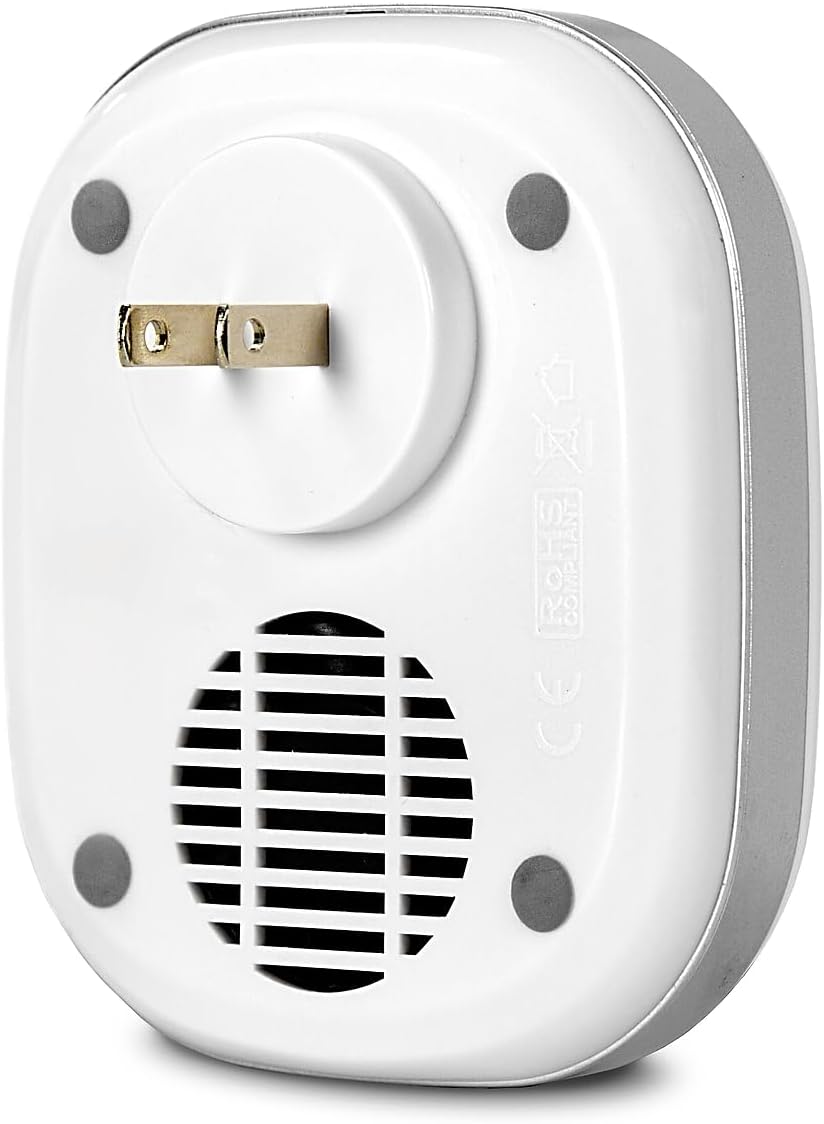
Figure 3: Rear view of the pureAir 50, showing the plug and air intake.
Maintenance
Regular cleaning ensures the longevity and peak performance of your pureAir 50. It is recommended to perform this procedure at least once per month.
- Disconnect Power: Turn the unit off by rotating the dial counter-clockwise until it clicks, then unplug the pureAir 50 from the wall outlet.
- Clean Air Intake: Use the hose attachment of a vacuum cleaner to thoroughly remove any loose dust and debris from the air intake vents located on the back of the unit. Do NOT use compressed air or blow into the fan air intake, as this can cause restricted airflow and lead to product inefficiency.
- Clean Grooves and Nozzle: Dip a cotton swab into isopropyl rubbing alcohol. Gently use it to clean all the grooves around the dial and the front output nozzle until as much visible contamination has been removed as possible.
- Allow to Dry: Once satisfied with the cleaning, allow the unit to dry completely, sitting face down, before plugging it back in.
- Reconnect Power: Plug your pureAir 50 back into the wall outlet. Set the purification output to the maximum setting. Check for a green light and verify there's a familiar, clean, pure smell emitting from the unit before setting to your desired level.
Video 1: Official GreenTech Environmental video demonstrating the cleaning instructions for the pureAir 50.
Troubleshooting
If you encounter issues with your pureAir 50, refer to the following common troubleshooting steps:
| Problem | Possible Cause | Solution |
|---|---|---|
| Unit not powering on (no green light) | Not properly plugged in; power outlet issue. | Ensure the unit is firmly plugged into a working outlet. Test the outlet with another device. |
| No noticeable air purification/odor reduction | Dial set too low; air intake/output blocked; unit needs cleaning. | Increase the dial setting. Check for obstructions around the unit. Perform the monthly cleaning procedure. |
| Unusual or strong odor from unit | Unit needs cleaning; excessive ozone production for space size. | Perform the monthly cleaning procedure. Reduce the dial setting. Ensure the unit is used in an appropriately sized area. |
| Unit making excessive noise | High setting; internal fan obstruction. | Reduce the dial setting. Ensure air intake is clear of debris. If noise persists after cleaning, contact customer support. |
Specifications
- Model: pureAir 50
- Brand: GreenTech Environmental
- Color: White
- Product Dimensions: 2.5"D x 3.5"W x 4.25"H
- Floor Area Coverage: Up to 325 sq ft
- Noise Level: 10 dB
- Controller Type: Button Control (Dial)
- Item Weight: 6.4 ounces
- Included Components: Air Purifier
- UPC: 855819003472, 773822985380

Figure 4: Dimensions of the pureAir 50 Air Purifier.
Warranty and Support
Your GreenTech Environmental pureAir 50 is covered by a 90 Day Limited Warranty from the date of purchase. For warranty claims, technical support, or any questions not covered in this manual, please contact GreenTech Environmental customer service.
You can also visit the official GreenTech Environmental store for more information and product resources: GreenTech Environmental Store.
Ask a question about this manual
Ask about setup, troubleshooting, compatibility, parts, safety, or missing instructions. Manuals+ will review the question and use this page’s manual context to help answer it.