
MOB – MOBILITY ON BOARD MUSH-BL
MOB Mushroom Bluetooth Waterproof Speaker User Manual
Model: MUSH-BL
Introduction
Thank you for purchasing the MOB Mushroom Bluetooth Waterproof Speaker. This compact and versatile speaker is designed to provide high-quality audio and hands-free calling in various environments, including wet conditions. Please read this manual carefully before using the product to ensure proper operation and to maximize its lifespan.
Safety Information
- Do not expose the speaker to extreme temperatures or direct sunlight for prolonged periods.
- Avoid dropping or subjecting the speaker to strong impacts.
- Do not disassemble, repair, or modify the speaker yourself. This will void the warranty.
- Ensure the charging port cover is securely closed when using the speaker in wet environments to maintain its waterproof integrity.
- Keep out of reach of children.
- Use only the provided charging cable or a certified equivalent.
Package Contents
Please check the package for the following items:
- MOB Mushroom Bluetooth Waterproof Speaker (Blue)
- USB Charging Cable
- User Manual
Product Overview
Familiarize yourself with the components of your MOB Mushroom Speaker.
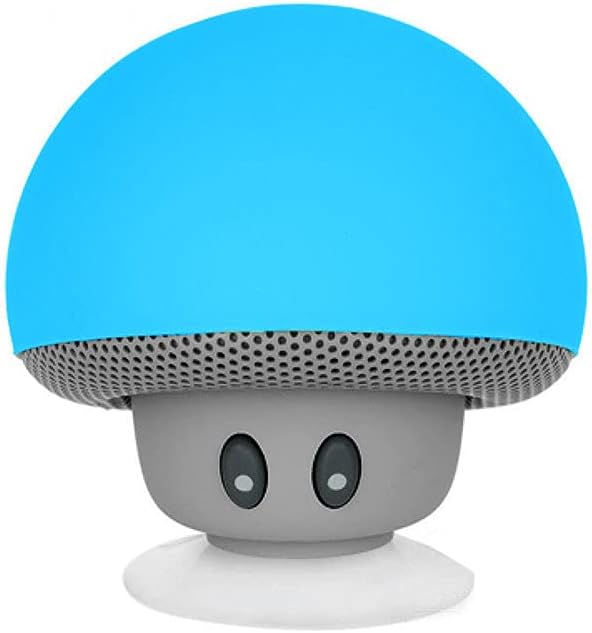
Figure 1: Front view of the MOB Mushroom Bluetooth Speaker. It features a vibrant blue mushroom cap, a grey speaker grille, and a base with two small, dark eyes, giving it a playful appearance.

Figure 2: Rear view of the MOB Mushroom Bluetooth Speaker. This image highlights the "MOB MOBILITY ON BOARD" logo on the blue cap and the micro-USB charging port located at the bottom of the grey base, which is protected by a waterproof cover.
Controls and Indicators:
- Power Button: Located on the speaker's base (often integrated with the charging port area). Press and hold to turn on/off.
- Microphone: Integrated for hands-free calling.
- Charging Port: Micro-USB port for charging the device.
- LED Indicator: (Location may vary) Indicates power status, charging status, and Bluetooth pairing mode.
- Suction Cup: Located at the bottom for attaching to smooth surfaces.
Setup
1. Charging the Speaker:
- Connect the micro-USB end of the charging cable to the speaker's charging port.
- Connect the USB-A end to a USB power adapter (not included) or a computer's USB port.
- The LED indicator will typically show red during charging and turn off or change color when fully charged.
- A full charge takes approximately 2-3 hours.
2. Powering On/Off:
- To Power On: Press and hold the Power button for a few seconds until you hear an audible prompt or the LED indicator lights up.
- To Power Off: Press and hold the Power button again for a few seconds until you hear an audible prompt or the LED indicator turns off.
Operating
1. Bluetooth Pairing:
- Ensure the speaker is powered on and in pairing mode (LED indicator may flash blue rapidly).
- On your smartphone, tablet, or other Bluetooth-enabled device, go to the Bluetooth settings.
- Search for available devices. You should see "MUSH-BL" or a similar name (e.g., "MOB Speaker") in the list.
- Select the speaker to pair. Once successfully paired, you will hear a confirmation sound, and the LED indicator will typically turn solid blue or flash slowly.
- The speaker will automatically connect to the last paired device when powered on, if the device's Bluetooth is active and within range.

Figure 3: The MOB Mushroom speaker highlighting its key features: hands-free calling, powerful sound output, Bluetooth stereo connectivity, and a 3-hour battery autonomy.
2. Playing Audio:
- Once paired, play music or any audio from your connected device. The sound will be output through the speaker.
- Volume control is typically managed directly from your connected device.
3. Hands-Free Calling:
- When a call comes in while connected, the speaker will ring.
- To answer a call: (Specific button action not provided, but usually a short press on the power/multi-function button).
- To end a call: (Specific button action not provided, but usually a short press on the power/multi-function button).
- The integrated microphone allows for clear communication.
4. Using the Suction Cup:
- The suction cup on the base allows you to attach the speaker to smooth, flat surfaces like glass, tiles, or the back of a smartphone/tablet.
- Ensure the surface is clean and dry for optimal suction.
- Press the speaker firmly against the surface to create a vacuum seal.

Figure 4: The blue MOB Mushroom speaker demonstrating its suction cup functionality, securely attached to the back of a gold-colored smartphone. This allows the speaker to act as a stand or be mounted on various smooth surfaces.
Maintenance
- Cleaning: Wipe the speaker with a soft, damp cloth. Do not use harsh chemicals or abrasive cleaners.
- Storage: When not in use for extended periods, store the speaker in a cool, dry place.
- Waterproof Care: Always ensure the charging port cover is sealed tightly when using the speaker near water. After use in wet conditions, dry the speaker thoroughly before charging.
Troubleshooting
| Problem | Possible Cause | Solution |
|---|---|---|
| Speaker does not turn on. | Battery is low or depleted. | Charge the speaker fully. |
| Cannot pair with Bluetooth device. | Speaker is not in pairing mode; Device's Bluetooth is off; Speaker is too far from device. | Ensure speaker is in pairing mode; Turn on Bluetooth on your device; Move speaker closer to device (within 10 meters). |
| No sound or low volume. | Volume on connected device is too low; Speaker is not connected. | Increase volume on your device; Re-pair the speaker with your device. |
| Sound distortion. | Volume is too high; Device is too far from speaker. | Lower the volume on your device; Move speaker closer to device. |
Specifications
- Model: MUSH-BL
- Connectivity: Bluetooth
- Bluetooth Range: Up to 10 meters (33 feet)
- Speaker Output: 3 Watts
- Battery: 280mAh Lithium-ion (rechargeable)
- Battery Life: Up to 3 hours
- Charging Time: Approximately 2-3 hours
- Waterproof Rating: Yes (specific IP rating not provided, but stated as waterproof)
- Dimensions (L x W x H): 16 x 17 x 15 cm (6.3 x 6.7 x 5.9 inches)
- Weight: 70 grams (2.47 ounces)
- Included Components: Bluetooth Speaker, USB Charging Cable
Warranty and Support
For warranty information and customer support, please refer to the contact details provided on the product packaging or visit the official MOB – MOBILITY ON BOARD website. Keep your purchase receipt as proof of purchase for any warranty claims.
Manufacturer: MOB
Brand: MOB – MOBILITY ON BOARD
Website: MOB Official Store on Amazon (Note: This link leads to the brand's store on Amazon, not a direct support site. Users should check packaging for direct support.)
Ask a question about this manual
Ask about setup, troubleshooting, compatibility, parts, safety, or missing instructions. Manuals+ will review the question and use this page’s manual context to help answer it.