
Introduction
This manual provides detailed instructions for the installation, operation, and maintenance of your Tell Manufacturing Cortland LT2000 Series Light Duty Commercial Entry Lever. This product is designed for light traffic areas and is tested to ANSI A156.2 Grade 2 standards, certified with a UL 3-hour fire rating, and is ADA compliant. Please read these instructions carefully before beginning installation or use.
Setup and Installation
What's in the Box
- Entry Lever Handles (Interior and Exterior)
- Tubular Latch Mechanism
- Adjustable Backset (2 3/8 inches - 2 3/4 inches)
- Square T Strike Plate
- Mounting Screws and Hardware
Tools Required
- Phillips Head Screwdriver
- Measuring Tape
- Pencil
- Drill (if new door preparation is required)
Installation Steps
Follow these general steps for installing the tubular commercial entry lever. Refer to the detailed diagrams included with your product packaging for precise measurements and component identification.
- Prepare the Door: Ensure the door has the correct bore holes for the lever and latch. The adjustable backset allows for either 2 3/8 inches or 2 3/4 inches. Mark the center line for the latch and the cross bore.
- Install the Latch: Insert the tubular latch into the edge bore hole. Ensure the latch bolt faces the door frame. Secure it with the provided screws.
- Install the Exterior Lever: Place the exterior lever assembly through the cross bore, ensuring the spindle aligns with the latch mechanism.
- Install the Interior Lever: Position the interior lever assembly, aligning it with the exterior lever and the latch. Secure both lever assemblies together using the mounting screws. Tighten screws firmly but do not overtighten.
- Install the Strike Plate: Mark the position for the square T strike plate on the door frame, aligning it with the latch bolt. Chisel out the recess if necessary and secure the strike plate with screws.
- Test Operation: Close the door and test the lever operation to ensure smooth movement and proper latch engagement.
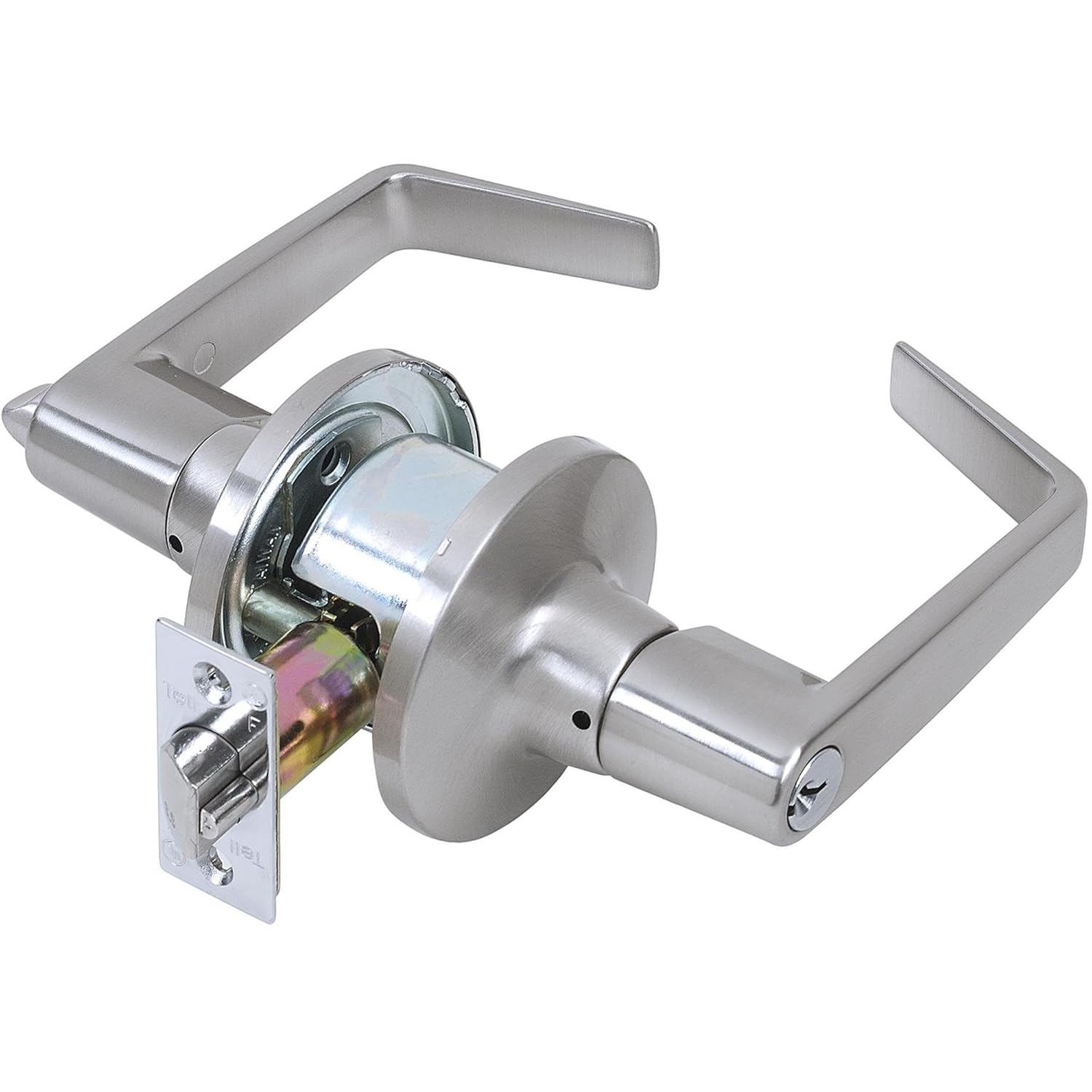
Image: The Tell Manufacturing Cortland LT2000 Series Light Duty Commercial Entry Lever, showcasing its satin chrome finish and design. This image displays both the interior and exterior lever handles and the associated hardware components for installation.
Operating Instructions
The Cortland LT2000 Series Entry Lever is designed for light duty commercial applications and functions as a passage lever. This means the lever does not lock and provides free access from both sides at all times. It is suitable for hallway or closet doors in various commercial settings such as offices, schools, hospitals, apartments, hotels, and motels.
- To open the door, simply depress the lever handle.
- The lever is non-handed, meaning it can be installed on both left-hand and right-hand doors.
- Its ADA compliant design ensures ease of operation for individuals with disabilities.
Maintenance
Regular maintenance helps ensure the longevity and smooth operation of your lever.
- Cleaning: Clean the lever's exterior finish with a soft, damp cloth. Avoid abrasive cleaners, solvents, or harsh chemicals, as these can damage the satin chrome finish.
- Lubrication: Periodically, a small amount of silicone-based lubricant can be applied to the latch bolt and internal mechanisms to maintain smooth operation. Avoid oil-based lubricants as they can attract dust and debris.
- Inspection: Regularly check all mounting screws for tightness. If the lever feels loose, gently tighten the screws.
This lever is tested to last over 400,000 cycles, indicating its robust design for light commercial use.
Troubleshooting
If you encounter issues with your lever, consider the following common solutions:
- Lever is Stiff or Hard to Turn: Check for any obstructions around the lever or latch. Apply a silicone-based lubricant to the latch bolt and internal moving parts. Ensure mounting screws are not overtightened.
- Lever is Loose: Tighten the mounting screws that secure the interior and exterior lever assemblies to the door.
- Latch Does Not Retract Fully: Inspect the latch bolt for debris. Ensure the strike plate is properly aligned and not obstructing the latch.
- Door Does Not Latch Properly: Verify the strike plate alignment on the door frame. Adjust if necessary to ensure the latch bolt fully engages.
If problems persist after attempting these solutions, contact customer support.
Specifications
| Product Model | Cortland LT2000 Series (Specific Model: LT2081CTL 26D ADJ T SCC / CL100200) |
| Function | Entry (Passage - Non-locking) |
| Material | Tubular Steel Coated with Zinc Dichromate (Corrosion Resistance), Alloy Steel Handle |
| Finish | Satin Chrome |
| ANSI Rating | A156.2 Grade 2 |
| UL Rating | 3 Hour Fire Rating |
| Keyway | 6 pin C keyway (750,000 combinations) |
| Backset | Adjustable 2 3/8 inches - 2 3/4 inches |
| Handing | Non-Handed |
| ADA Compliant | Yes |
| Durability | Tested over 400,000 cycles |
| Item Weight | 2.6 Pounds |
| UPC | 737874002006 |
Note: While the product title and description refer to 'Tell Manufacturing', some specifications list 'Kwikset' as the brand. This manual refers to the product as 'Tell Manufacturing Cortland LT2000 Series' as per its primary identification.
Warranty Information
This Tell Manufacturing Cortland LT2000 Series Light Duty Commercial Entry Lever comes with a limited lifetime warranty. For specific terms and conditions of the warranty, please refer to the warranty card included with your product or contact the manufacturer directly.
Customer Support
For further assistance, technical support, or warranty claims, please contact the manufacturer's customer service department. Contact information can typically be found on the product packaging or the manufacturer's official website.