
1. Introduction
Thank you for purchasing the Kenko Artos 7x50 Waterproof Binoculars. This manual provides essential instructions for the proper setup, operation, maintenance, and troubleshooting of your binoculars. Please read this manual thoroughly before using the product to ensure optimal performance and longevity.
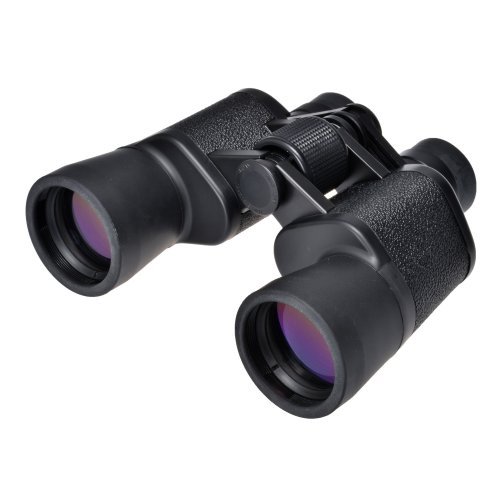
Image 1: Front view of the Kenko Artos 7x50 Waterproof Binoculars, showing the objective lenses and main body.
2. Setup
2.1 Unpacking and Attaching the Strap
Carefully remove the binoculars and accessories (case, strap) from the packaging. Attach the provided neck strap to the strap lugs on the binocular body. Ensure the strap is securely fastened before use to prevent accidental drops.
2.2 Adjusting Interpupillary Distance
The interpupillary distance (the distance between the centers of your pupils) varies from person to person. To adjust, hold the binoculars firmly and bend the body to bring the two halves closer together or further apart until you see a single, clear circular field of view.
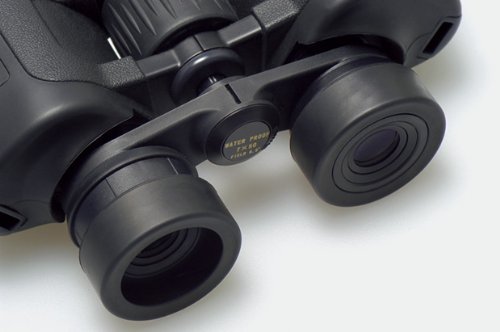
Image 2: Close-up view of the binocular eyepieces and central focus wheel, illustrating the area for interpupillary adjustment.
2.3 Diopter Adjustment
The diopter adjustment compensates for differences in vision between your left and right eyes. Follow these steps:
- Close your right eye or cover the right objective lens.
- Look through the binoculars with your left eye at a distant object. Rotate the central focus wheel until the image is sharp and clear.
- Close your left eye or cover the left objective lens.
- Look through the binoculars with your right eye. Rotate only the diopter adjustment ring (usually on the right eyepiece) until the image is sharp. Do not use the central focus wheel for this step.
- With both eyes open, the image should now be clear and focused. You will only need to use the central focus wheel for subsequent focusing.
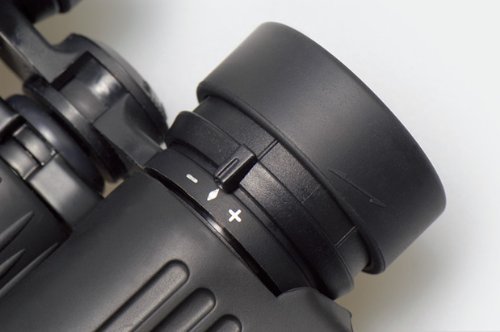
Image 3: Close-up of the right eyepiece showing the diopter adjustment ring with '+' and '-' markings.
3. Operating the Binoculars
3.1 Focusing
Once the interpupillary distance and diopter are set, use the central focus wheel to bring objects at various distances into sharp focus. Turn the wheel slowly for precise adjustment.

Image 4: Detailed view of the central focus wheel, located between the two barrels of the binoculars.
3.2 Eyecups
The eyecups can be adjusted for comfortable viewing. If you wear eyeglasses, twist or push down the eyecups to view the full field of view. If you do not wear eyeglasses, extend the eyecups to block out peripheral light.
Image 5: Close-up of the binocular eyepieces with eyecups extended, ready for use without eyeglasses.
3.3 Waterproof Feature
These binoculars are waterproof, designed to withstand exposure to water. This feature allows for use in various weather conditions and provides protection against accidental splashes or submersion. However, prolonged submersion at significant depths is not recommended. Always ensure lens caps are on when not in use in wet conditions.
4. Maintenance
4.1 Cleaning Lenses
To clean the lenses, first gently brush off any dust or debris with a soft lens brush or blow it off with compressed air. Then, use a clean microfiber lens cloth and a small amount of lens cleaning fluid (specifically designed for optics) to wipe the lenses in a circular motion. Avoid using abrasive cloths or harsh chemicals, as these can damage the lens coatings.
4.2 Cleaning Body
The body of the binoculars can be wiped clean with a soft, damp cloth. For stubborn dirt, a mild soap solution can be used, followed by wiping with a clean, damp cloth. Ensure the binoculars are completely dry before storage.
4.3 Storage
When not in use, store the binoculars in their protective case in a cool, dry place, away from direct sunlight and extreme temperatures. Ensure lens caps are in place to protect the optics from dust and scratches.
5. Troubleshooting
- Blurry Image: Ensure the central focus wheel is properly adjusted for your viewing distance. Re-check the diopter setting for your right eye.
- Double Image: This usually indicates incorrect interpupillary distance. Adjust the hinge of the binoculars until you see a single, merged circular field of view.
- Dark Edges / Partial View: Adjust the eyecups to match whether you wear eyeglasses or not. Ensure your eyes are centered on the eyepieces.
- Fogging: While the binoculars are waterproof, rapid temperature changes can sometimes cause external fogging. Allow the binoculars to acclimate to the ambient temperature or gently wipe with a clean, dry cloth. Internal fogging indicates a seal issue and may require professional service.
6. Specifications
| Feature | Specification |
|---|---|
| Model Name | Artos 7x50 |
| Model Number | BIN0-2116 |
| Magnification | 7x |
| Objective Lens Diameter | 50 mm |
| Prism Type | Porro Prism |
| Field of View | 6.5 Degrees |
| Eye Relief | 18.1 mm |
| Closest Focusing Distance | 10 meters |
| Water Resistance Level | Waterproof |
| Focus Type | Center Focus |
| Coating | Fully Multi-Coated |
| Material | Aluminium, Rubber |
| Weight | 600 Grams |
| Dimensions (L x W x H) | 12L x 12W x 6H Centimeters |
7. Warranty and Support
7.1 Warranty Information
This Kenko Artos 7x50 Waterproof Binocular comes with a 1 Year Brand Warranty from the date of purchase. Please retain your proof of purchase for warranty claims. The warranty covers manufacturing defects but does not cover damage caused by misuse, accidents, or unauthorized repairs.
7.2 Customer Support
For technical assistance, warranty claims, or service inquiries, please contact Kenko customer support. You can find contact details on the official Kenko website or through your local distributor.
- Manufacturer: Kenko Tokina Co.,Ltd Japan
- Importer (India): Kenko Tokina Imaging India Pvt. Ltd.New Delhi 110001
- Box Contents: Case & Strap