1. Introduction
The HELMER BM207M is an integrated in-wall stereo amplifier designed for home audio systems. It features a 5-inch capacitive touch screen for direct control and can also be operated via a remote control. This manual provides detailed instructions for installation, operation, and maintenance of your device.

Image 1.1: Front view of the HELMER BM207M in-wall amplifier with its remote control.
2. Product Features
- Integrated In-Wall Design: Stereo amplifier designed for seamless integration into walls.
- Control Options: Operable via a 5-inch capacitive touch screen (800*480 resolution) or included remote control.
- Built-in Media Player: Features a built-in music and video player.
- Expandable Storage: Adaptable for TF Card/Micro USB with 4GB ROM.
- Bluetooth Connectivity: Allows direct connection to smartphones, tablets, and other Bluetooth-enabled devices for audio streaming.
- FM Radio: Built-in FM radio (87-108MHz) for additional audio options.
- Clock and Calendar Functionality: Can display time and date, with programmable on/off settings.
- Multi-Room Audio: Capable of connecting with up to four passive, constant resistance 8-ohm speakers for multi-room audio playback.
3. Package Contents
Verify that all items listed below are included in your package:
- HELMER BM207M In-Wall Amplifier Unit
- Remote Control
- Mounting Bracket
- Backbox (for in-wall installation)
- Mounting Screws and Accessories
- User Manual (this document)

Image 3.1: Overview of items included in the product package.
4. Product Dimensions
Understanding the dimensions of the amplifier and its backbox is crucial for proper installation. The amplifier unit measures 148mm (5.83 inches) in length, 90mm (3.54 inches) in width, and has a depth of 13mm (0.51 inches) from the wall surface, with an additional 37mm (1.46 inches) for the embedded part. The backbox measures 141mm (5.55 inches) in length, 80mm (3.15 inches) in width, and 54mm (2.13 inches) in depth.

Image 4.1: Dimensional drawing of the amplifier unit and the required backbox.
5. Interface Overview
The HELMER BM207M features a user-friendly interface with various ports and controls for easy operation and connectivity.
5.1 Top and Bottom Panel
- Vol+/-: Volume control buttons.
- ON/OFF: Power button for the unit.
- Micro USB Port: For connecting external storage or for firmware updates.
- TF Card Slot: For inserting a TF (MicroSD) card for media playback.
- Reset Button: To reset the device to factory settings.

Image 5.1: Detailed view of the top and bottom interfaces of the amplifier, highlighting controls and ports.
6. Installation
Proper installation is essential for the optimal performance and safety of your in-wall amplifier. This section outlines the physical installation steps and wiring connections.
6.1 Physical Installation
- Prepare the Wall Opening: Ensure the wall opening is appropriately sized for the backbox, matching the dimensions provided in Section 4.
- Embed the Backbox: Securely embed the provided backbox into the wall opening.
- Fix Mounting Frame: Attach the mounting frame to the embedded backbox using the provided screws.
- Connect Wiring: Before mounting the amplifier unit, complete all necessary wiring connections as detailed in Section 6.2.
- Mount the Amplifier: Carefully hang the amplifier unit onto the mounting frame. Pull it down gently to ensure it locks securely into the hanger of the mounting frame.

Image 6.1: Step-by-step illustration of the amplifier installation process.
6.2 Wiring Diagram
The amplifier requires connection to a power supply, speakers, and optionally external audio input/output, and an antenna for FM radio. Ensure all connections are made correctly to prevent damage and ensure proper functionality.
- Power Supply (100-250V): Connect the AC power supply to the designated terminals.
- Speakers: Connect up to four passive, constant resistance 8-ohm speakers. Ensure correct polarity (R+, R-, L+, L-) for each speaker channel.
- Audio Input: Connect external audio sources to the Audio Input terminals.
- Audio Output: Connect to other audio devices if needed.
- Antenna: Connect an FM antenna for optimal radio reception.
- GND: Ground connection.
- 485A/485B: For advanced control or integration with smart home systems (refer to specific system documentation).
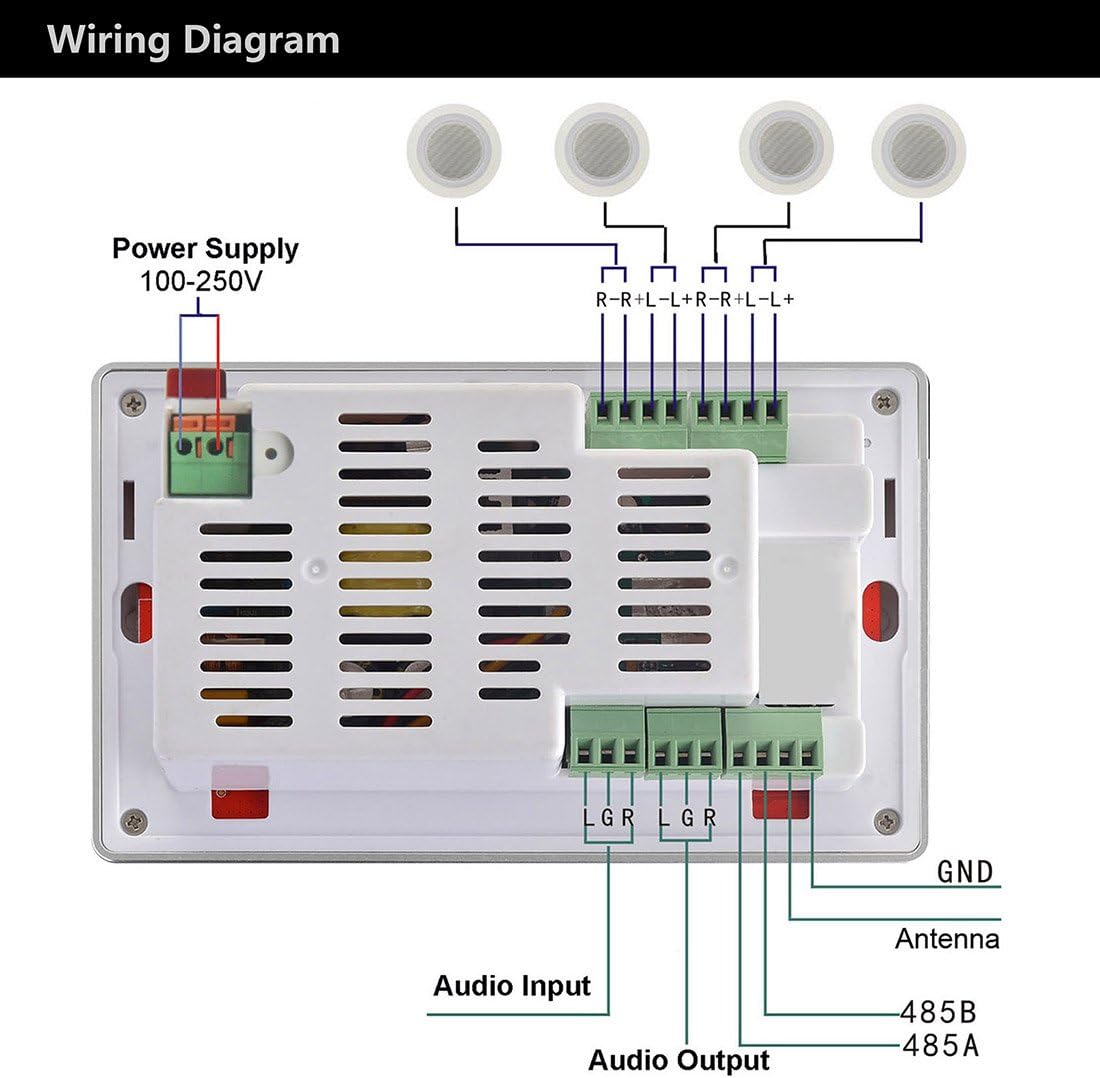
Image 6.2: Comprehensive wiring diagram for all connections on the amplifier's rear panel.
7. Operating Instructions
This section details how to operate your HELMER BM207M amplifier using the touch screen or remote control.
7.1 Power On/Off
Press the ON/OFF button on the top panel or the power button on the remote control to turn the unit on or off.
7.2 Touch Screen Navigation
The 5-inch capacitive touch screen displays a main menu with icons for various functions:
- Music: Access the built-in music player.
- Video: Access the built-in video player.
- FM: Tune into FM radio stations.
- Aux In: Select external audio input.
- BT (Bluetooth): Activate Bluetooth mode for wireless audio streaming.
- Explorer: Browse files on connected TF card or Micro USB.
- Setting: Access system settings, including time, date, and display options.
7.3 Bluetooth Pairing
- From the main menu, tap the BT icon to enter Bluetooth mode.
- On your smartphone or other Bluetooth device, search for available devices.
- Select "HELMER BM207M" (or similar name) from the list to pair.
- Once paired, audio from your device will play through the amplifier.
7.4 FM Radio Operation
- Tap the FM icon on the touch screen.
- Use the on-screen controls or remote to scan for stations, adjust frequency, or select presets.
7.5 Media Playback (TF Card/Micro USB)
- Insert a TF card into the designated slot or connect a Micro USB device.
- Tap the Music or Video icon, or use the Explorer to browse files.
- Select your desired media file for playback.
7.6 Clock and Timer Functions
Access the Setting menu to set the current time and date. You can also configure timers to automatically turn the unit on or off at specified times.
8. Maintenance
To ensure the longevity and optimal performance of your HELMER BM207M amplifier, follow these maintenance guidelines:
- Cleaning: Use a soft, dry cloth to clean the touch screen and unit surface. Avoid abrasive cleaners or solvents.
- Ventilation: Ensure the ventilation slots on the rear of the unit are not obstructed to prevent overheating.
- Environmental Conditions: Avoid exposing the unit to extreme temperatures, humidity, or direct sunlight.
- Firmware Updates: Periodically check the manufacturer's website for any available firmware updates to improve performance and add new features.
9. Troubleshooting
If you encounter issues with your HELMER BM207M amplifier, refer to the following troubleshooting guide:
- No Power:
- Check if the power cable is securely connected to the unit and the power outlet.
- Verify that the power outlet is functional.
- No Sound:
- Ensure speakers are correctly wired and connected to the amplifier.
- Check the volume level on the amplifier and your connected device.
- Verify that the correct audio source (Bluetooth, Aux In, FM, etc.) is selected.
- Confirm that the speakers are passive, constant resistance 8-ohm speakers.
- Bluetooth Connection Issues:
- Ensure Bluetooth is enabled on both the amplifier and your device.
- Move your device closer to the amplifier to ensure it's within range.
- Try unpairing and re-pairing the device.
- Restart both the amplifier and your Bluetooth device.
- Touch Screen Unresponsive:
- Try restarting the unit.
- Use the remote control as an alternative.
- If persistent, perform a factory reset using the reset button (refer to Section 5.1).
- Poor FM Reception:
- Ensure the FM antenna is properly connected.
- Adjust the position of the antenna for better signal reception.
If the problem persists after attempting these solutions, please contact customer support.
10. Specifications
| Brand | HELMER |
| Model | BM207M |
| Display Size | 5 Inches |
| Display Type | Capacitive Touch Screen |
| Display Resolution | 800x480 |
| ROM Size | 4 GB |
| Removable Memory | MicroSD (TF Card) |
| Wireless Type | Bluetooth |
| Audio Output Mode | Stereo |
| Speaker Surround Sound Channel Configuration | 2.0 |
| Speakers Maximum Output Power | 25 Watts (per channel, total 100 Watts) |
| Wattage | 15 Watts (RMS) |
| Power Source Type | AC (100-250V) |
| Supported Audio Formats | MP3, WAV, etc. |
| FM Radio Frequency | 87-108MHz |
| Product Dimensions | 14.8 x 9 x 5 cm |
| Item Weight | 798 g |
11. Warranty and Support
The HELMER BM207M amplifier comes with a standard manufacturer's warranty. Please refer to the warranty card included in your package for specific terms and conditions, including warranty duration and coverage details. For technical support, service, or further inquiries, please contact HELMER customer service through the contact information provided on the product packaging or the official HELMER website.


