
Introduction
This manual provides essential information for the safe and efficient operation of your PowerMax PM4 55A RV Converter. This device converts 120V AC shore power to 12V DC power, suitable for powering recreational vehicle (RV) appliances and charging onboard batteries. It features a 4-stage smart charging system and adjustable output voltage for compatibility with various battery chemistries.
Safety Information
WARNING: Read all instructions before operating this device. Failure to follow these instructions may result in electric shock, fire, or serious injury.
- Ensure proper ventilation around the converter. Do not block ventilation openings.
- Do not expose the converter to rain, moisture, or excessive heat.
- Disconnect all power sources (AC and DC) before making or breaking electrical connections.
- Installation should be performed by a qualified technician in accordance with all local and national electrical codes.
- Verify correct polarity when connecting to batteries and DC loads. Reverse polarity can damage the unit and connected equipment.
- This unit is designed for indoor use in dry environments.
Product Features
- 12V AC to DC Power Conversion: Provides stable 12V DC power from a 120V AC input.
- 4-Stage Smart Battery Charger: Optimizes battery charging with Bulk, Absorption, Float, and Equalization stages to extend battery lifespan.
- Adjustable Output Voltage: Output range of 13V to 16.5V for compatibility with lithium, AGM, gel, and lead-acid batteries.
- Safety Protections: Includes reverse polarity protection, overload protection, and thermal shutdown.
- Versatile Application: Suitable for RVs, boats, solar systems, off-grid setups, and car audio.

Image: The PowerMax PM4 55A converter, illustrating its advanced 4-stage smart charging system for optimal battery health and efficiency.
Package Contents
Upon unpacking, please verify that all items are present:
- PowerMax PM4 55A RV Converter (Battery Charger)
- Installation Guide
Specifications
| Specification | Value |
|---|---|
| Model Number | PM4 55A |
| Input Voltage | 110 Volts AC |
| Output Voltage | 12 Volts DC (Adjustable 13V to 16.5V) |
| Output Amperage | 55 Amps |
| Item Weight | 6.44 pounds |
| Package Dimensions | 12.09 x 9.09 x 4.29 inches |
| Color | Metallic |
| Manufacturer | PowerMax |
Setup and Installation
The PowerMax PM4 55A converter is designed for straightforward installation. It is recommended to consult the detailed Installation Manual for specific wiring diagrams and safety precautions relevant to your application (RV, boat, etc.).
- Mounting: Choose a dry, well-ventilated location. Ensure adequate clearance around the unit for airflow.
- AC Input Connection: Connect the 120V AC input to a dedicated circuit breaker.
- DC Output Connection: Connect the DC output terminals to your RV's 12V distribution panel and battery bank. Observe correct polarity (positive to positive, negative to negative).
- Grounding: Ensure the unit is properly grounded according to electrical codes.

Image: A top-down view of the PowerMax PM4 55A RV Converter, showing its compact design and connection points.
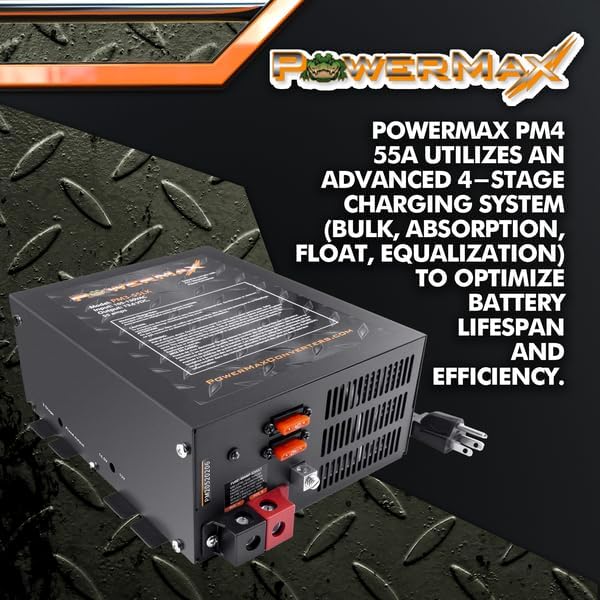
Image: The PowerMax PM4 55A converter with visible labels indicating input voltage (105-130VAC) and output voltage (13.6VDC), along with fuse locations and battery terminals.
Operating Instructions
Once installed, the PowerMax PM4 55A converter operates largely automatically. It will provide 12V DC power to your loads and charge your battery bank when connected to AC shore power.
- Power On: After all connections are secure, apply AC power to the converter. The unit will automatically begin providing DC power and charging the battery.
- Battery Charging Stages: The 4-stage charger will cycle through Bulk, Absorption, Float, and Equalization modes as needed to maintain optimal battery health.
- Adjustable Output: Refer to the detailed user manual for instructions on adjusting the output voltage if specific battery charging profiles are required. This feature allows fine-tuning for different battery types (e.g., higher voltage for lithium batteries).
Maintenance
The PowerMax PM4 55A converter requires minimal maintenance to ensure long-term performance.
- Ventilation: Periodically check that the ventilation openings are clear of dust and debris.
- Connections: Annually inspect all electrical connections for tightness and corrosion.
- Cleaning: Clean the exterior of the unit with a dry cloth. Do not use liquid cleaners.
- Fuses: The unit contains internal fuses. If the unit stops functioning, consult the troubleshooting section and the full manual for fuse replacement procedures.
Troubleshooting
If you encounter issues with your PowerMax PM4 55A converter, refer to the following common problems and solutions:
- No DC Output/Battery Not Charging:
- Check AC input power (shore power connection, circuit breaker).
- Verify DC output connections are secure and correct polarity.
- Inspect internal fuses (refer to full manual for location and replacement).
- Overheating:
- Ensure adequate ventilation around the unit. Clear any obstructions.
- Reduce DC load if possible.
- Fan Noise:
- The cooling fan operates as needed based on internal temperature and load. Intermittent fan operation is normal.
- Excessive or constant fan noise may indicate high load or insufficient ventilation.
For more detailed troubleshooting steps, please consult the comprehensive User Manual.
Warranty and Support
PowerMax products are designed for durability and performance. For specific warranty terms and conditions, please refer to the documentation included with your product or visit the official PowerMax website. For technical support or service inquiries, please contact PowerMax customer service.
You can find more information and contact details on the PowerMax Store.
Additional Resources
For comprehensive details regarding installation, operation, and maintenance, please download the official PDF manuals:


