
1. Important Safeguards
When using electrical products, especially when children are present, basic safety precautions should always be followed. Read all instructions before using this appliance.
DANGER: To reduce the risk of electrocution:
- Do not handle the plug with wet hands.
- Do not place in or drop into water or other liquid.
- Do not use while bathing.
- Do not reach for a product that has fallen into water. Unplug immediately.
- Check the power cord for damage before first use and during the life of the product.
WARNING: To reduce the risk of burns, electrocution, fire, or injury to persons:
- Do not plug this device into a voltage system that is different from the voltage specified on the device or charger.
- Do not use this product if it has a damaged cord or plug, if it is not working properly, if it has been dropped or damaged, or dropped into water. Contact customer service.
- Do not direct water under the tongue, into the ear, nose, or other delicate areas. This product is capable of producing pressures that may cause serious damage in these areas.
- Use this product only for its intended use as described in this manual.
- Do not fill the reservoir with hot water.
- Supervise children and individuals with special needs when using this product.
- Do not operate where aerosol (spray) products are being used or where oxygen is being administered.
2. Product Overview
The Nicefeel FC-168 Water Flosser is designed to provide effective oral hygiene through a powerful stream of water. Familiarize yourself with the components of your device.

Figure 2.1: Front view of the Nicefeel FC-168 Water Flosser. This image displays the main unit with its blue transparent water reservoir, the handle with a blue button, and the pressure control dial at the bottom.

Figure 2.2: Top-down view of the Nicefeel FC-168 Water Flosser, showing the removable reservoir and the integrated tip storage compartment within the lid.

Figure 2.3: Side view of the Nicefeel FC-168 Water Flosser, highlighting the convenient built-in tip storage on the side of the unit.
Components:
- Reservoir Lid with Tip Storage: Covers the water reservoir and provides a hygienic storage space for flossing tips.
- Water Reservoir: Holds water for flossing, with capacity markings.
- Handle: Ergonomically designed for comfortable grip, includes a pause button.
- Flossing Tip: Interchangeable tips for various dental needs.
- Tip Eject Button: Releases the flossing tip from the handle.
- Pressure Control Dial: Adjusts water pressure from 1 (gentle) to 10 (maximum).
- Power Switch: Turns the unit ON or OFF.
- Power Cord: Connects the unit to an electrical outlet.
3. Setup Instructions
Follow these steps for the initial setup of your Nicefeel Water Flosser.
- Unpack the Unit: Remove the water flosser and all accessories from the packaging.
- Place the Unit: Place the unit on a flat, stable surface near a power outlet and a sink.
- Fill the Reservoir: Lift the reservoir lid and remove the reservoir from the base. Fill the reservoir with lukewarm water. Distilled water is recommended to prevent mineral buildup. Replace the reservoir onto the base and close the lid securely.

Figure 3.1: Demonstrates filling the water reservoir with water. Ensure the reservoir is properly seated after filling.
- Insert a Tip: Select the desired flossing tip and insert it into the center of the handle until it clicks into place. To remove a tip, press the tip eject button on the handle.
- Prime the Unit (First Use Only):
- Set the pressure control dial to the highest setting (10).
- Direct the handle and tip into the sink.
- Turn the unit ON until water flows from the tip.
- Turn the unit OFF.
4. Operating Instructions
4.1 General Usage
- Adjust Pressure: Turn the pressure control dial to the lowest setting (1) for first-time use or sensitive gums. Gradually increase the pressure to a comfortable level.
- Positioning: Lean over the sink and place the tip in your mouth. Close your lips enough to prevent splashing, but allow water to flow from your mouth into the sink.
- Start Flossing: Turn the unit ON. Direct the water stream at a 90-degree angle to your gumline. Move the tip along the gumline, pausing briefly between teeth.
- Pause Function: Use the pause button on the handle to temporarily stop the water flow without turning off the unit.
- Finish: When finished, turn the unit OFF and press the tip eject button to remove and rinse the tip.
4.2 Using Different Tips
The Nicefeel FC-168 comes with various tips designed for specific oral care needs.

Figure 4.1: Illustrates the different types of flossing tips included with the Nicefeel FC-168, including Classic Jet, Orthodontic, Pik Pocket, and Tongue Cleaner tips, each designed for specific oral hygiene purposes.
- Classic Jet Tip: For general use, cleaning between teeth and below the gumline.
- Orthodontic Tip: Designed for cleaning around braces and orthodontic appliances.
- Pik Pocket Tip: For periodontal pockets and furcations. Use at the lowest pressure setting.
- Tongue Cleaner: For fresh breath, gently scrape the tongue from back to front.
5. Maintenance
5.1 Daily Cleaning
- After each use, turn off the unit and unplug it.
- Empty any remaining water from the reservoir.
- Rinse the reservoir with clean water.
- Remove the tip from the handle and rinse it under running water.
- Wipe the exterior of the unit with a soft, damp cloth.
5.2 Preventing Mineral Deposits (Descaling)
Mineral deposits can build up in your unit, especially if you have hard water. To prevent this, descale your unit every 1 to 3 months:
- Add 2 tablespoons of white vinegar to a full reservoir of warm water.
- Run the unit until half of the reservoir is empty.
- Turn the unit OFF and let it sit for 20 minutes.
- Run the remaining solution through the unit.
- Rinse by filling the reservoir with clean warm water and running half of it through the unit. Repeat until the reservoir is empty.
5.3 Storage
Ensure the unit is clean and dry before storing. Store the unit and tips in a cool, dry place away from direct sunlight.
6. Troubleshooting
| Problem | Possible Cause | Solution |
|---|---|---|
| Unit does not start. | Unit not plugged in; power switch OFF. | Ensure unit is plugged into a working outlet; turn power switch ON. |
| No water flow. | Reservoir empty; unit not primed; tip clogged. | Fill reservoir; prime the unit (see Setup); clean or replace tip. |
| Low pressure. | Pressure dial set too low; mineral buildup. | Increase pressure setting; descale the unit (see Maintenance). |
| Leaking. | Reservoir not seated properly; damaged hose/seal. | Ensure reservoir is firmly seated; contact customer service if damage is suspected. |
7. Specifications
| Feature | Detail |
|---|---|
| Model Number | FC-168 |
| Dimensions (L x W x H) | 21.84 x 17.78 x 10.41 cm (approx.) |
| Item Weight | 975 g (approx.) |
| Water Capacity | 600 mL (90+ seconds) |
| Pressure Settings | 10 Levels |
| Special Features | Built-in Tip Storage, Multiple Tips, Pause Button on Handle |
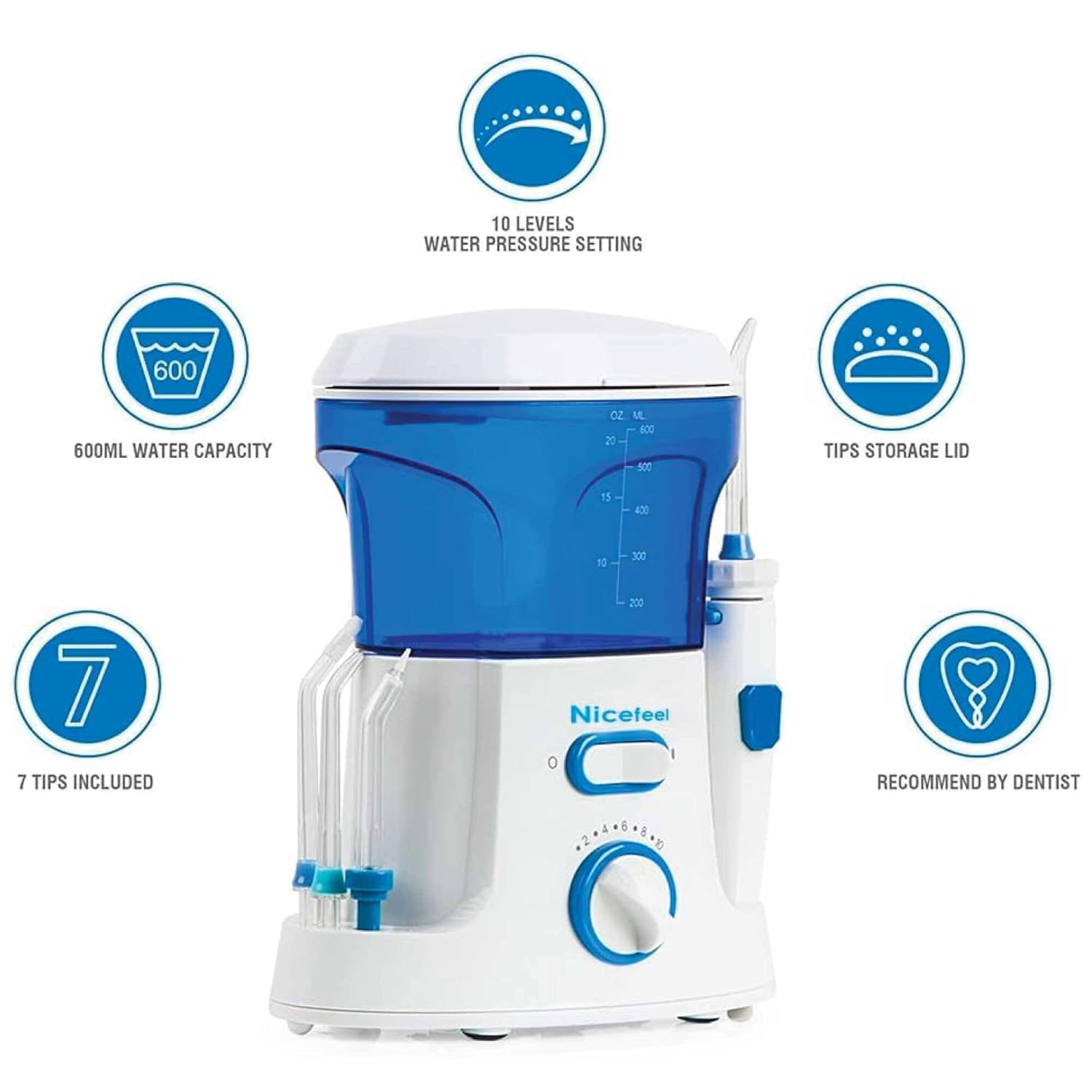
Figure 7.1: Infographic summarizing key features of the Nicefeel FC-168 Water Flosser, including 10 pressure settings, 600ml water capacity, tip storage lid, and 7 included tips.
8. Warranty and Support
For warranty information or product support, please refer to the documentation included with your purchase or contact Nicefeel customer service. Keep your purchase receipt as proof of purchase.
For further assistance, you may visit the official Nicefeel website or contact their support channels as provided in your product packaging.