
1. Introduction
The Tone City Comp Engine is a compact compressor pedal designed for electric guitar. It provides dynamic control over your signal, enhancing sustain and evening out volume peaks for a more consistent sound. Featuring a mini housing, rugged construction, and true bypass circuitry, this pedal is built for reliable performance.
2. Safety Information
- Use only a regulated 9V DC power supply with a center-negative plug. Using an incorrect power supply may damage the unit and void the warranty.
- Do not expose the pedal to water, moisture, or extreme temperatures.
- Avoid dropping the pedal or subjecting it to strong impacts.
- Do not attempt to open or service the unit yourself. Refer all servicing to qualified personnel.
3. Package Contents
Ensure your package contains the following items:
- Tone City Comp Engine Compressor Pedal
- User Manual
Note: A 9V DC power adapter is not included and must be purchased separately.
4. Controls and Features

Figure 1: Top and side view of the Tone City Comp Engine pedal, illustrating the control knobs, input/output jacks, and power input.
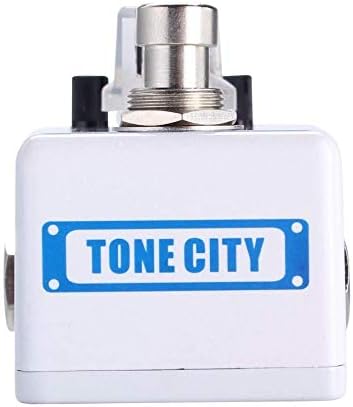
Figure 2: Front view of the Tone City Comp Engine pedal, highlighting the footswitch and compact design.
- VOL (Volume) Knob: Controls the overall output level of the pedal. Adjust this to match the bypassed signal level or to boost your signal.
- COMP (Compression) Knob: Adjusts the amount of compression applied to the signal. Higher settings result in more sustain and a more compressed sound.
- ATTACK Knob: Controls how quickly the compressor reacts to the initial transient of your guitar signal. A faster attack (lower setting) will compress the initial pick attack more, while a slower attack (higher setting) allows more of the initial attack to pass through before compression engages.
- IN Jack: 1/4-inch mono input jack for connecting your guitar or other instrument.
- OUT Jack: 1/4-inch mono output jack for connecting to your amplifier or other effects pedals.
- 9V DC Input: Power input for a standard 9V DC, center-negative power adapter (8mA current draw).
- Footswitch: Engages or bypasses the effect. The pedal features true bypass, ensuring your signal remains unaffected when the pedal is off.
5. Setup
- Power Connection: Connect a 9V DC, center-negative power adapter to the 9V DC input jack on the pedal. Ensure the power supply meets the specified requirements (8mA minimum current).
- Instrument Connection: Connect your guitar or other instrument to the IN jack of the Comp Engine pedal using a standard 1/4-inch instrument cable.
- Amplifier Connection: Connect the OUT jack of the Comp Engine pedal to your amplifier's input or to the input of the next pedal in your signal chain using a standard 1/4-inch instrument cable.
- Power On: Once all connections are secure, turn on your amplifier and then apply power to the pedal.
6. Operating Instructions
To operate the Tone City Comp Engine pedal:
- Engage/Bypass: Press the footswitch to toggle the effect on or off. When the effect is engaged, the LED indicator will illuminate. When bypassed, the LED will be off.
- Adjusting Volume (VOL): Start with the VOL knob at the 12 o'clock position. Adjust it to achieve the desired output level, ensuring it matches or slightly boosts your bypassed signal.
- Setting Compression (COMP): Begin with the COMP knob at a lower setting (e.g., 9 o'clock). Increase the COMP knob gradually to add more sustain and dynamic control. Higher settings will result in a more noticeable compression effect.
- Controlling Attack (ATTACK): Experiment with the ATTACK knob to fine-tune the compressor's response. A lower ATTACK setting will compress the initial pick attack more, resulting in a smoother, more rounded tone. A higher ATTACK setting will allow more of the initial pick attack to pass through, preserving some of the natural dynamics before the compression kicks in.
Experiment with different knob settings to find the compression characteristics that best suit your playing style and musical context.
7. Maintenance
- Cleaning: Use a soft, dry cloth to clean the pedal's exterior. Do not use abrasive cleaners or solvents.
- Storage: Store the pedal in a dry, cool environment away from direct sunlight and extreme temperatures when not in use.
- Connections: Periodically check all cable connections for wear and tear. Replace damaged cables to ensure optimal performance.
8. Troubleshooting
- No Sound:
- Ensure all cables are securely connected to the correct input/output jacks.
- Verify the power supply is correctly connected and providing the specified 9V DC.
- Check if the footswitch LED is illuminated when the effect is intended to be on.
- Test with different cables and a different power supply if available.
- Weak or Distorted Sound:
- Check the VOL knob setting; it may be too low.
- Ensure the power supply is providing stable power.
- Reduce the COMP knob setting if the sound is overly squashed or distorted.
- Unwanted Noise:
- Ensure you are using a regulated power supply. Unregulated power supplies can introduce noise.
- Check for ground loops in your signal chain.
- Keep the pedal away from strong electromagnetic interference sources (e.g., power transformers, fluorescent lights).
9. Specifications
| Feature | Specification |
|---|---|
| Voltage | 9 Volts DC (Center-Negative) |
| Amperage | 8 Milliamps |
| Controls Type | Knob |
| Hardware Interface | 1/4-inch Audio Input/Output |
| Signal Format | Analog |
| Bypass Type | True Bypass |
10. Warranty and Support
For warranty information or technical support, please refer to the documentation provided at the point of purchase or contact your authorized Tone City dealer. Keep your proof of purchase for any warranty claims.
