
1. Introduction
This manual provides essential information for the safe and effective installation and use of the Technical Precision Replacement Bulb, specifically designed for the HEINE OMEGA 500 UNPLUGGED system. This product is a high-quality replacement component, manufactured by Technical Precision, and is not an original HEINE product.
2. Safety Information
Please read and understand all safety instructions before attempting installation or use. Failure to follow these guidelines may result in injury or damage to equipment.
- Disconnect Power: Always ensure the HEINE OMEGA 500 UNPLUGGED system is completely powered off and unplugged from its power source before attempting to replace the bulb.
- Handle with Care: The bulb is made of glass and can break if dropped or mishandled.
- Avoid Direct Contact: Do not touch the glass part of the bulb directly with bare hands. Oils from your skin can reduce bulb life. Use a clean cloth or gloves if necessary.
- Correct Specifications: Ensure this replacement bulb (10W, 6V) matches the specifications required by your HEINE OMEGA 500 UNPLUGGED system. Using an incorrect bulb may cause damage.
- Disposal: Dispose of old bulbs according to local regulations for electronic waste.
3. Product Overview
The Technical Precision Replacement Bulb is a compact, high-performance incandescent bulb designed for specific medical and industrial applications. It features a clear glass envelope and a durable copper base for reliable electrical contact.
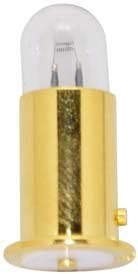
An image showing the Technical Precision replacement bulb, featuring a clear glass dome and a golden copper base. This bulb is designed for the HEINE OMEGA 500 UNPLUGGED system.
4. Setup and Installation
Follow these steps to safely install your new replacement bulb:
- Power Off: Ensure the HEINE OMEGA 500 UNPLUGGED system is turned off and disconnected from all power sources.
- Locate Bulb Housing: Identify the bulb housing on your HEINE OMEGA 500 UNPLUGGED device. Refer to your device's original manual if unsure.
- Remove Old Bulb: Carefully remove the old bulb. This may involve twisting, pulling, or releasing a retaining clip, depending on your device's design. Handle the old bulb by its base if possible, as it may be hot or fragile.
- Insert New Bulb: Gently insert the Technical Precision replacement bulb into the housing. Ensure it is seated firmly and correctly. Do not force the bulb.
- Secure Bulb (if applicable): If your device has a retaining mechanism, secure the new bulb in place.
- Reconnect Power: Once the new bulb is securely installed, reconnect the HEINE OMEGA 500 UNPLUGGED system to its power source.
- Test: Turn on the device to confirm the new bulb is functioning correctly.
5. Operating Instructions
Once the Technical Precision replacement bulb is installed, the operation of your HEINE OMEGA 500 UNPLUGGED system remains unchanged. Simply power on your device as you normally would. The bulb will illuminate, providing the necessary light for your application.
6. Maintenance
The Technical Precision replacement bulb requires minimal maintenance. Follow these guidelines to ensure optimal performance and longevity:
- Cleaning: If the glass envelope of the bulb becomes dusty or smudged, gently wipe it with a clean, dry, lint-free cloth. Do not use abrasive cleaners or solvents.
- Inspection: Periodically inspect the bulb for any signs of damage or wear. If the light output diminishes significantly or the bulb flickers, it may be nearing the end of its lifespan and require replacement.
- Storage: If storing a spare bulb, keep it in its original packaging in a cool, dry place to protect it from damage.
7. Troubleshooting
If you encounter issues after installing the replacement bulb, consider the following:
- Bulb Not Lighting:
- Ensure the HEINE OMEGA 500 UNPLUGGED system is properly connected to power and turned on.
- Verify the bulb is fully and correctly seated in its housing. Remove and reinsert if necessary.
- Check the power source and any fuses or circuit breakers associated with the device.
- If possible, test the bulb in another compatible device or test the device with a known working bulb to isolate the issue.
- Bulb Flickering:
- Ensure the bulb is securely seated and making good electrical contact.
- Check for any loose connections within the device's bulb housing.
- Dim Light Output:
- Confirm the bulb specifications (10W, 6V) match the requirements of your device.
- The bulb may be nearing the end of its operational life. Consider replacing it.
8. Specifications
| Attribute | Value |
|---|---|
| Brand | Technical Precision |
| Model Number | OMEGA 500 UNPLUGGED 10W 6V |
| Wattage | 10 Watts |
| Voltage | 6 Volts |
| Material | Copper (base) |
| Bulb Length | 1.5 Inches |
| Unit Count | 1.0 Count |
9. Warranty and Support
For information regarding warranty, returns, or technical support for your Technical Precision replacement bulb, please refer to the seller's policies or contact Technical Precision directly through their official website or customer service channels. Please note that this item is not manufactured by HEINE, and support for this replacement bulb is provided by Technical Precision.