
BLACK+DECKER BCRK17W
BLACK+DECKER 1.7 Cu. Ft. Compact Refrigerator Instruction Manual
Model: BCRK17W
1. Product Overview
The BLACK+DECKER 1.7 Cu. Ft. Compact Refrigerator, model BCRK17W, is an ENERGY STAR certified single-door mini fridge designed for compact spaces. Its relatively square shape, often referred to as "the cube" in the industry, allows for versatile placement on counters, tables, or floors. This appliance is ideal for college dorm rooms, offices, garages, home bars, small apartments, and RV campers, providing convenient storage for various items with minimal energy consumption.
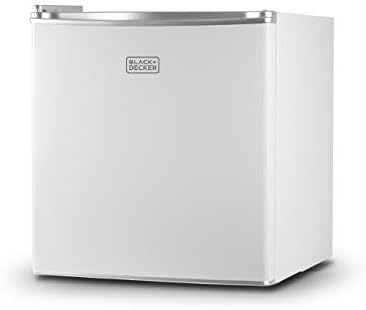
Image: Front view of the BLACK+DECKER 1.7 Cu. Ft. Compact Refrigerator in white.
2. Setup and Installation
2.1 Unpacking and Placement
- Carefully remove all packaging materials from the refrigerator.
- Place the refrigerator on a flat, stable surface. Ensure adequate ventilation around the unit.
- Allow the refrigerator to stand upright for at least 2-4 hours before plugging it in. This allows the refrigerant to settle.
- Adjust the leveling legs at the bottom of the unit to ensure it is stable and level. This helps in proper door closure and efficient operation.

Image: Diagram showing the compact dimensions of the refrigerator (18.5 x 17.5 x 19.7 inches).
2.2 Reversible Door Installation
The refrigerator features a reversible door, allowing it to open from either the left or right side to suit your space. Refer to the detailed instructions in the official user manual for the procedure to reverse the door swing.
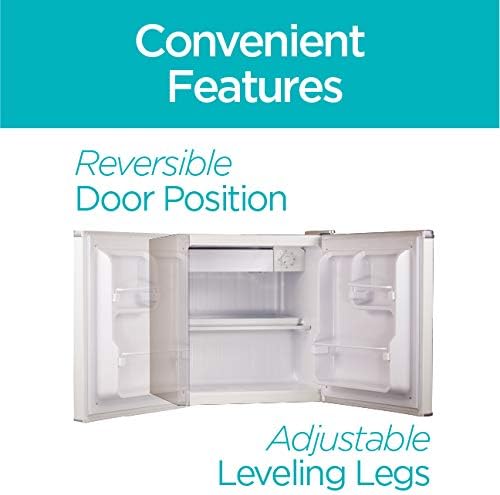
Image: Illustration highlighting the reversible door and adjustable leveling legs features.
3. Operating Instructions
3.1 Temperature Control
The refrigerator is equipped with an adjustable temperature control dial located inside the unit, typically near the chiller compartment. Settings range from 0 (off) to 7 (coldest). For optimal cooling, it is recommended to start with a mid-range setting and adjust as needed based on ambient temperature and desired cooling level. Higher settings will result in colder temperatures.
3.2 Interior Storage
This compact refrigerator offers efficient storage solutions:
- Removable Glass Shelf: A removable glass shelf helps expand storage space and can be adjusted to accommodate taller items.
- Door Storage Bins: Full and half-width door storage bins are designed to hold cans, small containers, or 1-liter and taller bottles securely.
- Chiller Compartment: A small chiller compartment provides space for items requiring colder temperatures, such as ice cubes.
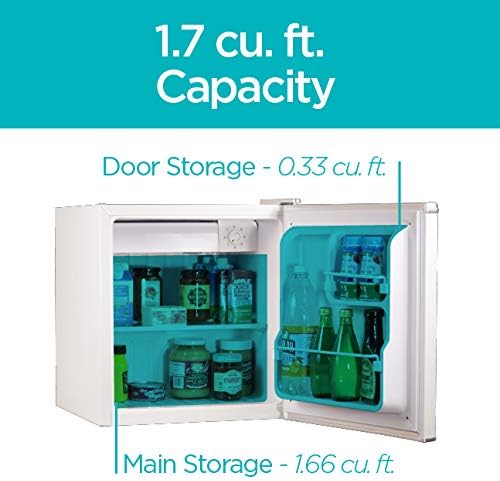
Image: Interior view of the refrigerator, illustrating the 1.7 cu. ft. capacity with main storage and door storage areas.

Image: Close-up of the small freezer compartment (8" x 2") including an ice tray and the adjustable temperature control dial.
3.3 Energy Efficiency
This refrigerator is ENERGY STAR certified, utilizing high-efficiency compressors and R600a refrigerant to minimize energy consumption and heat generation. This contributes to lower operating costs and environmental benefits.

Image: The ENERGY STAR Most Efficient 2020 logo, indicating high energy efficiency.
4. Maintenance
4.1 Manual Defrost
This refrigerator features a manual defrost system. Frost buildup in the chiller compartment is normal. When frost accumulates to a thickness of about 1/4 inch (6mm), the unit should be defrosted. To defrost, turn the temperature control to '0' (off), remove all contents, and leave the door open. Place a towel or shallow pan to catch any melting ice. Once defrosted, wipe the interior dry before restarting the unit.
4.2 Cleaning
Regular cleaning helps maintain the refrigerator's efficiency and appearance. Use a mild detergent and warm water to clean the interior and exterior surfaces. Avoid abrasive cleaners or harsh chemicals. Ensure the unit is unplugged before cleaning.
5. Troubleshooting
If you encounter issues with your refrigerator, please consult the following common troubleshooting tips:
- Refrigerator Not Cooling:
- Check if the power cord is securely plugged into a working outlet.
- Ensure the temperature control dial is not set to '0' (off).
- Verify that there is adequate clearance around the unit for proper ventilation.
- Avoid frequent door openings, which can cause temperature fluctuations.
- Water Bottles Falling Out of Door:
Some users have reported that items like water bottles may fall out of the door storage bins when the door is opened. This can be resolved by adjusting the position of the retaining bar. If the bar is removable, you may be able to drill new holes slightly further back to secure the bar more effectively, preventing items from slipping out.
- Unusual Noises:
- Gurgling or bubbling sounds are normal and indicate the refrigerant circulating.
- Clicking sounds may occur when the compressor cycles on and off.
- Ensure the refrigerator is level to prevent rattling or vibrating noises.
6. Specifications
| Feature | Detail |
|---|---|
| Brand Name | BLACK+DECKER |
| Model Info | BCRK17W |
| Item Weight | 34.2 pounds |
| Product Dimensions | 18.5 x 17.5 x 19.7 inches |
| Capacity | 1.7 Cubic Feet |
| Annual Energy Consumption | 201 Kilowatt Hours Per Year |
| Refrigerator Fresh Food Capacity | 1.5 Cubic Feet |
| Freezer Capacity | 0.2 Cubic Feet |
| Installation Type | Freestanding |
| Special Features | Adjustable Shelves, Compact, Manual Defrost |
| Color | White |
| Voltage | 115 Volts |
| Number Of Doors | 1 |
| Material Type | Steel |
7. Warranty and Support
BLACK+DECKER products typically come with a standard manufacturer's warranty covering defects in materials and workmanship. For specific warranty terms, conditions, and duration, please refer to the official user manual provided with your product or visit the manufacturer's website.
For further assistance, technical support, or to inquire about replacement parts, please contact BLACK+DECKER customer service or visit their official brand store:
- Official User Manual (PDF): Download PDF
- BLACK+DECKER Store: Visit Store
Related documentsBCRK17W


Ask a question about this manual
Ask about setup, troubleshooting, compatibility, parts, safety, or missing instructions. Manuals+ will review the question and use this page’s manual context to help answer it.