
Introduction
This manual provides instructions for the RCECAOSHAN replacement remote control, designed for use with various Fujitsu GENERAL AR-DL series air conditioners, including models AR-DL1, AR-DL2, AR-DL3, AR-DL4, AR-DL5, AR-DL6, AR-DL7, AR-DL8, AR-DL9, AR-DL10, and AR-DL12. Please read this manual carefully before using the remote control to ensure proper operation and to maximize its lifespan.
Safety Information
- Do not mix old and new batteries.
- Do not mix alkaline, standard (carbon-zinc), or rechargeable (nickel-cadmium) batteries.
- Remove batteries if the remote control will not be used for an extended period to prevent leakage.
- Keep the remote control away from direct sunlight, heat sources, and moisture.
- Do not attempt to disassemble or modify the remote control.
Product Overview
The RCECAOSHAN replacement remote control provides essential functions for your Fujitsu GENERAL air conditioner. It features an ergonomic design with clearly labeled buttons and an LCD display for easy temperature and mode adjustments.

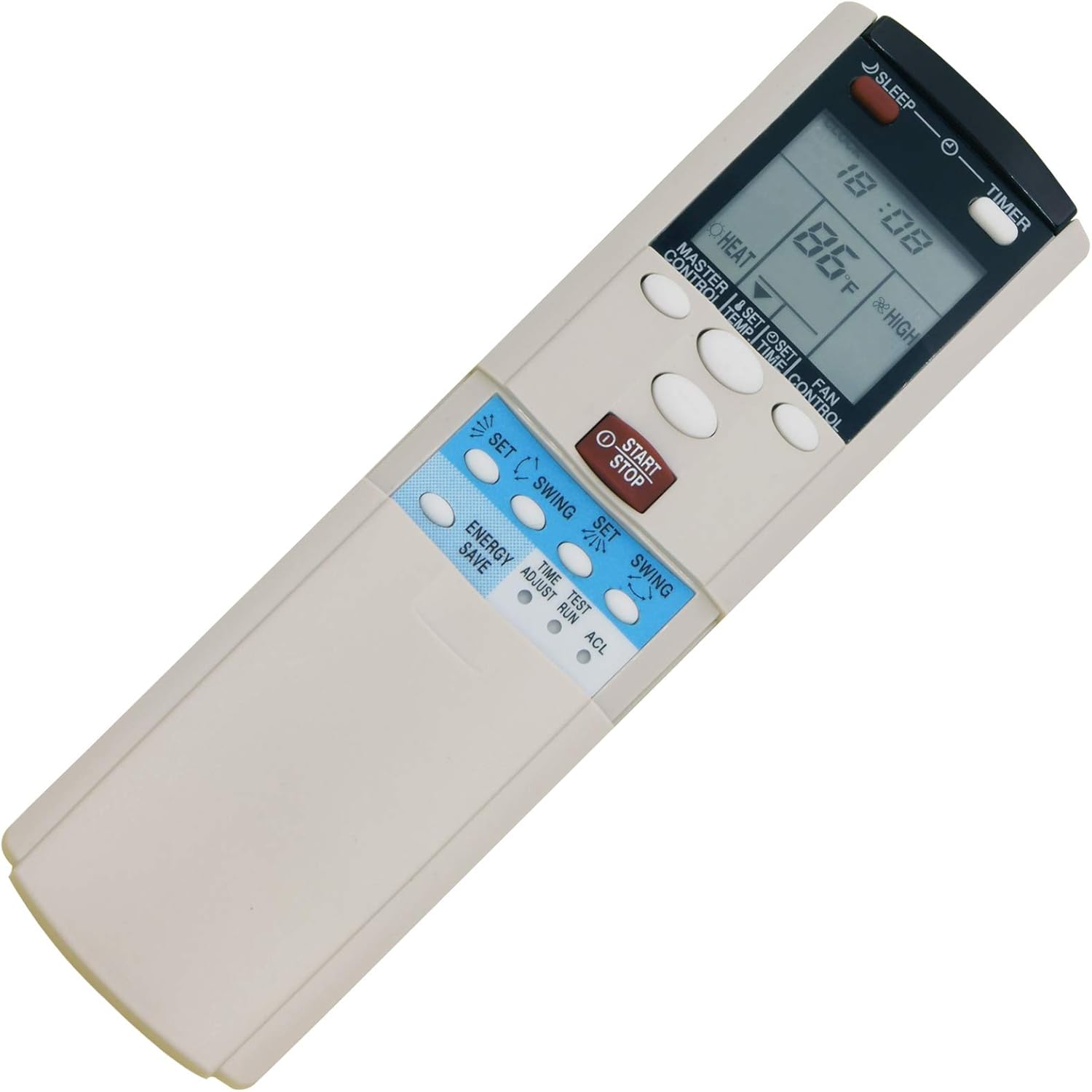
This image shows the front of the remote control, highlighting the LCD screen at the top which displays current settings like temperature, mode, and fan speed. Below the screen are various buttons for power, mode selection, temperature adjustment, fan speed, and other functions.
Setup
1. Battery Installation
The remote control requires 2 AA batteries (not included). Follow these steps to install them:
- Open the battery compartment cover located on the back of the remote control.
- Insert two AA batteries, ensuring the positive (+) and negative (-) terminals match the markings inside the compartment.
- Close the battery compartment cover securely.
This image displays the back of the remote control, where the battery compartment is located. The compartment cover can be slid open to insert or replace the AA batteries.
2. Initial Setup
This replacement remote control is designed to be compatible with Fujitsu GENERAL AR-DL series air conditioners without complex programming. In most cases, it will work immediately after battery installation. If the remote does not respond, ensure:
- The air conditioner is powered on.
- There are no obstructions between the remote control and the air conditioner's receiver.
- The batteries are correctly inserted and have sufficient charge.
Some models may require a simple pairing process, which is typically detailed on the back of the remote itself or in the original air conditioner manual. Refer to any instructions printed on the remote's battery cover or within the battery compartment for specific pairing steps if needed.
Operating Instructions
Familiarize yourself with the buttons and their functions:
- POWER (START/STOP): Turns the air conditioner ON or OFF.
- MODE: Cycles through operating modes (e.g., Cool, Heat, Fan, Dry, Auto).
- TEMP ▲/▼: Adjusts the desired temperature up or down.
- FAN: Adjusts fan speed (e.g., Auto, Low, Medium, High).
- TIMER: Sets the ON/OFF timer for the air conditioner.
- SLEEP: Activates or deactivates sleep mode, which adjusts temperature for comfortable sleep.
- SWING: Controls the louver swing function for air direction.
- ENERGY SAVE: Activates energy-saving mode (if supported by your AC unit).
- TEST: Used for diagnostic purposes (refer to AC unit manual if needed).
- ACL (Reset): A small recessed button, typically used to reset the remote to factory defaults. Use a thin, pointed object to press.
Temperature Display (Fahrenheit and Celsius)
This remote control supports both Fahrenheit (℉) and Celsius (℃) temperature displays. The method to switch between these units may vary:
- Common Method 1: With the remote OFF, press and hold the TEMP ▲ and TEMP ▼ buttons simultaneously for a few seconds.
- Common Method 2: Press and hold the MODE button for a few seconds.
- Common Method 3: Press the ACL (Reset) button, then follow on-screen prompts if any, or check if the default unit has changed.
If these methods do not work, consult the original air conditioner manual or try combinations of buttons while the remote is off or on.
Maintenance
- Cleaning: Wipe the remote control with a soft, dry cloth. Do not use liquid cleaners or abrasive materials.
- Battery Replacement: Replace batteries when the display becomes dim or the remote's range decreases. Always replace both batteries at the same time.
- Storage: Store the remote in a cool, dry place when not in use for extended periods.
Troubleshooting
| Problem | Possible Cause | Solution |
|---|---|---|
| Remote not responding | Dead or incorrectly installed batteries; remote out of range; obstruction; AC unit off. | Replace batteries; ensure correct polarity; move closer to AC unit; remove obstructions; turn on AC unit. |
| Limited range | Weak batteries; interference; remote sensor on AC unit blocked. | Replace batteries; ensure clear line of sight to AC unit sensor. |
| Display is dim or blank | Low battery power. | Replace batteries. |
| AC unit not responding to specific functions | Function not supported by AC unit; remote not fully compatible. | Verify if your AC unit model supports the specific function. While this remote is broadly compatible, some advanced features may vary. |
Specifications
- Brand: RCECAOSHAN
- Model Number: CECOMINOD032224
- Compatible Devices: Fujitsu GENERAL Air Conditioners (AR-DL series)
- Connectivity Technology: Infrared
- Controller Type: Button Control
- Maximum Range: Approximately 10 Meters (33 feet)
- Power Source: 2 x AA Batteries (not included)
- Special Feature: Ergonomic design, Fahrenheit and Celsius display
Warranty and Support
For warranty information or technical support, please contact the seller or the manufacturer directly. Keep your purchase receipt as proof of purchase. This product is a generic replacement and its warranty is typically provided by the seller.
