
1. Product Overview
The MASTOP Model 1096 is a solar-powered digital watch designed for daily wear and sports activities. It features a digital display, stopwatch, alarm, and is waterproof up to 50 meters. This manual provides detailed instructions for its use and care.

Image 1: Front view of the MASTOP Model 1096 Solar Digital Watch, highlighting its display and button layout.
2. Setup and Initial Use
2.1 Charging
Your MASTOP watch is solar-powered. For optimal performance, ensure the watch is exposed to light regularly. Initial charging may require several hours of exposure to bright light (natural sunlight is ideal) to fully charge the internal battery.
2.2 Button Functions

Image 2: Detailed diagram illustrating the function of each button and display element on the watch.
- LIGHT Button: Activates the EL backlight for viewing in low-light conditions.
- MODE Button: Cycles through different modes: Time Display, Stopwatch (Chrono), and Alarm.
- START/STOP Button: Used to start and stop functions in Stopwatch mode, or to adjust settings in setting modes.
- RESET Button: Used to reset values in Stopwatch mode, or to confirm settings in setting modes.
2.3 Setting Time and Date
- From the Time Display mode, press the MODE button until the time digits begin to flash, indicating setting mode.
- Use the START/STOP button to adjust the flashing digit (hours, minutes, date, etc.).
- Press the RESET button to move to the next setting item.
- Once all settings are adjusted, press the MODE button to exit the setting mode.
2.4 Setting Alarm
- Press the MODE button repeatedly until you reach the Alarm mode (indicated by 'ALM' on the display).
- Press the START/STOP button to adjust the alarm hour.
- Press the RESET button to move to the alarm minute setting.
- Press the START/STOP button to adjust the alarm minute.
- Press the MODE button to activate/deactivate the alarm and exit setting mode.
3. Operating Instructions
3.1 Time Display
The default mode displays the current time (hour, minute, second), day of the week, and date. The 'AM' indicator will show for morning hours.
3.2 Stopwatch (Chrono) Function
- Press the MODE button to navigate to the Stopwatch mode.
- Press the START/STOP button to begin timing.
- Press the START/STOP button again to pause timing.
- Press the RESET button to clear the stopwatch to zero.
3.3 Water Resistance
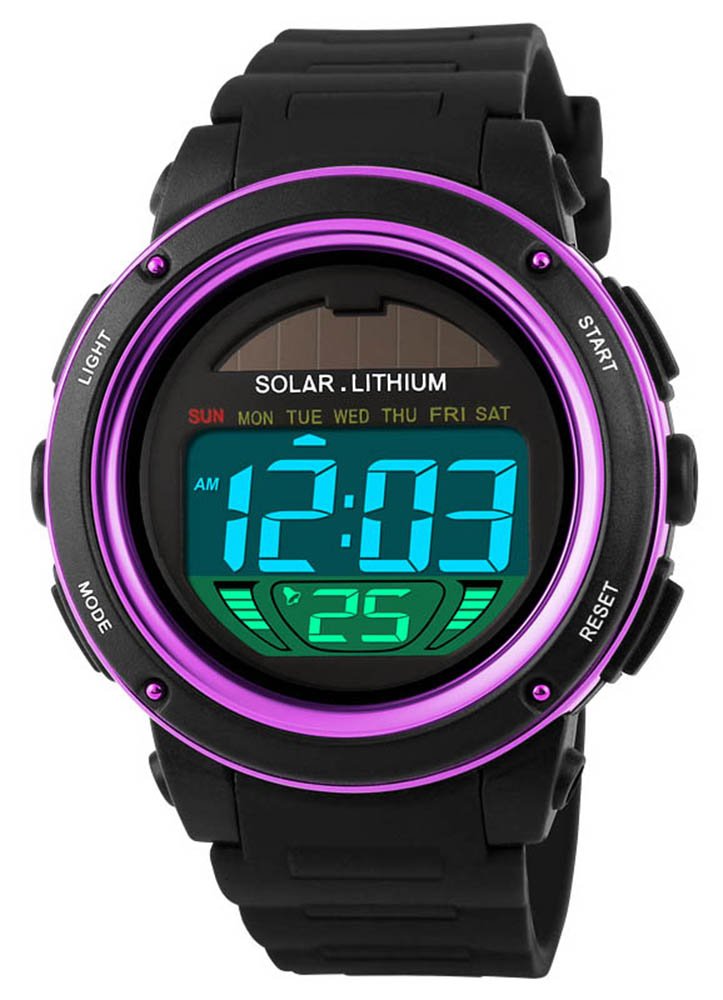
Image 3: The watch demonstrating its 50-meter water resistance capability.
This watch is rated for 50 meters of water resistance. This means it is suitable for daily use, such as hand washing, rain, and brief immersion in water. It is not recommended for hot water activities like hot showers or saunas, or for deep-sea diving.
4. Maintenance and Care
- Cleaning: Wipe the watch regularly with a soft, dry cloth to remove dirt and sweat. For stubborn dirt, a slightly damp cloth can be used, followed by drying.
- Avoid Extreme Conditions: Do not expose the watch to strong sunlight for prolonged periods, fire, or strong physical force to prevent damage.
- Chemicals: Keep the watch away from chemicals, solvents, detergents, perfumes, and cosmetics, as these can damage the watch's materials.
- Water Exposure: While waterproof, avoid exposing the watch to hot water, steam, or sudden temperature changes, which can compromise the seals.
- Storage: When not in use, store the watch in a cool, dry place, away from sharp objects to prevent scratches.
5. Troubleshooting
- Display is blank or dim: Ensure the watch receives sufficient light for solar charging. Place it under bright light for several hours.
- Time is incorrect: Refer to Section 2.3 to re-set the time and date.
- Buttons are unresponsive: Check for any debris around the buttons. If the issue persists, a full reset (if available, consult manufacturer for specific instructions) or professional inspection may be required.
- Water inside the watch: Immediately stop using the watch and seek professional service. Do not attempt to open the watch yourself.
6. Specifications

Image 4: Dimensional specifications and key features of the MASTOP Model 1096 watch.
| Feature | Detail |
|---|---|
| Model Number | 1096 |
| Display Type | Digital |
| Power Source | Solar Powered |
| Water Resistance Level | 50 Meters (Waterproof) |
| Case Diameter | 35 Millimeters |
| Case Thickness | 8.00 Millimeters |
| Band Width | 19 Millimeters |
| Band Material Type | Rubber |
| Crystal Type | Mineral |
| Closure Type | Buckle |
| Sport Type | Climbing, Running |
7. Warranty and Support
7.1 Manufacturer's Warranty
The MASTOP Model 1096 watch comes with a 1-year manufacturer's warranty from the date of purchase. This warranty covers manufacturing defects under normal use. It does not cover damage resulting from misuse, accidents, unauthorized repairs, or normal wear and tear.
7.2 Customer Support
For any questions, concerns, or warranty claims, please contact MASTOP customer service. We are committed to ensuring your satisfaction with our products.
Visit the official MASTOP Store for more information: MASTOP Store on Amazon