
BLACK+DECKER BPACT08WT
BLACK+DECKER 8,000 BTU Portable Air Conditioner User Manual
Model: BPACT08WT
Brand: BLACK+DECKER
Product Overview
The BLACK+DECKER 8,000 BTU Portable Air Conditioner is designed to provide efficient cooling for rooms up to 350 sq. ft. This versatile unit functions as a 3-in-1 appliance, offering air conditioning, fan, and dehumidifier modes to enhance your indoor comfort. Its compact design and integrated casters ensure easy mobility, allowing you to move it between rooms as needed. The unit features a convenient remote control and a top-mounted control panel with an LED display for intuitive operation. Key features include a slide-out washable filter for easy maintenance, auto water evaporation, and a 24-hour timer for customized cooling schedules.

Image: The BLACK+DECKER 8,000 BTU Portable Air Conditioner, a compact white unit with top vents and casters for easy movement.
Safety Information
Please read all safety warnings and instructions carefully before operating this appliance to reduce the risk of fire, electric shock, or injury. Keep this manual for future reference.
- Always plug the unit into a grounded 3-prong outlet. Do not remove the grounding prong.
- Do not operate the unit with a damaged cord or plug.
- Ensure proper ventilation and do not block air inlets or outlets.
- Do not use the unit near water or in excessively humid environments.
- Unplug the unit before cleaning or performing any maintenance.
- Keep children and pets away from the unit during operation.
- Position the unit on a flat, stable surface to prevent tipping.
What's in the Box
Your BLACK+DECKER Portable Air Conditioner package includes the following components:
- Portable Air Conditioner Unit
- Air exhaust hose
- Hose inlet adapter
- Hose outlet adapter
- Window casement (slider bracket)
- Foam seal
- 2 locking screws
- Water drain hose
- Full function remote control
- Owner's manual (this document)

Image: A visual representation of the included window kit components, including the exhaust hose, window slider bracket, and adapters.
Setup
Follow these steps to set up your portable air conditioner for optimal performance.
Window Kit Installation
- Extend the window slider bracket to fit your window opening. The kit is designed for windows up to 47.2 inches wide.
- Attach the exhaust hose inlet adapter to one end of the exhaust hose and the outlet adapter to the other end.
- Connect the exhaust hose outlet adapter to the opening in the window slider bracket.
- Insert the window slider bracket into your window opening and secure it. Use the foam seal to ensure an airtight fit.
- Connect the exhaust hose inlet adapter to the exhaust port on the back of the air conditioner unit.
- Ensure all connections are secure to prevent air leakage, which can reduce cooling efficiency.

Image: A visual guide showing the easy installation process of the portable AC unit, highlighting its side handles and casters for mobility.
Operating Instructions
Your portable air conditioner offers multiple modes for various comfort needs.
Control Panel and Remote Control
The unit can be operated using the top-mounted control panel with an LED display or the included full-function remote control. The remote allows you to adjust settings from a distance, including temperature, fan speed, and operating mode.

Image: The remote control for the BLACK+DECKER portable air conditioner, showing buttons for power, mode, fan speed, timer, and temperature adjustment.
Operating Modes
- Cool Mode: Provides powerful cooling for rooms up to 350 sq. ft. Set your desired temperature using the up/down arrows.
- Fan Mode: Circulates air without cooling. Choose from multiple fan speeds.
- Dehumidifier Mode: Removes excess moisture from the air, ideal for humid conditions.

Image: An overhead view of the portable AC unit's top-mounted controls, illustrating its 3-in-1 functionality as an AC, fan, and dehumidifier.
Timer Function
Utilize the 24-hour timer to program the unit to turn on or off automatically, saving energy and ensuring comfort when you need it.
Maintenance
Regular maintenance ensures the longevity and efficiency of your air conditioner.
Cleaning the Air Filter
The unit features a slide-out washable filter. It is recommended to clean the filter every two weeks, or more frequently depending on usage and air quality, to maintain optimal performance and air circulation.
- Unplug the air conditioner from the power outlet.
- Locate and slide out the air filter from its housing.
- Wash the filter with warm, soapy water. Rinse thoroughly.
- Allow the filter to air dry completely before reinserting it into the unit.
Water Drainage
This unit features auto water evaporation, which helps to minimize the need for manual drainage. However, in highly humid conditions, the internal water tank may fill up. When this occurs, the unit will stop operating and indicate that drainage is required. Connect the provided drain hose to the drainage port and allow the water to empty into a suitable container or floor drain.
Troubleshooting
If you encounter issues with your air conditioner, refer to the following common troubleshooting tips. For more detailed solutions, please consult the full User Manual PDF.
| Problem | Possible Cause | Solution |
|---|---|---|
| Unit does not turn on | No power, power cord unplugged, circuit breaker tripped. | Check power connection, reset circuit breaker. |
| Insufficient cooling | Dirty air filter, blocked air intake/outlet, room too large, window kit not sealed. | Clean filter, clear obstructions, ensure proper room size for BTU, seal window kit. |
| Unit is noisy | Unit not level, fan obstruction. | Place on a flat surface, check for foreign objects in fan. |
| Water leakage | Drain plug not secured, drain hose clogged, internal tank full. | Ensure drain plug is secure, clear drain hose, empty water tank if full. |
Specifications
- Model: BPACT08WT
- Cooling Capacity: 8,000 BTU (ASHRAE 128) / 4,100 BTU (DOE)
- Coverage Area: Up to 350 sq. ft.
- Dimensions (D x W x H): 14" x 15.3" x 24.8"
- Item Weight: 45.3 pounds
- Voltage: 115 Volts
- Wattage: 935 watts
- Sound Level: 52 dB
- Material: Aluminium (9.5%), Plastic (33.16%), Copper (14.1%), Steel (39.98%), Other materials (3.26%)
- Special Features: Remote Controlled, 3-in-1 (Air Conditioner, Fan, Dehumidifier)
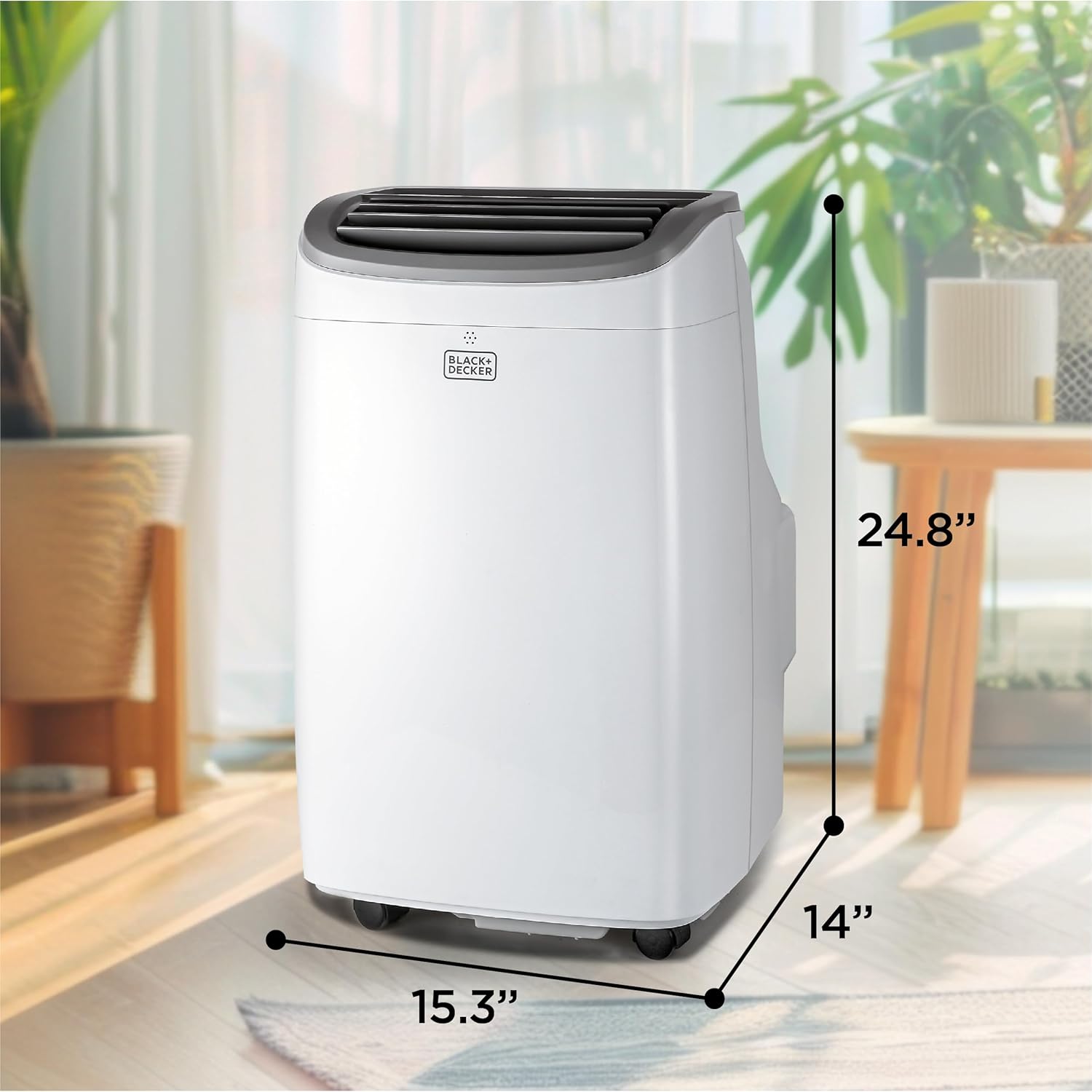
Image: A diagram illustrating the physical dimensions (depth, width, height) of the BLACK+DECKER portable air conditioner.

Image: A graphic indicating the cooling coverage of the unit, stating it cools up to 400 sq ft (9,000 BTU ASHRAE / 5,300 BTU SACC/CEC).

Image: A floor plan diagram showing recommended room sizes for different BTU ratings of BLACK+DECKER portable air conditioners, including 8,000 BTU for up to 350 sq ft.
Warranty and Support
Your BLACK+DECKER Portable Air Conditioner comes with a 1-year limited warranty. Please retain your proof of purchase for warranty claims.
For further assistance, detailed instructions, or troubleshooting not covered in this manual, please refer to the official User Manual PDF:
You can also visit the official BLACK+DECKER support website or contact their customer service for direct assistance.
Related documentsBPACT08WT


Ask a question about this manual
Ask about setup, troubleshooting, compatibility, parts, safety, or missing instructions. Manuals+ will review the question and use this page’s manual context to help answer it.