
Introduction
This manual provides comprehensive instructions for the QZSD Q888 Portable Travel Tripod Monopod. Designed for DSLR, DV, and video cameras, this aluminum tripod offers stability and versatility for various photographic activities. Please read this manual thoroughly before using the product to ensure proper operation and maintenance.
Package Contents
Upon opening the package, please verify that all the following items are included:
- 1 x QZSD Q888 Tripod with Ball Head
- 1 x Tripod Carrying Bag
- 1 x Ball Head Protector Bag

Image: Contents of the QZSD Q888 tripod package, including the tripod, carrying bag, and ball head protector bag.
Product Features
The QZSD Q888 tripod is engineered with several key features to enhance your photography experience:
- Durable Construction: Features high rigidity, efficient shock absorption, and enhanced heat and corrosion resistance.
- Versatile Design: Can be configured as a tripod or a monopod, adapting to various shooting scenarios.
- Secure Locking System: Utilizes a rotary locking system made from high-quality precision aluminum, offering waterproof and dustproof properties.
- Gravity Hook: An automatic telescopic gravity hook provides convenient operation and added stability by allowing you to hang weight.
- Macro Capability: The axis can be removed for flip-chip functionality, enabling macro photography.
- Stable Base: The principal trigeminal position is constructed from high-quality magnesium alloy using high-precision CNC lathes, ensuring high hardness, wear resistance, and excellent stability.
- Ball Head: Equipped with a ball head for flexible camera positioning.

Image: Close-up views highlighting the ball head, angle adjustment mechanism, and leg locking system of the QZSD Q888 tripod.
Setup
1. Unfolding the Tripod
- Gently extend the tripod legs from their folded position.
- Adjust the leg angles using the angle adjustment locks located at the top of each leg. Press the release button and set the leg to the desired angle (e.g., wide for stability, narrow for compact setup).
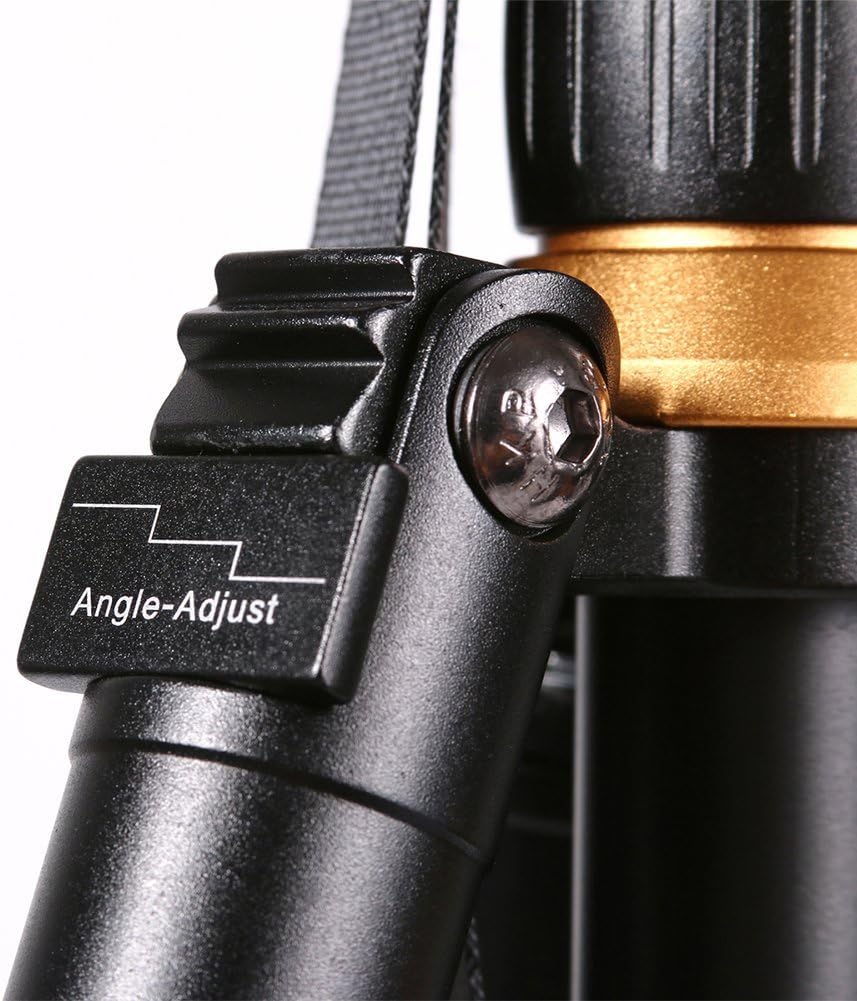
Image: Detail of the angle adjustment mechanism on the tripod leg, showing the button to release and set leg angles.
- Extend each leg section by twisting the rotary locking collars counter-clockwise to loosen, pulling the section out, and then twisting clockwise to tighten. Repeat for all sections until the desired height is reached.
2. Attaching the Camera
- Ensure the quick release plate is detached from the ball head. If attached, locate the release lever or knob on the ball head and disengage it.
- Screw the quick release plate onto the 1/4" standard screw hole on the bottom of your camera or compatible device. Ensure it is securely fastened.

Image: The quick release plate, showing the 1/4-inch mounting screw and integrated bubble level for precise leveling.
- Slide the quick release plate with the attached camera back into the ball head's receiver. Secure it by engaging the release lever or knob until it clicks into place. Verify the camera is firmly attached before letting go.
Operating Instructions
1. Adjusting Height and Stability
- Leg Extension: Loosen the leg section locks, extend the legs to the desired height, and then firmly tighten the locks.
- Center Column: The center column can be extended for additional height. Loosen the center column lock, raise the column, and then tighten the lock. For maximum stability, keep the center column as low as possible.
- Gravity Hook: For increased stability, especially in windy conditions or with heavy equipment, extend the gravity hook from the bottom of the center column and hang a weight (e.g., your camera bag).

Image: Visual representation of the QZSD Q888 tripod's dimensions, including its folded length (350mm), minimum height (360mm), and maximum height (1520mm).
2. Using the Ball Head
- Locking Knob: The main knob on the ball head controls the movement of the ball. Loosen it to adjust your camera's angle freely (tilt, pan, and rotate).
- Friction Control (if applicable): Some ball heads have a smaller knob to adjust the friction, allowing for smoother or stiffer movement when the main knob is slightly loosened.
- Panning Base: The base of the ball head can rotate independently for panoramic shots. Loosen the dedicated panning lock knob (if present) to rotate the camera horizontally without affecting the tilt.
- Once the desired composition is achieved, firmly tighten all relevant knobs to secure the camera in place.
3. Monopod Conversion
The QZSD Q888 tripod features a detachable leg that can be converted into a monopod for quick, portable support.
- Identify the leg with the foam grip. This leg is typically designed for monopod conversion.
- Unscrew this leg from the tripod's main body.
- Unscrew the ball head from the tripod's center column and screw it onto the top of the detached leg.
- Extend the monopod sections as needed and tighten the locks.

Image: The QZSD Q888 tripod shown in its fully extended tripod configuration, its compact folded state, and as a standalone monopod.
Maintenance
- Cleaning: After each use, especially in dusty or sandy environments, wipe down the tripod legs and joints with a clean, damp cloth. Avoid using harsh chemicals.
- Lubrication: Periodically check the leg locks and ball head for smooth operation. If they become stiff, apply a small amount of silicone-based lubricant to the moving parts. Do not over-lubricate.
- Storage: Store the tripod in its carrying bag in a dry, cool place away from direct sunlight and extreme temperatures. Ensure it is clean and dry before storage.
- Inspection: Regularly inspect all screws, bolts, and joints for tightness. Tighten any loose components to prevent accidental damage or instability.
Troubleshooting
| Problem | Possible Cause | Solution |
|---|---|---|
| Tripod is unstable. | Legs not fully extended or locked; uneven surface; insufficient weight. | Ensure all leg sections are fully extended and locks are tightened. Adjust leg angles for stability on uneven ground. Use the gravity hook with added weight. |
| Ball head movement is stiff or jerky. | Dust/dirt in mechanism; lack of lubrication; locking knob too tight. | Clean the ball head thoroughly. Apply a small amount of silicone lubricant. Ensure the locking knob is loosened sufficiently for movement. |
| Camera not securely attached to ball head. | Quick release plate not properly seated; screw loose. | Ensure the quick release plate is fully inserted and the locking mechanism is engaged. Tighten the screw connecting the camera to the quick release plate. |
| Leg sections slide down after locking. | Leg locks are not tightened enough or are worn. | Ensure locks are twisted firmly clockwise. If problem persists, inspect locks for wear and contact support. |
Specifications
| Attribute | Value |
|---|---|
| Model Number | QZSDTR-888 |
| Material | Aluminum Alloy |
| Folded Length | 350 mm (13.78 inches) |
| Maximum Height | 1520 mm (59.84 inches) |
| Minimum Height | 360 mm (14.17 inches) |
| Max Tube Diameter | 25 mm |
| Min Tube Diameter | 13 mm |
| Tripod Weight | 1.1 kg (2.42 pounds) |
| Max Load Capacity | 3 kg (6.6 pounds) - Note: Discrepancy with product description, using specification value for safety. |
| Compatible Devices | All devices with 1/4" standard screw hole (DSLR, DV, Video Camera, Camcorder) |
| Tripod Head Type | Ball Head |
Warranty and Support
QZSD products are manufactured to high quality standards. For any issues, questions, or support needs regarding your Q888 tripod, please contact the seller or manufacturer directly through the platform where the product was purchased. Please retain your proof of purchase for warranty claims.
For more information about QZSD products, you may visit the official QZSD Store: QZSD Store on Amazon.