
KEY SMART CM-8825FN
Smart Meter CM-8825FN Digital Paint Coating Thickness Gauge User Manual
Model: CM-8825FN
Introduction
The Smart Meter CM-8825FN is a versatile digital paint coating thickness gauge designed for precise measurement of coating thickness on various substrates. It utilizes two primary measuring methods: magnetic induction (F) for non-magnetic materials on magnetic substrates, and eddy current (N) for non-conductive coatings on non-magnetic metals. This device is ideal for quality control, inspection, and assessment in automotive, manufacturing, and painting industries.
Key features include selectable metric/imperial units, automatic substrate recognition, and an automatic memory for calibration values, ensuring ease of use and accurate readings.
Product Overview
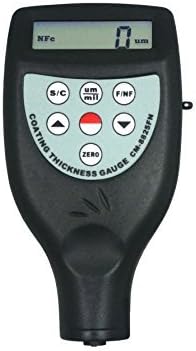
Figure 1: Front view of the Smart Meter CM-8825FN Digital Paint Coating Thickness Gauge. The device is black with a grey control panel featuring a digital display at the top, and buttons for S/C (Single/Continuous), um/mil (unit selection), F/NF (magnetic/non-magnetic mode), arrow keys for navigation, a red button for measurement, and a ZERO button for calibration.
Setup
1. Battery Installation
Locate the battery compartment on the back of the device. Insert the required batteries (typically AAA or 9V, refer to packaging for exact type) ensuring correct polarity. Close the battery compartment securely.
2. Power On/Off
Press the power button (if available, otherwise the device may power on automatically upon first use or measurement). The device will perform a self-test and display the initial screen.
3. Initial Calibration
The CM-8825FN features automatic memory of calibration values and automatic substrate recognition. For optimal accuracy, it is recommended to perform a zero-point calibration on an uncoated sample of the substrate material before taking measurements. Press the ZERO button while the probe is placed firmly on a clean, uncoated reference surface.
Operating Instructions
1. Selecting Measurement Method (F/NF)
The gauge automatically recognizes the substrate type. However, you can manually switch between magnetic induction (F) and eddy current (N) modes using the F/NF button if needed. The display will indicate the active mode (Fe for magnetic, NFe for non-magnetic).
- F (Magnetic Induction): Used for measuring the thickness of non-magnetic coatings (e.g., paint, plastic, enamel) on magnetic metal substrates (e.g., steel, iron).
- N (Eddy Current): Used for measuring the thickness of non-conductive coatings (e.g., paint, anodizing) on non-magnetic metal substrates (e.g., aluminum, copper, brass).
2. Selecting Measurement Mode (Single/Continuous)
Press the S/C button to toggle between Single and Continuous measurement modes.
- Single Mode: Takes one measurement each time the probe is applied to the surface.
- Continuous Mode: Allows for continuous measurement as the probe is moved across the surface. This mode is particularly convenient for measuring the coating thickness of curved objects or tiny objects, as mentioned in the product description. Note that the buzzing reminder is typically not active in continuous mode.
3. Selecting Units (um/mil)
Press the um/mil button to switch between micrometers (um) and mils (mil) units for measurement display.
4. Taking a Measurement
- Ensure the probe is clean and free of debris.
- Place the probe firmly and perpendicularly onto the coated surface to be measured.
- In Single mode, the measurement will appear on the display. In Continuous mode, the display will update as the probe moves.
- The operation process typically includes a buzzing reminder upon a stable reading, except in continuous mode.
- Lift the probe from the surface to finalize the reading in Single mode.
5. Automatic Shut Down
The device is equipped with an automatic shut-down feature to conserve battery life. It will power off after a period of inactivity. You can also manually shut down the device if a dedicated power button is present.
Maintenance
1. Cleaning
Regularly clean the probe tip and the device's body with a soft, dry cloth. Do not use abrasive cleaners or solvents. Ensure no dust or debris accumulates on the probe tip, as this can affect measurement accuracy.
2. Storage
When not in use, store the CM-8825FN in its protective case (if provided) in a cool, dry place, away from direct sunlight, extreme temperatures, and high humidity. Remove batteries if the device will not be used for an extended period to prevent leakage.
Troubleshooting
| Problem | Possible Cause | Solution |
|---|---|---|
| Device does not power on. | Low or dead batteries; incorrect battery installation. | Replace batteries with new ones; ensure correct polarity. |
| Inaccurate readings. | Probe tip dirty; improper calibration; incorrect measurement mode (F/N); unstable placement. | Clean probe tip; perform zero-point calibration; verify F/N mode matches substrate; ensure firm, perpendicular placement. |
| Display shows "Err" or similar error. | Measurement out of range; sensor malfunction. | Ensure measurement is within the gauge's specified range (0-1250um / 0-50mil); restart device; if persistent, contact support. |
Specifications
- Model: CM-8825FN
- Measuring Methods: Magnetic Induction (F) and Eddy Current (N)
- Measurement Range: 0-1250um / 0-50mil
- Measurement Modes: Single and Continuous
- Units: Micrometers (um) / Mils (mil) selectable
- Calibration: Automatic memory of calibration value, automatic substrate recognition
- Features: Buzzing reminder (except in continuous mode), Manual or automatic shut down
- Manufacturer: Smart Meter
- Style: Digital
- Item Package Quantity: 1
Warranty and Support
For information regarding warranty coverage, technical support, or service, please refer to the documentation included with your purchase or visit the official website of the manufacturer, Smart Meter. Keep your purchase receipt as proof of purchase for warranty claims.
For further assistance, you may contact the seller or manufacturer directly through their provided contact channels.
Ask a question about this manual
Ask about setup, troubleshooting, compatibility, parts, safety, or missing instructions. Manuals+ will review the question and use this page’s manual context to help answer it.