
1. Important Safety Instructions
Read all instructions carefully before using the appliance. Keep this manual for future reference. Always follow basic safety precautions to reduce the risk of fire, electric shock, injury to persons, or exposure to excessive microwave energy.
- Do not attempt to operate this oven with the door open as this can result in harmful exposure to microwave energy.
- Do not place any object between the oven front face and the door or allow soil or cleaner residue to accumulate on sealing surfaces.
- Do not operate the oven if it is damaged. It is particularly important that the oven door closes properly and that there is no damage to the: (1) door (bent), (2) hinges and latches (broken or loosened), (3) door seals and sealing surfaces.
- The oven should not be adjusted or repaired by anyone except properly qualified service personnel.
- Ensure the appliance is properly grounded.
- Do not use corrosive chemicals or vapors in this appliance.
- This appliance is intended for household use only.
2. Product Overview
The Daewoo KOC-9C0T is a 28-liter combination microwave oven designed for countertop use, offering microwave, grill, and convection cooking functions. It features a stainless steel cavity for durability and easy cleaning.
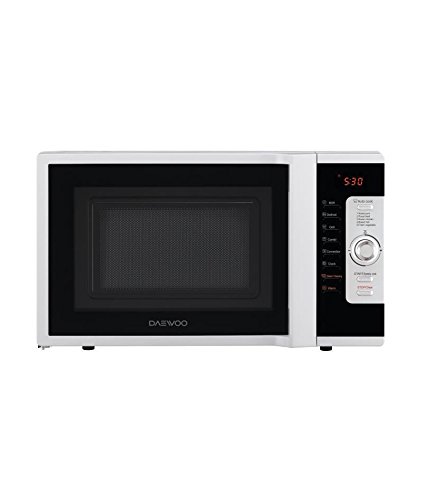
Figure 1: Front view of the Daewoo KOC-9C0T Combination Microwave Oven. This image displays the appliance's exterior, including the door, control panel, and overall design.
Components:
- Control Panel: Features touch buttons and a rotary knob for setting functions and time.
- Door: Equipped with a safety lock system.
- Turntable: Glass tray and roller ring for even cooking.
- Grill Rack: Used for grilling functions.
- Stainless Steel Cavity: Interior cooking chamber.
Key Features:
- Capacity: 28 Liters
- Microwave Power: 900 W (10 power levels)
- Grill Power: 1250 W
- Convection Power: 1250 W
- Functions: Microwave, Grill, Convection, Combination Cooking, Auto Defrost, Steam Clean.
- Controls: Touch panel and rotary knob.
3. Setup and Installation
3.1 Unpacking
Carefully remove the microwave oven and all packing materials from the carton. Check the oven for any damage, such as dents or a misaligned door. Do not operate the oven if it is damaged. Contact your dealer immediately.
3.2 Placement
- Place the oven on a flat, stable surface strong enough to support its weight (approximately 17.65 kg).
- Ensure adequate ventilation: leave a minimum of 20 cm (8 inches) of space above the oven, 10 cm (4 inches) at the rear, and 5 cm (2 inches) on each side.
- Do not block air vents.
- Keep the oven away from heat sources and strong magnetic fields.
3.3 Electrical Connection
Ensure the voltage and frequency of your power supply match the specifications on the oven's rating label. Plug the oven into a properly grounded electrical outlet. Do not use extension cords or adapters.
3.4 Initial Cleaning
Before first use, wipe the interior and exterior of the oven with a damp cloth. Wash the turntable and roller ring in warm, soapy water.
4. Operating Instructions
Familiarize yourself with the control panel before operation. The oven features a touch panel and a rotary knob for setting time and power levels.
4.1 Basic Microwave Cooking
- Place food in a microwave-safe container on the turntable.
- Close the door securely.
- Press the "Microwave" button.
- Use the rotary knob to select the desired power level (e.g., P100 for 100% power).
- Use the rotary knob to set the cooking time.
- Press "Start" to begin cooking.
4.2 Grill Cooking
Use the grill function for browning and crisping food. Place food on the grill rack.
- Place food on the grill rack.
- Press the "Grill" button.
- Use the rotary knob to set the grilling time.
- Press "Start".
4.3 Convection Cooking
Convection cooking uses a fan to circulate hot air, similar to a conventional oven.
- Press the "Convection" button.
- Use the rotary knob to select the desired temperature.
- Press "Start" to preheat the oven (optional).
- Once preheated (or if skipping preheat), place food inside.
- Use the rotary knob to set the cooking time.
- Press "Start".
4.4 Combination Cooking
This oven offers various combination modes (Microwave + Grill, Microwave + Convection) for faster and more versatile cooking.
- Press the "Combi" button repeatedly to cycle through available combination modes.
- Use the rotary knob to set the cooking time.
- Press "Start".
4.5 Auto Defrost
The auto defrost function simplifies defrosting by automatically calculating time based on food weight.
- Press the "Auto Defrost" button.
- Use the rotary knob to select the food type or weight.
- Press "Start".
4.6 Steam Clean Function
This feature helps loosen food residue for easier cleaning.
- Place a microwave-safe bowl with water inside the oven.
- Press the "Steam Clean" button (or refer to specific manual for exact button/sequence).
- Press "Start".
- After the cycle, carefully remove the bowl and wipe the interior with a damp cloth.
5. Maintenance and Cleaning
Regular cleaning ensures optimal performance and extends the life of your appliance.
5.1 General Cleaning
- Always unplug the oven before cleaning.
- Do not use abrasive cleaners, steel wool, or harsh chemicals.
5.2 Oven Interior
Wipe the interior cavity, door seals, and door surfaces with a damp cloth after each use. For stubborn stains, use a mild detergent or the steam clean function. The stainless steel cavity is designed for easy maintenance.
5.3 Oven Exterior
Clean the exterior with a soft, damp cloth. Avoid getting water into the ventilation openings.
5.4 Turntable and Roller Ring
Remove the glass turntable and roller ring for cleaning. Wash them in warm, soapy water or in the dishwasher. Ensure they are completely dry before placing them back in the oven.
6. Troubleshooting
Before contacting service, check the following common issues and solutions:
| Problem | Possible Cause | Solution |
|---|---|---|
| Oven does not start | Power cord not plugged in; Door not closed properly; Fuse blown or circuit breaker tripped. | Plug in power cord; Close door firmly; Check household fuse or reset circuit breaker. |
| Food not cooking evenly | Food not stirred or turned; Turntable not rotating. | Stir or turn food during cooking; Ensure turntable is correctly placed and not obstructed. |
| Light not working | Bulb is faulty. | Contact qualified service personnel for bulb replacement. |
| Excessive steam from door | Normal during cooking, especially with high moisture content food. | This is normal and not a fault. |
7. Specifications
| Feature | Specification |
|---|---|
| Model Number | KOC-9C0T |
| Type | Combination Microwave Oven |
| Installation Type | Countertop |
| Capacity | 28 Liters |
| Microwave Power Output | 900 W (10 power levels) |
| Grill Power Output | 1250 W |
| Convection Power Output | 1250 W |
| Control Type | Touch Panel, Rotary Knob |
| Cavity Material | Stainless Steel |
| Color | White |
| Weight | 17.65 kg |
| Special Features | Auto Defrost, Steam Clean |
8. Warranty and Support
For warranty information, please refer to the warranty card included with your product or contact Daewoo customer service. Keep your purchase receipt as proof of purchase.
For technical support or service inquiries, please visit the official Daewoo website or contact their authorized service centers. Contact details can typically be found in the product packaging or on the brand's official support pages.
