Introduction
The CORSAIR M65 Pro RGB is a high-performance FPS gaming mouse engineered for precision and durability. It features a 12,000 DPI optical sensor for pixel-precise tracking and advanced surface calibration. Constructed with an aircraft-grade aluminum frame, it offers both lightweight design and robust build quality. The mouse includes an advanced weight tuning system for customizable balance and supports three-zone RGB backlighting, along with advanced button configuration and macro programming via CORSAIR Utility Engine (CUE) software.
Package Contents
- CORSAIR M65 Pro RGB FPS Gaming Mouse (1)
- User Manual (this document)
- Warranty Guide
Setup
- Connect the Mouse: Plug the USB connector of the CORSAIR M65 Pro RGB mouse into an available USB 2.0 port on your PC. The mouse is a wired device and does not require batteries for operation.
- Install CORSAIR Utility Engine (CUE) Software: For full customization of DPI settings, button assignments, macro programming, and RGB lighting, download and install the latest CORSAIR Utility Engine (CUE) software from the official Corsair website (www.corsair.com/downloads). Follow the on-screen instructions for installation.
- Surface Calibration: After installing the CUE software, utilize the surface calibration tuning utility to optimize the sensor precision and responsiveness for your specific gaming surface. This ensures optimal tracking performance.
Operating Instructions
Button Functions
The CORSAIR M65 Pro RGB features eight strategically placed, programmable buttons for enhanced control and customization.
- Left/Right Click: Standard mouse buttons for primary interactions.
- Scroll Wheel: Used for vertical scrolling and acts as a clickable middle button.
- DPI Up/Down Buttons: Located above the scroll wheel, these buttons allow for on-the-fly adjustment of the mouse's Dots Per Inch (DPI) sensitivity. You can program up to five different DPI settings via the CUE software.
- Sniper Button: Positioned on the left side, this dedicated button (often red with a target icon) temporarily lowers the DPI to a pre-set value (e.g., 400 DPI) for precise aiming in FPS games. Releasing the button returns the DPI to its previous setting.
- Forward/Back Buttons: Located above the sniper button, these are typically used for navigating web pages or folders. They can be reprogrammed for other functions via CUE.
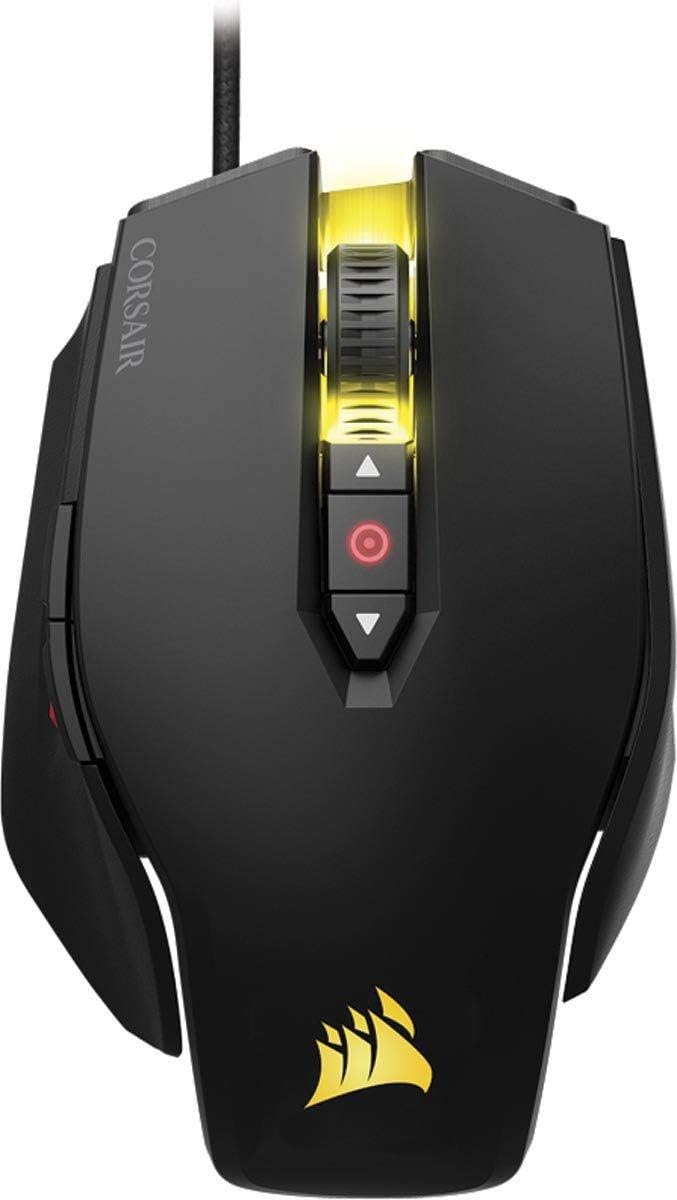
Figure 1: Side view highlighting the sniper button and side buttons.

Figure 2: Top view highlighting the DPI adjustment buttons and scroll wheel.
Weight Tuning System
The M65 Pro RGB features an advanced weight tuning system allowing you to adjust the mouse's weight and center of gravity to match your preferred play style. The mouse comes with three removable weights located on the underside.
- To remove or add weights, use a coin or a flat-head screwdriver to unscrew the weight covers on the bottom of the mouse.
- Carefully remove or insert the desired weights.
- Replace the covers and tighten them securely.

Figure 3: Underside of the mouse with tunable weights visible.
RGB Backlighting Customization
The M65 Pro RGB features three-zone RGB backlighting, which can be fully customized using the CORSAIR Utility Engine (CUE) software. You can select from a wide range of colors and lighting effects to personalize your mouse.

Figure 4: Top view of the mouse showcasing RGB lighting.
Maintenance
- Cleaning: Use a soft, dry cloth to clean the mouse. For stubborn dirt, a slightly damp cloth can be used, but ensure no moisture enters the mouse. Avoid harsh chemicals or abrasive materials.
- Cable Care: Avoid sharp bends or excessive pulling on the braided USB cable to prevent damage. Utilize the included Velcro strap to manage excess cable length.
- Sensor Maintenance: Keep the optical sensor on the underside of the mouse clean and free of dust or debris for optimal tracking performance.
Troubleshooting
- Mouse Not Responding:
- Ensure the USB cable is securely plugged into a working USB port on your PC.
- Try plugging the mouse into a different USB port.
- Restart your computer.
- Tracking Issues:
- Clean the optical sensor on the underside of the mouse.
- Ensure you are using a suitable mouse pad or surface.
- Perform surface calibration using the CORSAIR Utility Engine (CUE) software.
- CUE Software Not Detecting Mouse:
- Ensure the CUE software is updated to the latest version.
- Try reinstalling the CUE software.
- Check for any conflicting software that might interfere with CUE.
- RGB Lighting Not Working:
- Verify lighting settings within the CUE software.
- Ensure the CUE software is running in the background.
Specifications
| Feature | Detail |
|---|---|
| Brand | Corsair |
| Model Number | CH-9300011-NA |
| Movement Detection Technology | Optical |
| DPI | 12,000 DPI |
| Connectivity Technology | Wired (USB 2.0) |
| Hardware Platform | PC |
| Operating System | Windows |
| Item Weight | 5.9 ounces |
| Product Dimensions (LxWxH) | 4.64 x 2.8 x 1.5 inches |
| Color | Black |
| Switches | High capacity Omron switches (rated for 20 million clicks) |
| Special Feature | Lightweight, Tunable Weights, RGB Backlighting |
Warranty and Support
For detailed warranty information and technical support, please refer to the official CORSAIR User Guide (PDF) or visit the Corsair support website.
- Official User Guide: Download PDF
- Corsair Support: Visit www.corsair.com/support for FAQs, drivers, and contact information.


