
Introduction
Thank you for choosing the SCS Sentinel AAM0084 ControlGate 4-Channel Rolling Code Gate Remote Control. This remote is designed to provide secure and convenient access to your automated gate system. Featuring a rolling code technology, it offers enhanced security against unauthorized access. This manual will guide you through the setup, operation, and maintenance of your new remote control.

Image: Front view of the SCS Sentinel ControlGate remote control, showing the four fuchsia buttons and the SCS Sentinel logo.
Setup
1. Battery Installation
Your remote control comes with two CR2016 lithium batteries already installed. If replacement is needed, follow these steps:
- Carefully open the remote control casing. This usually involves gently prying apart the two halves, often near the keychain attachment point.
- Remove the old CR2016 batteries.
- Insert two new CR2016 lithium batteries, ensuring the correct polarity (+/-) as indicated inside the battery compartment.
- Close the remote control casing securely.

Image: Side view of the remote control, highlighting its compact design and the keychain attachment.
2. Programming the Remote Control
The SCS Sentinel AAM0084 ControlGate remote control must be programmed to your specific gate motorization system. Refer to the user manual of your gate motorization system for detailed programming instructions. The programming procedure varies depending on the gate opener model.
Compatibility: This remote control is compatible with the following SCS Sentinel gate motorization boards:
- CB100/P100 PCB1 (for ram-type gate openers)
- CB100/P100 PCB2 (for articulated arm gate openers)
- P501BH PCB1 (for sliding gate openers)
- CTR51
- CTR52
Important: This remote control is NOT suitable for the following boards: CTR50, CTR57, CTR58, and F12E.

Image: Back view of the remote control, showing the smooth casing and the CE compliance mark.
Operating Instructions
The SCS Sentinel ControlGate remote control features four independent channels, allowing you to control up to four different gate or garage door systems, provided they are compatible and correctly programmed.
- Button Functionality: Each of the four fuchsia buttons corresponds to a specific channel. Once programmed, pressing a button will send the signal to the associated gate or device.
- Activation: Press and hold the desired button briefly until your gate or device responds.
- Range: The maximum operating range is approximately 10 meters (33 feet). Optimal performance depends on environmental factors and the receiver's location.
- Security: The rolling code technology ensures that a different code is transmitted each time a button is pressed, preventing code duplication and enhancing security.
Maintenance
Battery Replacement
When the remote control's range decreases or it becomes unresponsive, it's likely time to replace the batteries. Refer to the "Battery Installation" section under Setup for detailed instructions on replacing the two CR2016 lithium batteries.
Cleaning
To clean your remote control, use a soft, dry cloth. Do not use abrasive cleaners, solvents, or immerse the device in water, as this can damage the electronics.
Storage
Store the remote control in a dry place, away from extreme temperatures and direct sunlight, to prolong its lifespan.
Troubleshooting
| Problem | Possible Cause | Solution |
|---|---|---|
| Remote control does not work. | Dead or low batteries. Incorrect programming. Remote out of range. | Replace batteries. Re-program the remote control (refer to your gate opener manual). Move closer to the gate receiver. |
| Reduced operating range. | Low batteries. Obstructions between remote and receiver. Interference. | Replace batteries. Ensure a clear line of sight. Check for sources of radio interference. |
| Gate opens/closes unexpectedly. | Accidental button press. Interference. | Ensure remote is not being pressed inadvertently. Check for strong radio signals nearby. |
| Remote not compatible with gate opener. | Incorrect gate motorization board. | Verify your gate motorization board is listed under the compatible models in the Setup section. |
Specifications
| Brand | SCS Sentinel |
| Model Name | ControlGate |
| Model Number | 3760074133345 (AAM0084) |
| Connectivity Technology | Wireless |
| Number of Buttons | 4 |
| Controller Type | Button Control |
| Emission Frequency | 433.92 MHz |
| Maximum Range | 10 Meters (approx. 33 feet) |
| Compatible Devices | SCS Sentinel gate motorization kits (CB100/P100 PCB1, CB100/P100 PCB2, P501BH PCB1, CTR51, CTR52) |
| Batteries | 2 x CR2016 Lithium (included) |
| Special Features | Robust, Solid construction, Rolling Code security |
| Color | Fuchsia |
| Box Contents | 1 Remote Control |
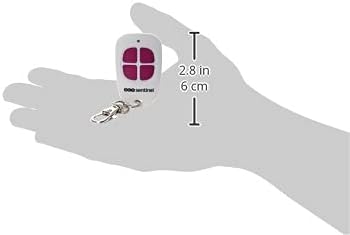
Image: The remote control held in a hand, illustrating its compact size (approximately 6 cm or 2.8 inches in length).
Warranty and Support
SCS Sentinel guarantees the reliability of its innovative technical products, designed for easy installation and use, combining comfort and security. Our technical assistance team, based in France, is available to help you with the installation of your product. Our technicians will provide informed and personalized advice. Your satisfaction is our priority!
For technical support or warranty inquiries, please contact SCS Sentinel customer service through their official website or the retailer where you purchased the product.


