
Product Overview
The Hampton Bay UC7067RC Remote Receiver is an OEM replacement part specifically designed for ceiling fan systems utilizing the 7067FM-05D(6+5) version receiver. This component facilitates wireless control of your ceiling fan's functions, including fan speed and light operation, when paired with a compatible remote control.
- Brand New UC7067RC OEM Remote Receiver Hampton Bay Version:7067FM-05D(6+5)
- This receiver IS NOT universal.
- This receiver is a replacement for 7067FM-05D(6+5) ONLY.
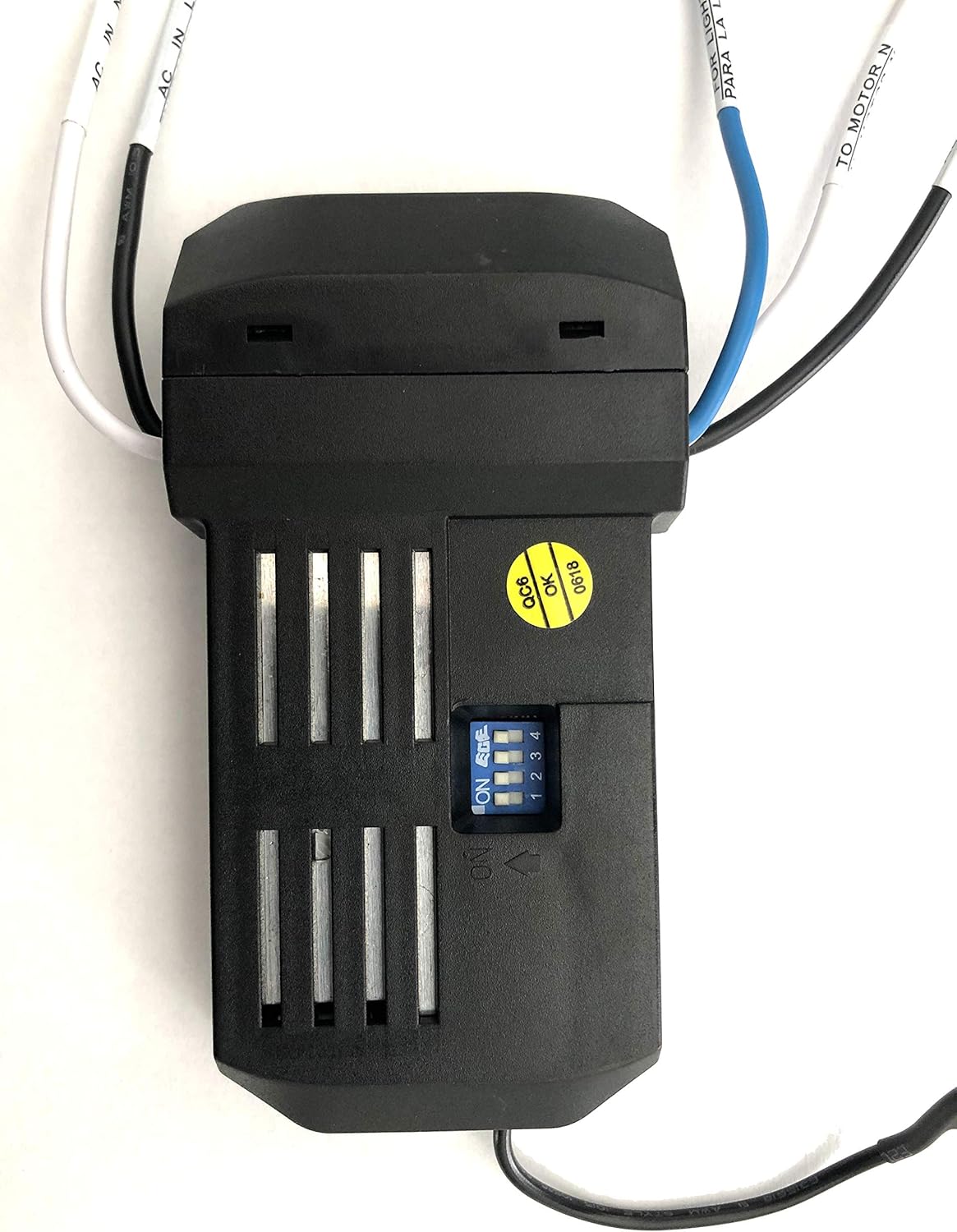
Figure 1: Front view of the Hampton Bay UC7067RC Remote Receiver, showing wiring connections and the DIP switch block for code setting.

Figure 2: Close-up view of the receiver's label, clearly displaying the model number "7067FM-05D(6+5)".
Important Safety Information
Please read and understand all instructions before attempting to install or operate this receiver. Failure to follow these instructions may result in electric shock, fire, or other hazards.
- Always disconnect power at the circuit breaker or fuse box before installing or servicing the receiver.
- Installation should be performed by a qualified electrician or a person with experience in electrical wiring.
- Ensure all wiring connections are secure and comply with local electrical codes.
- Do not use this receiver with dimmer switches or other non-compatible devices.
- Keep the receiver away from water and excessive moisture.
Installation and Setup
This receiver is designed as a direct replacement for existing 7067FM-05D(6+5) units. It is crucial to verify your existing receiver's model number before installation.
Compatibility
- This receiver is NOT universal.
- It is a replacement ONLY for Hampton Bay ceiling fan systems that originally used the 7067FM-05D(6+5) receiver.
Wiring Instructions
- Power Disconnection: Before beginning, turn off power to the ceiling fan at the main circuit breaker.
- Access Receiver: Carefully remove the canopy or housing of your ceiling fan to access the existing receiver.
- Disconnect Old Receiver: Note the wiring connections of the old receiver. Typically, wires are color-coded (e.g., AC IN L, AC IN N, TO MOTOR L, TO MOTOR N, TO LIGHT). Disconnect all wires from the old receiver.
- Connect New Receiver: Connect the wires from your ceiling fan to the new UC7067RC receiver, matching the color codes and labels on the receiver. Ensure all connections are firm and secure.
- Secure Receiver: Place the new receiver securely within the fan's housing.
- Restore Power: Once all connections are made and secured, restore power at the circuit breaker.
DIP Switch Configuration
The UC7067RC receiver features a set of DIP switches (visible in Figure 1) that must be set to match the code on your existing Hampton Bay remote control. This ensures proper communication between the remote and the receiver.
- Locate the DIP switches on both your remote control and the new receiver.
- Using a small screwdriver or pen, adjust the switches on the new receiver to exactly match the ON/OFF (or UP/DOWN) positions of the switches on your remote control.
- Once matched, the remote and receiver should be paired.
Operation
After successful installation and DIP switch configuration, the Hampton Bay UC7067RC receiver will respond to commands from your compatible Hampton Bay remote control.
- Fan Control: Use the fan speed buttons on your remote to adjust the fan's rotation speed (e.g., High, Medium, Low, Off).
- Light Control: Use the light button(s) on your remote to turn the fan light On/Off and, if applicable, to dim or brighten the light.
- Reverse Function: If your fan and remote support it, the reverse button on the remote will change the fan's direction.
Maintenance
The Hampton Bay UC7067RC receiver requires minimal maintenance. To ensure optimal performance and longevity:
- Cleaning: Keep the area around the receiver free from dust and debris. If cleaning is necessary, ensure power is disconnected and use a dry, soft cloth. Do not use liquid cleaners.
- Environment: Ensure the receiver is installed in a dry environment, protected from extreme temperatures and humidity.
- Battery Replacement: Regularly check and replace the batteries in your remote control as needed to ensure consistent operation. (Note: The receiver itself does not use batteries for operation, but the remote does).
Troubleshooting
If you experience issues with your Hampton Bay UC7067RC receiver, consider the following common troubleshooting steps:
| Problem | Possible Cause | Solution |
|---|---|---|
| Fan/Light not responding to remote. | Incorrect DIP switch setting. | Verify the DIP switches on the receiver match those on the remote control. |
| Fan/Light not responding to remote. | Remote control battery is low or dead. | Replace the battery in the remote control (requires 1 9V battery, as per specifications). |
| Fan/Light not responding to remote. | Power supply issue. | Check the circuit breaker and ensure power is supplied to the fan. |
| Fan operates, but light does not. | Light bulb issue. | Check if the light bulb is properly installed or needs replacement. |
| Intermittent operation. | Loose wiring connection. | Disconnect power and re-check all wiring connections to ensure they are secure. |
Specifications
| Feature | Detail |
|---|---|
| Model Number | UC7067RC |
| Compatible Version | 7067FM-05D(6+5) |
| Brand | Hampton Bay |
| Manufacturer | Rhine Taiwan |
| Item Weight | 3.2 ounces |
| Package Dimensions | 6.69 x 2.99 x 2.36 inches |
| Batteries Required (for remote) | 1 x 9V battery (not included with receiver) |
| Special Feature | Replacement for specific model |
| Color | Black |
| Max Number of Supported Devices | 1 (per receiver) |
| Compatible Devices | Ceiling Fan |
| Date First Available | March 27, 2016 |
Warranty Information
Specific warranty details for this replacement part may vary. It is recommended to retain your proof of purchase. For detailed warranty terms and conditions, please refer to the original product documentation of your Hampton Bay ceiling fan or contact Hampton Bay customer support directly.
Customer Support
For further assistance, technical support, or inquiries regarding the Hampton Bay UC7067RC Remote Receiver, please contact Hampton Bay customer service or the authorized seller from whom you purchased this product. Have your product model number (UC7067RC) and version (7067FM-05D(6+5)) ready when contacting support.
You may also visit the official Hampton Bay website for additional resources and contact information.