
1. Introduction
Thank you for choosing the Blue Star BI-5HW18ZARTU Split Air Conditioner. This manual provides essential information for the safe and efficient operation, installation, and maintenance of your new air conditioning unit. Please read this manual thoroughly before using the appliance and retain it for future reference.
1.1 Safety Information
Important Safety Instructions:
- Ensure the unit is installed by a qualified technician in accordance with local regulations and this manual.
- Do not operate the unit with wet hands or when standing on a wet surface.
- Keep children away from the unit and remote control.
- Do not insert objects into the air inlet or outlet.
- Turn off the power supply before cleaning or performing any maintenance.
- If the power cord is damaged, it must be replaced by the manufacturer, its service agent, or similarly qualified persons to avoid a hazard.
2. Product Overview
The Blue Star BI-5HW18ZARTU is a 1.5-ton split air conditioner designed for efficient cooling. It features an Anti Bacterial Filter for improved air quality and a copper core for enhanced durability and heat transfer.
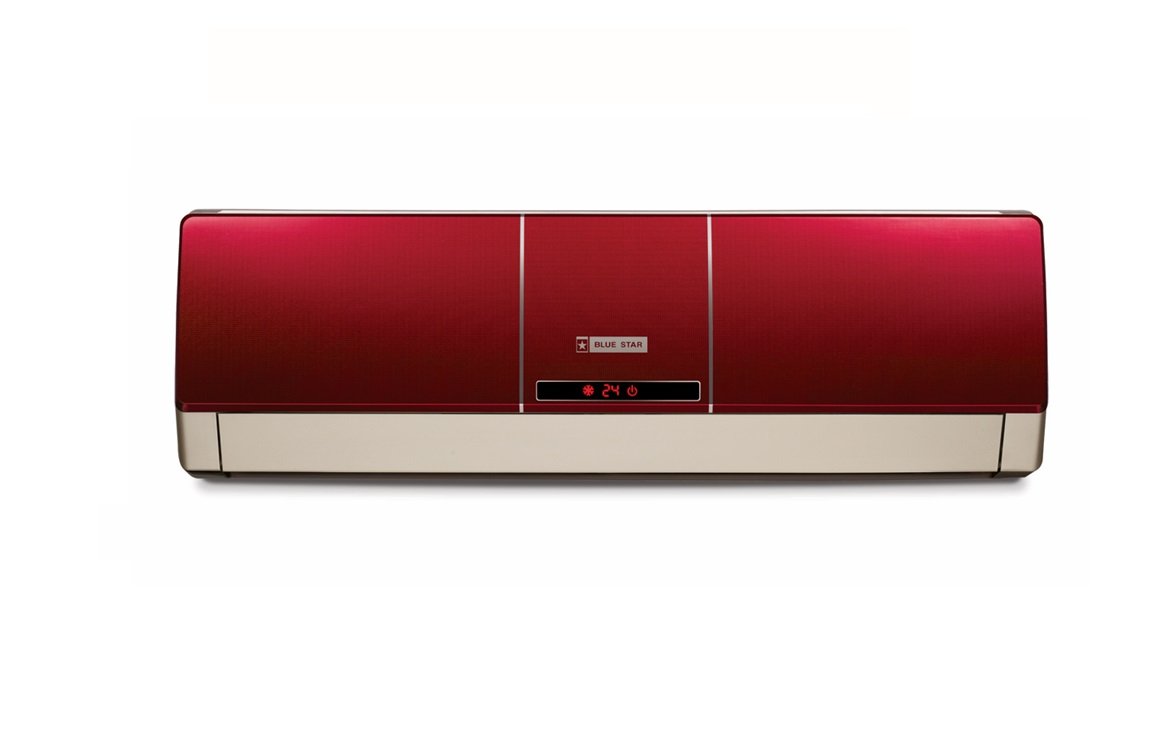
Figure 1: Indoor unit of the Blue Star BI-5HW18ZARTU Split AC. This image shows the front panel and air outlet.
2.1 Key Components
- Indoor Unit: Houses the evaporator coil, fan, and control panel.
- Outdoor Unit: Contains the compressor, condenser coil, and fan.
- Remote Control: For convenient operation of the unit.
- Air Filters: Located in the indoor unit, including an Anti Bacterial Filter.
2.2 Features
- 1.5 Ton Cooling Capacity
- Anti Bacterial Filter for cleaner air
- Copper Core Material for efficient heat exchange
- Multiple operating modes (Cool, Fan, Dry, Auto)
- Low Noise Level: 43 Decibels
3. Setup
The installation of a split air conditioner requires specialized tools and knowledge. It is strongly recommended that installation be performed by a certified and experienced technician to ensure proper functioning, safety, and warranty validity.
3.1 Professional Installation
Contact an authorized Blue Star service center or a qualified HVAC professional for installation. Improper installation can lead to electric shock, fire, water leakage, and damage to the unit.
3.2 Site Selection
- Indoor Unit: Choose a location that allows for even air distribution, away from direct sunlight or heat sources. Ensure sufficient space around the unit for maintenance.
- Outdoor Unit: Select a well-ventilated area, free from obstructions, and away from direct sunlight or excessive dust. Ensure the unit is placed on a stable, level surface.
3.3 Electrical Requirements
- The unit operates on 230 Volts AC power.
- Ensure the electrical circuit has adequate capacity and a dedicated circuit breaker.
- All electrical wiring must comply with local codes and regulations.
- Do not use extension cords or multi-outlet adapters.
4. Operating Instructions
Your Blue Star AC is controlled via the included remote control. Familiarize yourself with the remote's functions for optimal use.
4.1 Remote Control Functions
The remote control allows you to adjust temperature, select operating modes, set fan speed, and access other features. Point the remote control directly at the indoor unit when operating.
- POWER Button: Turns the unit ON or OFF.
- MODE Button: Cycles through operating modes: AUTO, COOL, DRY, FAN.
- TEMP ▲/▼ Buttons: Adjusts the desired temperature.
- FAN Button: Selects fan speed (Auto, Low, Medium, High).
- SWING Button: Controls the vertical louver movement.
- TIMER Button: Sets the ON/OFF timer.
- SLEEP Button: Activates sleep mode for comfortable night operation.
4.2 Operating Modes
- COOL Mode: Provides cooling. Set your desired temperature.
- FAN Mode: Circulates air without cooling. Fan speed can be adjusted.
- DRY Mode: Reduces humidity in the room.
- AUTO Mode: The unit automatically selects the appropriate mode (Cool, Fan) based on the room temperature.
5. Maintenance
Regular maintenance ensures optimal performance and extends the lifespan of your air conditioner. Always disconnect power before performing any maintenance.
5.1 Air Filter Cleaning
The air filters should be cleaned every two weeks or more frequently depending on usage and air quality.
- Open the front panel of the indoor unit.
- Remove the air filters, including the Anti Bacterial Filter.
- Clean the filters with a vacuum cleaner or wash them with lukewarm water and a mild detergent.
- Rinse thoroughly and allow them to dry completely in a shaded area before re-installing.
- Close the front panel.
5.2 Indoor Unit Cleaning
Wipe the indoor unit's surface with a soft, dry cloth. For stubborn stains, use a damp cloth with a mild detergent, then wipe dry. Do not use harsh chemicals or abrasive cleaners.
5.3 Outdoor Unit Maintenance
Periodically check the outdoor unit for any obstructions (leaves, debris) around the fan and coils. Clear any blockages. For thorough cleaning of the outdoor unit coils, it is recommended to contact a professional service technician annually.
6. Troubleshooting
Before contacting customer support, please refer to the following common issues and their solutions.
| Problem | Possible Cause | Solution |
|---|---|---|
| Unit does not start | No power supply; Remote control batteries low; Timer function active. | Check power connection and circuit breaker; Replace remote batteries; Cancel timer setting. |
| Insufficient cooling | Dirty air filters; Blocked outdoor unit; Room too large; Doors/windows open. | Clean air filters; Clear obstructions from outdoor unit; Ensure room size is appropriate; Close doors/windows. |
| Water leakage from indoor unit | Clogged drain pipe; Improper installation. | Clear drain pipe; Contact a professional for inspection and repair. |
| Unusual noise | Loose parts; Fan obstruction; Compressor issue. | Check for loose parts; Clear fan obstruction; If noise persists, contact service. |
If the problem persists after attempting these solutions, please contact Blue Star customer support. Do not attempt to repair the unit yourself.
7. Specifications
Technical specifications for the Blue Star BI-5HW18ZARTU Split AC.
| Feature | Detail |
|---|---|
| Brand | Blue Star |
| Model Name | BI-5HW18ZARTU |
| Capacity | 1.5 Tons |
| Cooling Power | 5135 Watts |
| BEE Star Rating | 3 Star |
| Annual Energy Consumption | 100 Kilowatt Hours |
| Noise Level (Indoor) | 43 Decibels |
| Special Feature | Anti Bacterial Filter |
| Core Material | Copper |
| Voltage | 230 Volts |
| Power Source | Corded Electric |
| Item Weight | 48000 Grams (48 kg) |
| Recommended Floor Area | 150 Square Feet |
| Controller Type | Remote Control |
| Included Components | 1 Main unit, Warranty card |
8. Warranty and Support
8.1 Warranty Information
Your Blue Star BI-5HW18ZARTU Split AC comes with the following warranty:
- 1 year comprehensive warranty on the product.
- 5 years warranty on the compressor.
Please retain your purchase receipt and warranty card for any warranty claims. The warranty is subject to the terms and conditions specified on the warranty card.
8.2 Customer Support
For service, technical assistance, or warranty claims, please contact Blue Star customer support. Refer to your warranty card or the official Blue Star website for contact details specific to your region.
Online Support: Visit Blue Star India's Contact Us page
When contacting support, please have your model number (BI-5HW18ZARTU) and purchase date ready.