
Honeywell HL12CESWB
Honeywell Contempo Series Portable Air Conditioner, Dehumidifier & Fan
Model: HL12CESWB
Introduction
This manual provides important instructions for the proper installation, operation, and maintenance of your Honeywell Contempo Series Portable Air Conditioner, Dehumidifier & Fan. Please read this manual thoroughly before using the appliance and keep it for future reference.
The Honeywell HL series portable air conditioner combines 3-in-1 technology into one sleek body, cooling and dehumidifying areas up to 400-550 square feet. It features an auto-evaporation system, a reliable dehumidifying function as well as a traditional three speed fan only function delivering optimum cooling, dehumidification and fresh ventilation. The full-function remote control allows you to operate each feature from across the room. Unlike a fixed air conditioner unit, the Honeywell Portable Air Conditioner requires no permanent installation and the smooth-gliding caster wheels provide easy mobility from room to room. A special sleep mode setting allows you to control the temperature for comfort during the night. This portable air conditioner comes with everything needed including a flexible exhaust hose and an easy-to-install window venting kit. The window vent can be removed when the unit is not in use.
Safety Information
Always follow basic safety precautions when using electrical appliances to reduce the risk of fire, electrical shock, or injury to persons.
- Read all instructions before using this appliance.
- Do not operate any appliance with a damaged cord or plug.
- Do not use the appliance near water or in wet environments.
- Ensure the appliance is placed on a stable, level surface.
- Unplug the appliance from the power outlet when not in use or before cleaning.
- Keep children and pets away from the appliance during operation.
- Do not block air openings.
Product Overview
The Honeywell Contempo Series Portable Air Conditioner is designed for versatile cooling, dehumidification, and fan-only operation. Its compact design and smooth-gliding wheels allow for easy portability between rooms.

Figure 1: Front view of the Honeywell Contempo Series Portable Air Conditioner.

Figure 2: The portable air conditioner featuring smooth gliding wheels for easy movement.

Figure 3: Top view showing the automatic wind motion feature for even air distribution.
Setup and Installation
The Honeywell Portable Air Conditioner comes with a full set window kit for quick and easy installation in both vertical and horizontal windows. The maximum hose length is 4 feet.

Figure 4: Demonstrates the quick and easy installation process of the exhaust hose into the unit.

Figure 5: Components of the full set window installation kit, including the adjustable window bracket and pre-assembled exhaust hose.
Installation Steps:
- Attach the exhaust hose to the back of the air conditioner unit.
- Adjust the window bracket kit to fit your window opening.
- Insert the plastic pins to secure the window bracket.
- Snap the exhaust hose adapter onto the window bracket.
- Position the assembled window kit and hose into the window opening, ensuring a secure fit to prevent air leakage.
Video 1: Quick Installation Guide for Honeywell Contempo Portable Air Conditioner.
This video demonstrates the step-by-step process of installing the exhaust hose and window kit for the portable air conditioner.
Video 2: Honeywell Portable Air Conditioner Easy Exhaust Hose Connection.
This video provides a detailed look at connecting the exhaust hose to the air conditioner unit.
Operating Instructions
The unit features simple digital controls and a remote control for convenient operation.

Figure 6: The digital control panel and remote control for easy temperature and mode adjustments.
Modes of Operation:
- Cooling Mode: Provides powerful cooling for rooms up to 400-550 sq. ft.
- Dehumidifier Mode: Removes up to 86 pints/24 hours, with a continuous drain option for long unattended operation.
- Fan Mode: Offers three fan speeds for air circulation and ventilation.
Features:
- Digital Controls: Easy-to-use interface for setting temperature and modes.
- Remote Control: Full-function remote with digital display for convenient operation from across the room.
- Sleep Mode: Adjusts temperature for comfortable overnight use.
- 24-Hour Energy Saving Timer: Allows for programmed operation to save energy.
- Automatic Wind Motion: Distributes cool air evenly for fast and consistent cooling.
- Quiet Operation: Operates between 49 to 52 decibels, ensuring minimal disturbance.
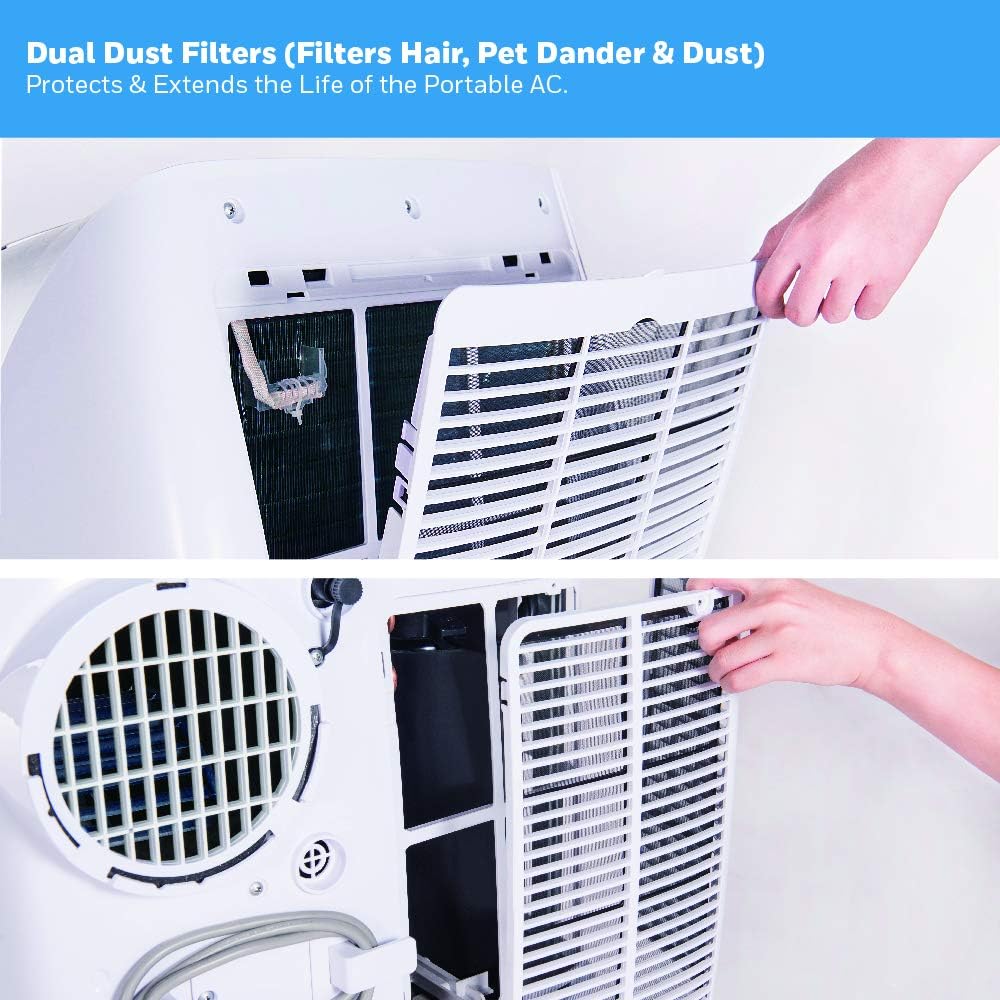
Figure 7: Decibel chart illustrating the quiet operation of the Honeywell Portable Air Conditioner compared to common sounds.
Maintenance
Regular maintenance ensures optimal performance and extends the lifespan of your air conditioner.
Filter Cleaning:
The unit features dual dust filters designed to protect from dust and hair. These filters are washable and can be easily cleaned under a faucet, eliminating the need for regular replacements.

Figure 8: Close-up view of the dual dust filters, showing how they protect the unit from dust and hair.
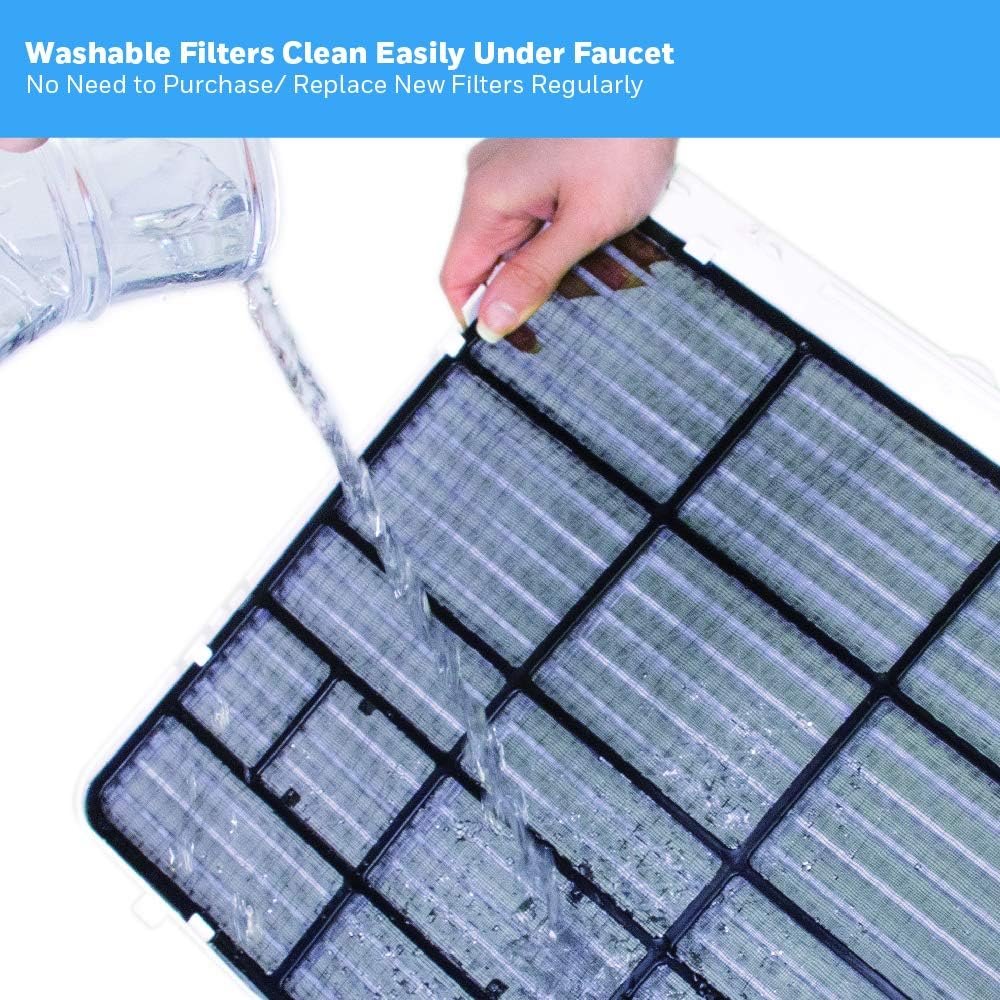
Figure 9: Demonstrates how to easily wash the filters under a faucet for maintenance.
Dehumidifier Drainage:
The auto-evaporation system typically eliminates the need to empty a water bucket. However, in areas with high humidity, a continuous drain option is available. A drain tube is included for this purpose.
Figure 10: Shows the continuous drain system connection point for the dehumidifier function.
Video 3: Honeywell Portable Air Conditioner Filter Cleaning.
This video demonstrates how to remove and clean the air filters of the portable air conditioner.
Troubleshooting
If your air conditioner is not operating correctly, please refer to the following common issues before contacting customer support.
| Problem | Possible Cause | Solution |
|---|---|---|
| Unit does not turn on. | No power supply; Power cord not plugged in; Circuit breaker tripped. | Check power outlet; Ensure plug is fully inserted; Reset circuit breaker. |
| Unit does not cool effectively. | Air filter is dirty; Exhaust hose is blocked or disconnected; Room size too large; Doors/windows open. | Clean air filter; Check exhaust hose for obstructions and proper connection; Ensure unit is appropriate for room size; Close all doors and windows. |
| Water leakage. | Drain plug not properly sealed; Unit is tilted. | Ensure drain plug is securely closed; Place unit on a level surface. |
| Unit is noisy. | Unit not on a level surface; Obstruction in fan. | Place unit on a flat, stable surface; Check for and remove any obstructions. |
Specifications
- Model Number: HL12CESWB
- Cooling Power: 12,000 BTU (ASHRAE-128 Standard) / 6,500 BTU (DOE+ 2017 Standard)
- Coverage Area: 450-550 sq. ft.
- Dehumidification Capacity: 86 Pints/24 hours
- Product Dimensions: 18.9 x 15.7 x 31.3 inches
- Item Weight: 64 pounds
- Power Source: Corded Electric
- Refrigerant: R 410A
- Color: White/Blue
- Included Components: Air conditioner, remote control, flexible exhaust hose, window venting kit, manual, warranty.
Warranty and Support
Warranty Description: 5-year limited warranty.
For further assistance or to download the full user guide, please visit the official Honeywell support page or refer to the PDF document provided: