1. Product Overview
This AISEN Carburetor is a replacement part designed for the Troy Bilt 5500 Generator with a 10hp OHV engine, specifically Model 01919. It is engineered to provide reliable fuel delivery and optimal engine performance.
Key Features:
- Direct fit for Troy Bilt 5500 Generator with 10hp OHV Model 01919.
- Constructed for durability and consistent performance.
- Aids in efficient fuel mixture for proper engine operation.
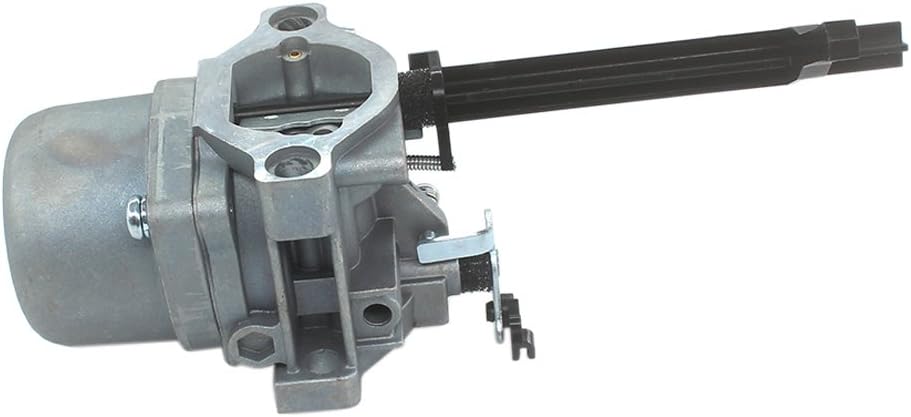
Figure 1: Main view of the AISEN Carburetor.

Figure 2: Components included with the AISEN Carburetor, including gaskets and linkage parts.
2. Installation and Setup
Proper installation is crucial for the correct function of your generator. If you are not confident in your mechanical abilities, it is recommended to seek assistance from a qualified mechanic.
Pre-Installation Checklist:
- Ensure the generator is turned off and cooled down.
- Disconnect the spark plug wire to prevent accidental starting.
- Drain the fuel tank and carburetor bowl to prevent spills.
- Gather necessary tools (wrenches, screwdrivers, pliers, etc.).
Installation Steps:
- Carefully remove the air filter housing and air filter.
- Disconnect the fuel line from the old carburetor.
- Detach any throttle and choke linkages connected to the old carburetor. Note their positions for reassembly.
- Unbolt and remove the old carburetor from the engine.
- Clean the mounting surface on the engine block.
- Install new gaskets (included with the AISEN Carburetor) on both sides of the new carburetor.
- Mount the new AISEN Carburetor onto the engine, ensuring proper alignment.
- Secure the carburetor with the mounting bolts, tightening them evenly.
- Reconnect the throttle and choke linkages. Ensure they move freely and operate correctly.
- Reconnect the fuel line.
- Reinstall the air filter and air filter housing.
- Refill the fuel tank with fresh, clean fuel.
- Reconnect the spark plug wire.

Figure 3: Side view of the carburetor, showing the choke lever and fuel inlet.

Figure 4: Rear view of the carburetor, illustrating the throttle plate and mounting points.
Installation Video:
Video 1: Overview of the Eamonhigh 01919 Generator Carburetor, demonstrating its features and components. This video provides a visual guide to the carburetor's design and parts, which can be helpful for understanding the installation process.
3. Operating Instructions
After successful installation, follow your generator's manufacturer guidelines for starting and operating the engine. The new carburetor is designed to provide the correct fuel-air mixture for optimal performance.
- Ensure the fuel valve is open.
- Set the choke lever to the appropriate starting position (usually "Choke" or "Start").
- Pull the recoil starter or engage the electric starter until the engine fires.
- Once the engine starts, gradually move the choke lever to the "Run" position as the engine warms up.
- Allow the engine to warm up for a few minutes before applying load.
4. Maintenance
Regular maintenance helps prolong the life of your carburetor and generator.
- Fuel Quality: Always use fresh, clean fuel. Stale or contaminated fuel can clog the carburetor and lead to poor engine performance. Consider using a fuel stabilizer if the generator will be stored for extended periods.
- Air Filter: Regularly inspect and clean or replace the air filter to ensure proper airflow to the carburetor. A dirty air filter can cause the engine to run rich and lose power.
- Storage: Before long-term storage, drain the fuel from the tank and run the engine until it stops to clear any remaining fuel from the carburetor. This prevents fuel deposits from forming and clogging the jets.
5. Troubleshooting
If your generator experiences issues after carburetor replacement, consider the following common troubleshooting steps:
| Problem | Possible Cause | Solution |
|---|
| Engine will not start or starts with difficulty. | - Improper choke setting.
- No fuel or stale fuel.
- Clogged fuel filter or line.
- Loose spark plug wire.
- Incorrect carburetor installation.
| - Adjust choke.
- Check fuel level and quality.
- Inspect and clear fuel system.
- Ensure spark plug wire is securely connected.
- Review installation steps, check for air leaks around gaskets.
|
| Engine runs rough or stalls. | - Dirty air filter.
- Improper fuel-air mixture.
- Loose connections.
| - Clean or replace air filter.
- Ensure all carburetor components are correctly assembled.
- Check all fuel lines and electrical connections.
|
For persistent issues, consult your generator's service manual or a qualified technician.
6. Specifications
| Attribute | Detail |
|---|
| Brand | AISEN |
| Model Number | AI435 |
| Item Weight | 13.7 ounces |
| Package Dimensions | 8.27 x 3.62 x 3.54 inches |
| Flange Type | Bolt On |
| Fuel Type | Liquefied Petroleum Gas |
| ASIN | B01CJHB7DA |
| UPC | 600977954612 |
Note: The product title mentions "Carburetor Carb for Troy Bilt 5500 Generator with 10hp Ohv Model 01919", which typically implies gasoline. However, the specifications list "Fuel Type: Liquefied Petroleum Gas". Please verify the correct fuel type for your specific generator model before installation and operation.
7. Warranty and Support
Warranty Information:
This product typically comes with a standard return policy of 30 days from the date of purchase. For specific warranty details, including coverage and duration, please refer to the documentation provided with your purchase or contact the manufacturer directly.
Customer Support:
For technical assistance, installation questions, or warranty claims, please contact AISEN customer support through their official channels. Ensure you have your product model number (AI435) and purchase details available when contacting support.
