
Product Overview
The Hobart FP250-1B is a robust countertop food processor designed for continuous feed operation, featuring a 3/4 HP motor. It is engineered for commercial kitchen environments to efficiently process various food items.
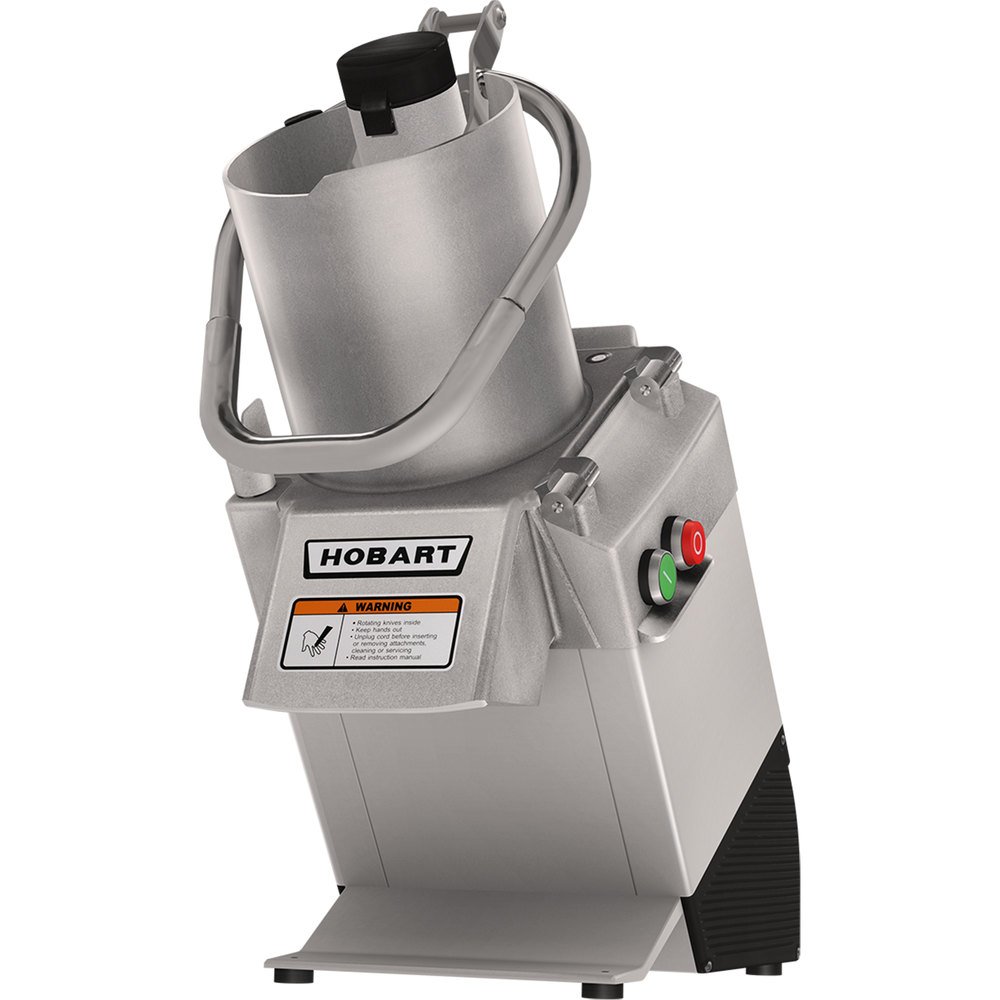
Image 1: The Hobart FP250-1B Countertop Food Processor. This image displays the main unit with its continuous feed chute, the Hobart brand logo, and the red 'stop' and green 'start' control buttons on the side. A warning label is visible below the feed chute.
Important Safety Information
Before operating the Hobart FP250-1B Food Processor, please read and understand all safety instructions. Failure to follow these instructions may result in serious injury or damage to the appliance.
⚠ WARNING
- Rotating knives inside: Always exercise extreme caution.
- Keep hands out: Never place hands or utensils into the feed chute or discharge opening while the processor is operating or connected to power.
- Unplug cord: Always unplug the power cord before inserting or removing attachments, cleaning, or servicing the unit.
- Read instruction manual: Refer to this complete instruction manual for detailed safety guidelines and operating procedures.
Setup
- Unpacking: Carefully remove the food processor and all components from the packaging. Retain packaging for future transport or storage.
- Component Identification: Verify that all included components are present: the main processor unit, chopping blade, container, and lid.
- Placement: Place the unit on a stable, level, and dry countertop surface. Ensure adequate ventilation around the appliance.
- Assembly:
- Ensure the main unit is unplugged.
- Carefully install the chopping blade into the container. The blade material is Stainless Steel.
- Secure the container onto the processor base.
- Place the lid securely on the container. Ensure all safety interlocks are engaged before connecting power.
- Power Connection: Plug the power cord into a grounded electrical outlet of the correct voltage as specified on the unit's rating label.
Operating Instructions
- Preparation: Ensure the unit is properly assembled and plugged in. Prepare food items by washing and cutting them into appropriate sizes to fit the continuous feed chute.
- Starting the Processor: Press the green 'ON' button located on the side of the unit. The motor will start, and the blade will begin to rotate.
- Continuous Feed Operation:
- Carefully feed prepared food items into the continuous feed chute.
- Use the food pusher (if applicable) to guide food down the chute. Never use hands or fingers.
- Processed food will exit through the discharge opening. Place a suitable collection container beneath the opening.
- Stopping the Processor: Press the red 'OFF' button to stop the motor. Wait for the blade to come to a complete stop before attempting to remove any components or access the interior.
- Processing Tips:
- For best results, process similar-sized pieces of food together.
- Avoid overfilling the feed chute, as this can strain the motor.
- Refer to specific recipe guidelines for processing times and techniques.
Maintenance and Cleaning
Regular cleaning and maintenance will ensure the longevity and optimal performance of your Hobart FP250-1B Food Processor.
- Safety First: Always unplug the unit from the power outlet before cleaning or performing any maintenance.
- Disassembly for Cleaning:
- Remove the lid, container, and chopping blade. Handle the blade with extreme care due to its sharpness.
- The manufacturer specifies "Hand Wash" for product care.
- Cleaning Components:
- Wash the chopping blade, container, and lid thoroughly with warm, soapy water. Rinse well and dry immediately to prevent water spots or corrosion.
- Do not use abrasive cleaners or scouring pads, as these can damage surfaces.
- Cleaning the Base Unit:
- Wipe the exterior of the motor base with a damp cloth. Do not immerse the motor base in water or spray it directly with liquids.
- Ensure all surfaces are dry before reassembly or storage.
- Storage: Store the clean and dry food processor in a safe, dry location.
Troubleshooting
If you encounter issues with your Hobart FP250-1B Food Processor, refer to the following common problems and solutions:
| Problem | Possible Cause | Solution |
|---|---|---|
| Unit does not turn on. | Not plugged in; power outage; safety interlock not engaged; faulty power switch. | Check power cord connection; verify power supply; ensure lid and container are correctly assembled and locked; contact service if switch is faulty. |
| Motor runs but food is not processing. | Blade not installed correctly; blade is dull; food too large or hard. | Ensure blade is properly seated; inspect blade for sharpness (replace if dull); cut food into smaller pieces. |
| Unit vibrates excessively or makes unusual noise. | Unstable surface; unbalanced load; damaged blade or motor component. | Place on a stable surface; ensure food is evenly distributed; discontinue use and contact service if damage is suspected. |
If the problem persists after attempting these solutions, please contact Hobart customer support.
Specifications
| Feature | Detail |
|---|---|
| Brand | Hobart |
| Model Number | FP250-1B |
| Type | Countertop Food Processor, Continuous Feed |
| Motor Power | 3/4 HP |
| Color | Steel |
| Included Components | Chopping Blade, Container, Lid |
| Blade Material | Stainless Steel |
| Product Care Instructions | Hand Wash |
| Manufacturer | Hobart |
| ASIN | B01CERMGYY |
| Date First Available | March 1, 2016 |
Warranty Information
Specific warranty details for the Hobart FP250-1B Food Processor are typically provided with the product at the time of purchase or can be obtained directly from Hobart. Please refer to your purchase documentation or the official Hobart website for the most current and comprehensive warranty terms and conditions.
Customer Support
For technical assistance, spare parts, or further inquiries regarding your Hobart FP250-1B Food Processor, please contact Hobart customer service. You can find contact information on the official Hobart website or through your authorized dealer.
Online Resources: For additional information and support, visit the official Hobart website: www.hobartcorp.com