
BTF-LIGHTING WS2812B5M60LB30
BTF-LIGHTING WS2812B Addressable LED Strip Instruction Manual
Model: WS2812B5M60LB30 | Brand: BTF-LIGHTING
1. Introduction
This manual provides comprehensive instructions for the installation, operation, and maintenance of your BTF-LIGHTING WS2812B IC RGB 5050SMD Pure Gold Individual Addressable LED Strip. Designed for DIY chasing color projects, this flexible LED strip offers vibrant full-color illumination and individual pixel control. Please read this manual thoroughly before use to ensure proper setup and optimal performance.

Figure 1.1: The BTF-LIGHTING WS2812B LED Strip, coiled for packaging.
2. Features
- High-Quality LED Chip: Utilizes pure gold wires internally for enhanced stability, exceptional quality, ultra-bright output, reduced light decay, and extended lifespan.
- Individually Addressable SPI LED: Each WS2812B IC built into the 5050SMD allows for individual control of color and brightness per pixel, enabling dynamic effects like chasing, flowing water, and more.
- Easy Installation: Equipped with 3-pin JST-SM connectors on both ends for straightforward connection. Separate power/ground wires are also provided.
- Customizable Length: Each LED segment is cuttable, allowing you to shorten, lengthen, or bend the strip as needed. Supports both series and parallel connections.
- Wide Compatibility: Compatible with various programmable controllers such as WLED, K-1000C, Raspberry Pi, UNO R3, ESP8266, ESP32. Also supports Bluetooth music controllers (e.g., SP630E, SP611E) and Wi-Fi Alexa music controllers (e.g., SP530E, SP511E).
- DC5V Power Requirement: Operates solely on DC5V. A power adapter and controller are required and must be purchased separately.
- Versatile Application: Ideal for LED screens, advertising boards, and decorative lighting in hotels, KTVs, bars, and for festive occasions like Christmas and weddings.
- Adhesive Backing: IP30/IP65 versions feature adhesive tape for easy mounting on walls or other surfaces. IP67 versions include fixing clips and screws for secure installation.

Figure 2.1: Key features of the WS2812B LED Strip, highlighting its advanced design and capabilities.

Figure 2.2: Comparison illustrating the superior conductivity and stability of BTF-LIGHTING's pure gold wire LEDs compared to alloy wire alternatives.

Figure 2.3: Illustration of the double-layer copper PCB board used in BTF-LIGHTING strips for better conductivity and stability, contrasting with single-layer boards.
3. Package Contents
Upon opening the package, verify that all components are present and in good condition. The standard package for the WS2812B LED Strip includes:
- 1 x BTF-LIGHTING WS2812B Addressable LED Strip (16.4FT / 5M, 300 LEDs)
- 1 x 3-PIN Male Connector (Gift)
- User Manual (this document)
Note: Power adapter and controller are not included and must be purchased separately.

Figure 3.1: Visual representation of the LED strip and the included 3-PIN male connector.
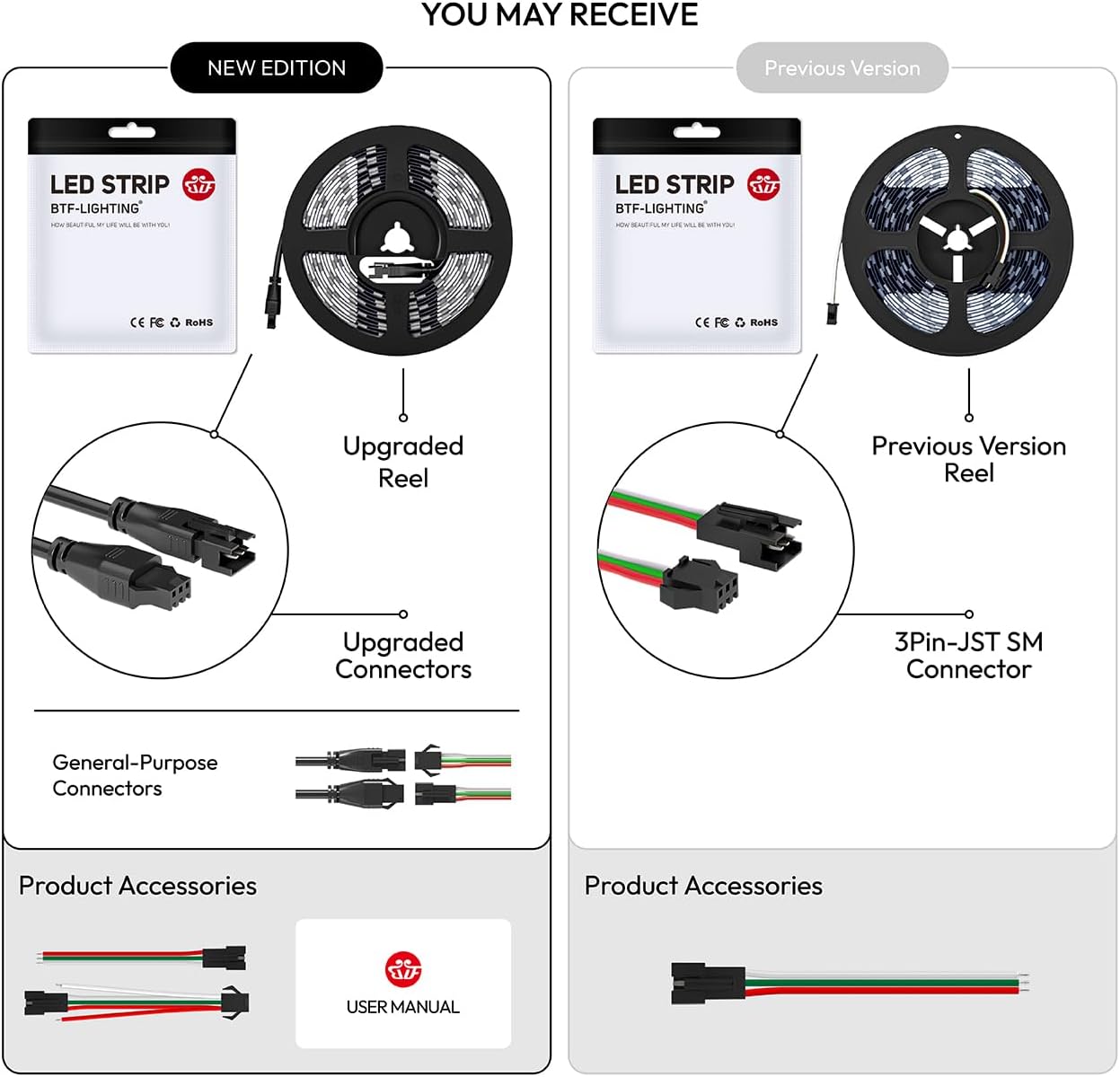
Figure 3.2: Illustration showing potential variations in packaging and connector types between new and previous editions of the product.
4. Specifications
| Attribute | Detail |
|---|---|
| Model Number | WS2812B5M60LB30 |
| LED Type | WS2812B IC RGB 5050SMD |
| LED Quantity | 300 LEDs (60 LEDs/meter) |
| Length | 16.4 FT (5 meters) |
| Input Voltage | DC 5V |
| Power Consumption | 45W (Max 90W) |
| Color | Multicolor (Full Color Programmable) |
| PCB Color | Black |
| IP Rating | IP30 (Non-Water Resistant) |
| Control Method | External Controller (not included) |
| Connectivity | SPI (Serial Peripheral Interface) |
| Dimensions | 4.72 x 3.94 x 0.59 inches (packaged) |
| Item Weight | 1.76 ounces (0.05 Kilograms) |
| Material | FPCB (Flexible Printed Circuit Board) |

Figure 4.1: Detailed dimensions of the LED strip and examples of compatible controllers.

Figure 4.2: Various LED densities and how the strip can be cut and data direction flows.

Figure 4.3: Different types of addressable LEDs and their integrated circuit (IC) configurations.

Figure 4.4: Different levels of water resistance for LED strips, showing silicone coating (IP65) and sheathing (IP67).
5. Setup and Installation
Proper installation is crucial for the performance and longevity of your LED strip. Follow these steps carefully:
5.1. Preparation
- Ensure you have a compatible DC5V power supply and an addressable LED controller (not included).
- Plan your layout and measure the required length of the LED strip.
- Clean the surface where the LED strip will be mounted. Ensure it is dry and free of dust or grease.
5.2. Cutting the LED Strip (Optional)
If you need to shorten the strip, cut only along the designated cut lines, typically marked with a copper pad and a scissor icon. Cutting elsewhere will damage the circuit and render that section unusable.

Figure 5.1: Solder points are present every 50cm (1.6ft) on the FPCB for customization.
5.3. Wiring Connections
The WS2812B LED strip has three main connections: +5V (Power), GND (Ground), and DIN (Data Input). Ensure correct polarity and data direction.
- Connect the +5V wire from the LED strip to the +5V output of your power supply.
- Connect the GND wire from the LED strip to the GND output of your power supply and the GND pin of your controller.
- Connect the DIN wire from the LED strip to the data output pin of your controller.
- For longer runs or multiple strips, consider using a signal amplifier and/or injecting power at multiple points to prevent voltage drop.

Figure 5.2: Proper connection of the 3-pin JST-SM connector to the LED strip.

Figure 5.3: Diagram illustrating how to connect multiple LED strips in series, ensuring proper power distribution.

Figure 5.4: Diagram illustrating how to connect multiple LED strips in parallel, often used with a signal amplifier for larger installations.
5.4. Mounting the LED Strip
For IP30/IP65 strips, peel off the adhesive backing and firmly press the strip onto the prepared surface. For IP67 strips, use the provided fixing clips and screws to secure the strip.

Figure 5.5: Demonstrating the application of the adhesive backing for mounting the LED strip.
6. Operating Instructions
The BTF-LIGHTING WS2812B LED strip requires an external controller to function. The operation will vary depending on the specific controller used. Common control methods include:
- Programmable Controllers: Use software (e.g., WLED) with microcontrollers like Raspberry Pi, Arduino UNO R3, ESP8266, or ESP32 to program custom lighting effects.
- Bluetooth Music Controllers: Connect via Bluetooth to a smartphone app (e.g., SP630E, SP611E) to control colors, brightness, and synchronize lights with music.
- Wi-Fi Alexa/Google Home Controllers: Integrate with smart home systems for voice control and app-based management (e.g., SP530E, SP511E).
Refer to your specific controller's manual for detailed operating instructions. The LED strip supports a wide range of dynamic effects, including chasing, flowing, and static colors, with 256 brightness levels and 24-bit color depth.

Figure 6.1: Example of a DIY setup for controlling LED strip effects using open-source software and a mobile application.

Figure 6.2: Examples of user-friendly mobile application interfaces for managing LED strip lighting.

Figure 6.3: A selection of compatible controllers, including Bluetooth, Wi-Fi, and DIY options like Raspberry Pi and Arduino.

Figure 6.4: Visual difference between dynamic chasing color effects and static ordinary RGB lighting.

Figure 6.5: Examples of the LED strip used in different indoor settings to create various lighting atmospheres.

Figure 6.6: Further examples of the LED strip's application in various home environments, demonstrating its adaptability.
7. Maintenance
The BTF-LIGHTING WS2812B LED strip is designed for durability and requires minimal maintenance. Follow these guidelines to ensure its longevity:
- Cleaning: Gently wipe the surface of the LED strip with a soft, dry cloth to remove dust. Do not use harsh chemicals or abrasive cleaners.
- Environment: Ensure the operating environment is within the specified temperature and humidity ranges. For IP30 strips, avoid exposure to moisture or water.
- Connections: Periodically check all connections to ensure they are secure and free from corrosion.
- Power Supply: Use only a stable DC5V power supply that meets the power requirements of your LED strip length. Over-voltage can damage the LEDs.
8. Troubleshooting
If you encounter issues with your LED strip, refer to the following common problems and solutions:
| Problem | Possible Cause | Solution |
|---|---|---|
| LED strip does not light up. | No power, incorrect wiring, faulty power supply/controller. | Check power supply connection and output. Verify all wiring (V+, GND, Data) is correct and secure. Test with a known working power supply/controller. |
| Only part of the strip lights up or colors are incorrect. | Data line issue, voltage drop, damaged LED/IC. | Ensure data line is connected correctly and signal is strong. Inject power at multiple points for long runs. Inspect the strip for physical damage; a damaged IC can stop data flow. |
| Flickering or unstable lighting. | Insufficient power, poor connections, controller issue. | Verify power supply can provide enough current for the entire strip. Check all connections for looseness. Ensure controller firmware is up to date. |
| Controller not responding. | Controller not powered, incorrect pairing, software issue. | Check controller power. Re-pair the controller with its app/device. Restart the controller and app. |
9. Warranty and Support
For warranty information and technical support, please refer to the official BTF-LIGHTING website or contact their customer service directly. Keep your purchase receipt as proof of purchase.
BTF-LIGHTING Store: Visit BTF-LIGHTING Store on Amazon
Related Documents - WS2812B5M60LB30
 |
BTF-LIGHTING WS2812B/WS2812B ECO RGB LED Strip User Manual User manual for BTF-LIGHTING WS2812B and WS2812B ECO individually addressable RGB LED strips. Covers product parameters, precautions, installation, and recommended accessories. |
 |
BTF-LIGHTING 5050 SMD RGBW LED Strip User Manual User manual for the BTF-LIGHTING 5050 SMD RGBW LED Strip, detailing product parameters, installation, precautions, and troubleshooting for optimal lighting solutions. |
 |
BTF-LIGHTING 5050 SMD RGBCCT LED Strip User Manual Comprehensive user manual for the BTF-LIGHTING 5050 SMD RGBCCT LED Strip, detailing product specifications, installation instructions, and troubleshooting for this versatile 5-color-in-1 LED strip. |
 |
BTF-LIGHTING 5050SMD RGBW LED Strip User Manual User manual for BTF-LIGHTING 5050SMD RGBW 4 Colors in 1 LED Strip, covering product specifications, installation guides, precautions, and troubleshooting. Learn to set up and use your LED lighting. |
 |
Addressable LED Strip User Guide and Precautions Comprehensive guide for Addressable LED Strips, covering precautions, installation, troubleshooting common issues, and UL certification. Includes details on brightness factors and solutions. |
 |
BTF-LIGHTING 5050SMD RGBW 4-in-1 LED Strip User Manual and Specifications Comprehensive user manual and technical specifications for BTF-LIGHTING's 5050SMD RGBW 4-in-1 LED strip. Includes installation guides, precautions, controller compatibility, product parameters, and certification details. |
Ask a question about this manual
Ask about setup, troubleshooting, compatibility, parts, safety, or missing instructions. Manuals+ will review the question and use this page’s manual context to help answer it.