
Northpoint NV4-Vivid
Northpoint NV4x50 Vivid Night Vision Device User Manual
Model: NV4-Vivid
Introduction
The Northpoint NV4x50 Vivid Night Vision Device is a professional-quality instrument designed for high-quality observation in complete darkness. This passive device does not require artificial light sources, though an artificial infrared light source significantly enhances observation effectiveness. It features a 10.5 cm (10.6 cm) connection for tripod mounting and a rugged exterior for extreme field conditions. The device is fully autonomous, operating for up to 20 hours on 2 x AA batteries at temperatures from -30 to +40 degrees Celsius.
Safety Information
- Do not expose the device to direct sunlight: Prolonged exposure to bright light, especially direct sunlight, can damage the internal components of the night vision device. Always keep the lens cap on when not in use, especially during daylight hours.
- Avoid sudden bright light flashes: While using the device in low light conditions, avoid sudden exposure to bright light sources (e.g., car headlights, flashlights) as this can cause temporary blinding and potential damage to the image intensifier tube.
- Battery Safety: Use only recommended battery types (2 x AA). Do not mix old and new batteries, or different types of batteries. Remove batteries if the device will not be used for an extended period to prevent leakage.
- Water and Moisture: This device is designed for outdoor use but is not fully waterproof. Protect it from heavy rain, submersion, and high humidity.
- Handling: Handle the device with care. While designed to be robust, dropping it can cause internal damage.
- Temperature Range: Operate the device within the specified temperature range of -30°C to +40°C.
Package Contents
Please check the package to ensure all items are present:
- Northpoint NV4x50 Vivid Night Vision Device
- Carrying Case
- Lens Protection Cap
- Cleaning Cloth
- 2 x 1.5V AA Batteries (Please check your package contents as availability may vary.)
Product Overview
Familiarize yourself with the main components of your Northpoint NV4x50 Vivid Night Vision Device.

Figure 1: Front view of the Northpoint NV4x50 Vivid Night Vision Device, showing the large objective lens with a blue tint and control buttons on top.

Figure 2: Side view of the Northpoint NV4x50 Vivid Night Vision Device, highlighting the ergonomic design and control buttons.

Figure 3: Bottom view of the Northpoint NV4x50 Vivid Night Vision Device, showing the tripod mounting thread and product label.

Figure 4: Eyepiece view of the Northpoint NV4x50 Vivid Night Vision Device, showing the adjustable diopter.
Key Components:
- Objective Lens: The front lens that gathers light.
- Eyepiece/Diopter Adjustment: The rear lens for viewing, with adjustment for individual eye focus.
- Power Button: To turn the device on and off.
- IR Illuminator Button: To activate the built-in infrared illuminator for enhanced viewing in complete darkness.
- Focus Ring: Located on the objective lens for focusing on objects at various distances.
- Tripod Mounting Thread: Located on the bottom for attaching to a standard tripod.
Setup
1. Battery Installation
- Locate the battery compartment, typically on the underside or side of the device.
- Open the battery compartment cover.
- Insert two (2) AA batteries, ensuring correct polarity (+/-) as indicated inside the compartment.
- Close the battery compartment cover securely.
2. Initial Focus Adjustment (Diopter)
Before observing, adjust the eyepiece (diopter) to your individual vision for a clear image.
- Point the device at a distant, well-lit object (but avoid direct bright light).
- Look through the eyepiece.
- Rotate the diopter adjustment ring on the eyepiece until the image appears sharp and clear without straining your eye. This adjustment only needs to be done once for your vision.
3. Tripod Mounting
For extended observation or to ensure stability, the device can be mounted on a standard tripod.
- Locate the tripod mounting thread on the bottom of the device (refer to Figure 3).
- Align the device's thread with the screw on your tripod's quick-release plate or head.
- Securely screw the device onto the tripod. Do not overtighten.
Operating Instructions
1. Powering On/Off
- To turn on: Press the ON button. The device will activate, and you should see a green image in the eyepiece.
- To turn off: Press and hold the ON button until the image disappears.
2. Using the IR Illuminator
The built-in infrared (IR) illuminator enhances viewing in conditions of absolute darkness where no ambient light is available.
- To activate IR: Press the IR button. A red indicator light may appear, and the image in the eyepiece will become brighter.
- To deactivate IR: Press the IR button again.
- Note: Using the IR illuminator will consume more battery power.
3. Focusing During Use
Once the diopter is set, use the objective lens focus ring to bring objects at different distances into sharp focus.

Figure 5: Diagram illustrating the two-step focusing process: first adjust the eyepiece (Okular) for personal vision, then fine-tune with the objective lens (Objektiv) for distance.
- While looking through the eyepiece, rotate the large focus ring on the objective lens (front of the device) until the object you are observing appears clear and sharp.
- Adjust as needed for different viewing distances.
4. Observation Tips
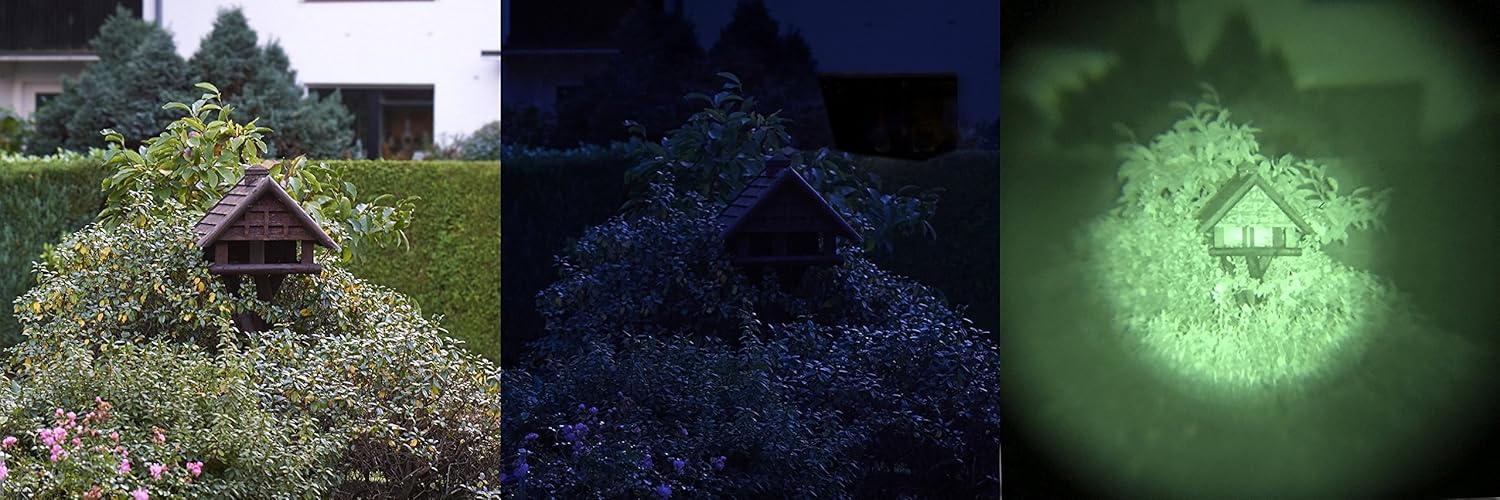
Figure 6: Visual comparison demonstrating the effectiveness of the night vision device in low light conditions. From left to right: daylight view, low light view, and the enhanced view through the night vision device.

Figure 7: A person demonstrating the ergonomic handling of the Northpoint NV4x50 Vivid Night Vision Device during outdoor use.
- Ambient Light: The device performs best in low-light conditions. In complete darkness, activate the IR illuminator.
- Movement: For stable viewing, especially at higher magnifications, consider using a tripod.
- Environmental Factors: Fog, heavy rain, and extreme temperatures can affect performance.
Maintenance
1. Cleaning the Lenses
- Use the provided cleaning cloth or a soft, lint-free optical cloth.
- Gently wipe the lens surfaces to remove dust and smudges.
- For stubborn dirt, use a small amount of lens cleaning fluid specifically designed for optics, applied to the cloth, not directly to the lens.
- Avoid abrasive materials or harsh chemicals, as they can scratch or damage the lens coatings.
2. General Cleaning
- Wipe the body of the device with a soft, damp cloth.
- Do not use solvents or strong detergents.
3. Storage
- Always store the device with the lens cap on to protect the objective lens from light and dust.
- Store in a cool, dry place, away from direct sunlight and extreme temperatures.
- If storing for an extended period, remove the batteries to prevent leakage and potential damage to the device.
Troubleshooting
| Problem | Possible Cause | Solution |
|---|---|---|
| Device does not power on. |
|
|
| Image is blurry or out of focus. |
|
|
| Image is too dark or not visible in complete darkness. |
|
|
| Image has spots or blemishes. |
|
|
Specifications
| Feature | Detail |
|---|---|
| Brand | Northpoint |
| Model Number | NV4-Vivid |
| Magnification | 4x |
| Objective Lens Diameter | 50 mm |
| Image Intensifier Generation | Generation 1 |
| Rest Light Amplification | 500x |
| Material Type | Aluminium |
| Power Source | Battery (2 x AA) |
| Operating Temperature | -30°C to +40°C |
| Battery Life (approx.) | Up to 20 hours |
| Dimensions | 20 x 13 x 13 cm |
| Weight | 540 g |
| Tripod Mount | Yes |
Warranty and Support
For information regarding warranty coverage, technical support, or service inquiries, please refer to the warranty card included with your product or contact Northpoint customer service directly. Contact details can typically be found on the manufacturer's official website or on the product packaging.
Please retain your proof of purchase for warranty claims.
Ask a question about this manual
Ask about setup, troubleshooting, compatibility, parts, safety, or missing instructions. Manuals+ will review the question and use this page’s manual context to help answer it.