
1. Introduction
Welcome to your OHSEN 1601 Digital Quartz Sports Watch. This manual provides comprehensive instructions for setting up, operating, and maintaining your watch. Please read this manual carefully to ensure proper use and to maximize the lifespan of your timepiece.
The OHSEN 1601 is a versatile watch combining analog and digital displays, designed for sports and outdoor activities. It features multiple functions including time, date, alarm, and chronograph, along with water resistance.
2. Product Overview
Familiarize yourself with the components of your OHSEN 1601 watch:
- A (Top Left Pusher): Used for Light and Mode selection.
- B (Bottom Left Pusher): Used for Reset and Adjust functions.
- C (Crown): Used for setting the analog time.
- D (Top Right Pusher): Used for Start and Stop functions.
- E (Bottom Right Pusher): Used for Alarm and Date functions.

Figure 2.1: Front view of the OHSEN 1601 Digital Quartz Sports Watch, showing the analog and digital displays, and all control buttons.

Figure 2.2: Side view of the OHSEN 1601 watch, highlighting the crown (C) and pushers (A, B, D, E) for various functions.

Figure 2.3: The stainless steel case back of the OHSEN 1601, indicating the model number AD1601 and water resistance of 3 ATM.
3. Setup
3.1 Setting Analog Time
- Pull out the crown (C) to position 1.
- Rotate the crown (C) in either direction to set the hour and minute hands to the desired time.
- Push the crown (C) back to position 0 to start the analog movement.
3.2 Setting Digital Time and Date
- In normal time mode, press button B three times to enter time setting mode. The seconds display will flash.
- Press button D to reset the seconds to zero.
- Press button B to move to the hour setting. Press button D to adjust the hour (12-hour or 24-hour format).
- Press button B to move to the minute setting. Press button D to adjust the minutes.
- Continue pressing button B to cycle through month, date, and day settings. Use button D to adjust each value.
- Press button B again to exit the setting mode and return to normal time display.
4. Operating Instructions
4.1 Mode Switching
From the normal time display, press button A to cycle through the different modes in the following order: Time > Stopwatch > Alarm > Time.
4.2 Chronograph (Stopwatch) Function
- Press button A until the watch enters Stopwatch mode.
- Press button D to start the stopwatch.
- Press button D again to stop the stopwatch.
- Press button B to reset the stopwatch to zero.
4.3 Alarm Function
- Press button A until the watch enters Alarm mode.
- Press button B to select either the hour or minute setting.
- Press button D to adjust the selected hour or minute.
- Press button A to activate or deactivate the alarm. An alarm icon will appear on the display when activated.
4.4 Backlight
Press button A briefly to illuminate the digital display for improved visibility in low-light conditions.
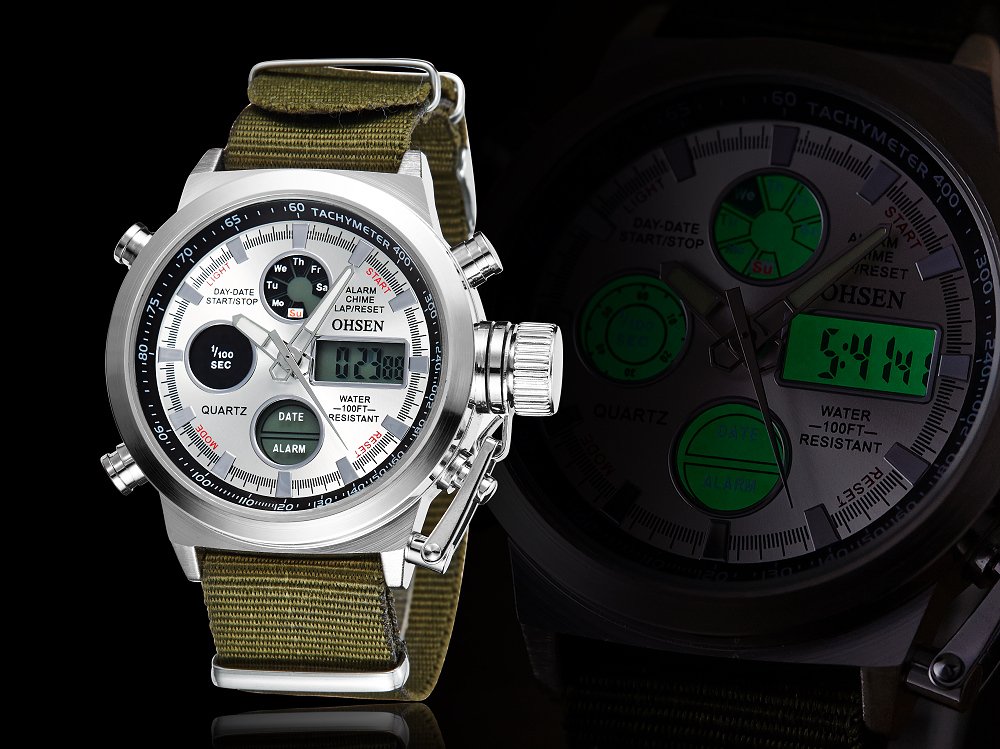
Figure 4.1: The OHSEN 1601 watch with its backlight activated, showing the digital display illuminated for night viewing.
5. Maintenance
5.1 Cleaning
Wipe the watch case and strap with a soft, dry cloth. For fabric straps, a mild soap solution and water can be used, ensuring the watch head is not submerged unless specifically designed for it.
5.2 Battery Replacement
When the display dims or functions become erratic, the battery may need replacement. It is recommended to have this done by a qualified watch technician to maintain water resistance.
5.3 Water Resistance
The OHSEN 1601 is water resistant to 3 ATM (30 meters / 100 feet). This means it is suitable for daily use, splashes, and rain. It is NOT suitable for showering, bathing, swimming, snorkeling, or water-related work. Do not operate buttons or the crown while the watch is wet or submerged.
6. Troubleshooting
- Digital Display Blank or Faint: The battery may be low. Consider replacing the battery.
- Buttons Unresponsive: Ensure the watch is not in a locked mode. Try pressing all buttons simultaneously (if applicable) or removing and reinserting the battery to perform a soft reset.
- Time Inaccurate: Verify that both the analog and digital times are set correctly. If the quartz movement is consistently inaccurate, the battery may be low or the movement may require professional service.
- Water Inside Watch: Immediately take the watch to a professional for inspection and drying to prevent internal damage.
7. Specifications
| Model | AD1601 |
| Movement | Quartz (Analog & Digital) |
| Case Diameter | 4.8 Centimetres |
| Case Thickness | 1.5 Centimetres |
| Band Material | Fabric |
| Band Width | 2.2 Centimetres |
| Water Resistance | 3 ATM (30 meters / 100 feet) |
| Item Weight | Approximately 118 grams (0.26 Pounds) |
| Manufacturer | OHSEN |
8. Warranty and Support
For warranty information or technical support, please refer to the retailer where the product was purchased or contact OHSEN customer service directly. Keep your purchase receipt as proof of purchase.